Confronti tra Note Taker IA
8 min di lettura
Updated on:
Oct 20, 2025
Recensione di Claap e alternative
Vuoi sapere se l'assistente per le note AI di Claap ne vale la pena? Ecco la tua guida.
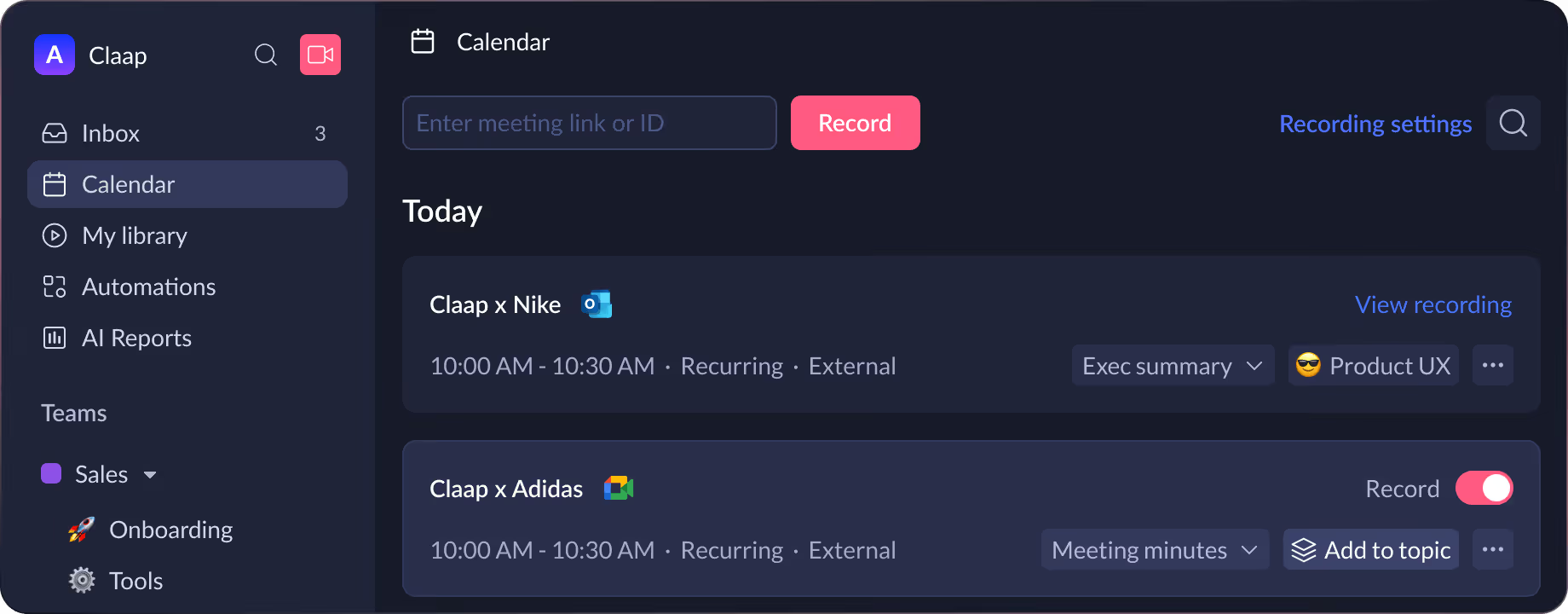
Claap è uno spazio di lavoro per riunioni e video basato sull'IA che ti aiuta a registrare le discussioni, generare trascrizioni e trasformare i tuoi meeting in riepiloghi operativi.
Tuttavia, Claap non è affatto l'unico attore in questo settore in crescita. Sul mercato sono sempre più numerosi gli strumenti di presa appunti basati sull'IA.
In questo articolo scopriremo cos'è Claap e se si adatta davvero al tuo flusso di lavoro.
Cos'è Claap?
Claap è uno spazio di lavoro per riunioni e video basato sull'IA, progettato per aiutarti a registrare, riassumere e gestire le conversazioni, invece di limitarsi a registrarle.
Fondamentalmente, Claap non è solo un registratore, ma una piattaforma di automazione per le riunioni. Promette di ridurre il tempo dedicato al follow-up, alla presa di appunti manuale e alla ricerca di decisioni sepolte in vecchie registrazioni.
Si integra con i tuoi strumenti per le riunioni (come Zoom, Google Meet, Microsoft Teams), oltre a supportare registrazioni dello schermo e caricamenti, cercando così di acquisire ogni tipo di discussione: in presenza, da remoto o tramite condivisione dello schermo.
Dopo l'acquisizione, utilizza l'IA per trascrivere in diverse lingue (oltre 99, secondo quanto dichiarato) e per generare riepiloghi strutturati, estrarre attività da svolgere, decisioni e persino assegnare responsabilità.
Funzionalità e gamma di prodotti Claap
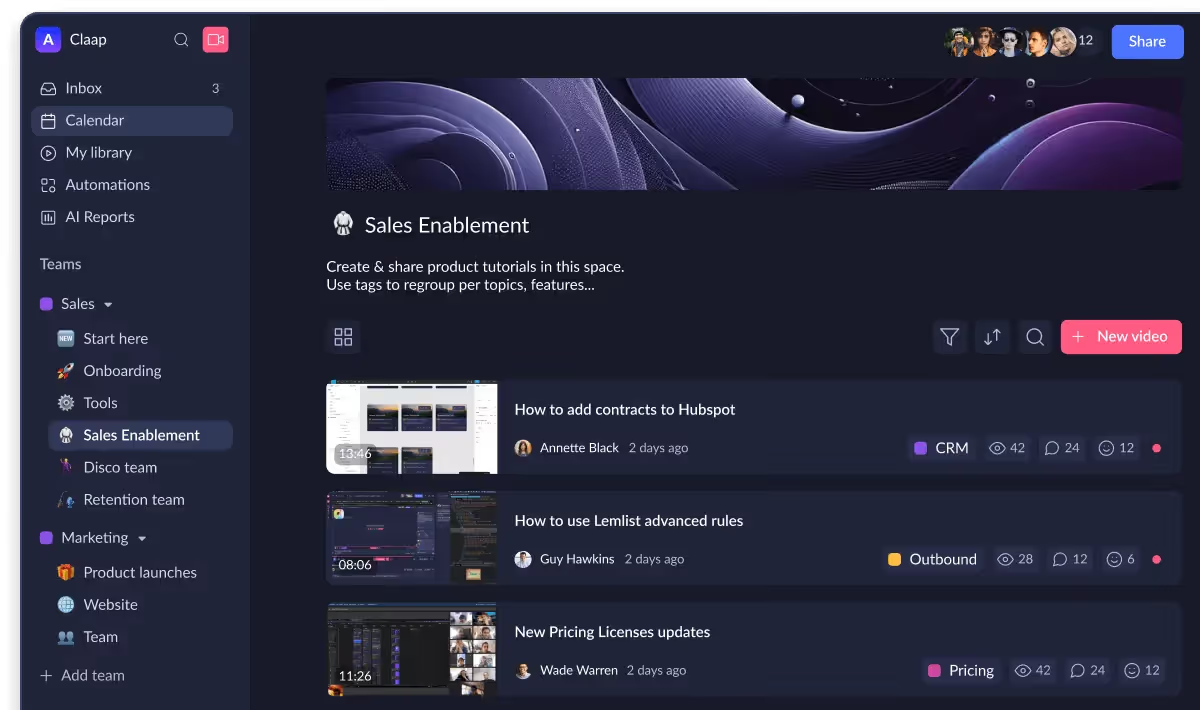
Claap offre un ricco set di funzionalità mirate ad acquisire, elaborare e sfruttare i contenuti delle tue riunioni. Ecco i punti salienti da considerare:
• Registrazione e trascrizione multipiattaforma
Claap può registrare automaticamente le riunioni, che si svolgano dal vivo su piattaforme come Zoom, Google Meet o Microsoft Teams, oppure tramite condivisione dello schermo e caricamenti.
Le trascrizioni sono generate in oltre 99 lingue, con identificazione dei parlanti e testo ricercabile.
Nelle registrazioni più lunghe troverai anche i capitoli automatici, così potrai passare direttamente ai momenti chiave invece di guardare o ascoltare tutto dall'inizio alla fine.
• Riepiloghi basati sull'IA ed estrazione delle attività
Invece di limitarsi a fornire una trascrizione, Claap utilizza l'IA per creare riepiloghi strutturati: punti chiave, decisioni, passaggi successivi e altro ancora.
Puoi scegliere tra vari modelli (chiamate di vendita, ricerche sugli utenti, aggiornamenti del team) o personalizzarli in base alle tue esigenze.
In questo modo dedicherai meno tempo alla stesura manuale dei verbali e più tempo a mettere in pratica quanto stabilito.
• Funzionalità di collaborazione e modifica
Il lavoro non finisce dopo la riunione: Claap ti aiuta a gestire i follow-up, aggiungere annotazioni e organizzare i risultati.
Puoi commentare le trascrizioni, taggare i membri del team, inserire sondaggi o risposte video e utilizzare le integrazioni (come Notion o Slack) per trasferire i contenuti delle riunioni nei tuoi sistemi attuali.
Condividere e modificare diventa molto più semplice quando tutti possono reagire a una clip o a una parte della trascrizione, invece di dover rivedere l'intera riunione.
• Libreria video ricercabile e knowledge base
Oltre al riepilogo delle riunioni, Claap offre un archivio centralizzato per le registrazioni del tuo team. Puoi organizzare i video in canali, argomenti o cartelle.
Questo diventa una risorsa a lungo termine: puoi cercare riunioni passate, recuperare citazioni, monitorare le decisioni o riutilizzare i contenuti per la formazione o l'onboarding.
• Analisi delle riunioni e dashboard di approfondimento
Per i team che vogliono fare di più della semplice registrazione, Claap offre funzionalità basate sull'analisi: rapporti sui tempi di parola, metriche di coinvolgimento, individuazione dei trend e suggerimenti per il coaching.
È particolarmente utile se gestisci un team e desideri avere visibilità su ciò che funziona (e ciò che non funziona) durante le tue riunioni o chiamate.
Prezzi di Claap
Ecco una panoramica dei prezzi, di cosa è incluso e di come valutare se è la soluzione adatta a te.
- La Licenza Basic (gratuita) offre ai collaboratori una capacità limitata: un limite al numero di video/caricamenti, accesso alle funzionalità principali come trascrizioni in 99 lingue, sincronizzazione del calendario e funzionalità di riepilogo AI di base.
- La licenza Pro è pensata per team leader o team in crescita: registrazioni illimitate, riepiloghi AI più avanzati, integrazioni e una maggiore durata/quota di registrazione. Secondo i listini, circa 24 USD per utente/mese o 30 USD con fatturazione mensile.
- La licenza Business è rivolta ai team di vendita/revenue: registrazioni e durata illimitate, coaching AI, integrazioni CRM, condivisione avanzata e controlli di amministrazione. Prezzo intorno ai 48-60 USD per utente/mese a seconda della fatturazione.
- Il piano Enterprise è destinato alle organizzazioni più grandi con esigenze personalizzate (SSO, SCIM, supporto dedicato, maggiore sicurezza). Il prezzo è personalizzato ed è necessario contattare l'ufficio vendite.
Recensioni di Claap
è utile ascoltare cosa dicono gli utenti attuali e i recensori.
✅ Cosa apprezzano gli utenti
- Molti utenti affermano che l'interfaccia utente è pulito, intuitivo e rapido da adottare, rendendolo più facile da integrare nel flusso di lavoro esistente
- La possibilità di evitare di prendere appunti manualmente e lasciare che la piattaforma trascriva e riassuma gli argomenti è un aspetto lodato ripetutamente:
- Gli utenti apprezzano anche il valore della collaborazione asincrona—ovvero, i membri del team possono condividere aggiornamenti video, revisionare in modo asincrono, commentare e proseguire, senza dover sempre incontrarsi in tempo reale. “
- Alcuni team segnalano che il supporto di Claap per le lingue multiple, la registrazione dello schermo, le librerie video e le trascrizioni ricercabili fornisce loro una risorsa riutilizzabile, non solo verbali di riunione usa e getta.
⚠️ Le preoccupazioni sollevate dagli utenti
- Un tema ricorrente: l'esperienza mobile e i tempi di elaborazione video potrebbero essere meno performanti.
- Alcuni piani includono limitazioni di archiviazione o caricamento nei livelli inferiori, il che potrebbe limitare l'utilizzo per i team con frequenti caricamenti video o un elevato volume di riunioni.
- In ambienti altamente regolamentati o su scala molto ampia, alcuni utenti suggeriscono la necessità di verificare la conformità avanzata, la conservazione dei dati o i controlli di amministrazione, poiché Claap è ancora in fase di evoluzione in tali aree.
🔍 Cosa significa questo per il tuo flusso di lavoro per riunioni e appunti
- Se organizzi o partecipi a molte riunioni, e il tuo obiettivo è dedicare meno tempo alla stesura dei resoconti, le funzionalità di automazione e riassunto offerte da Claap potrebbero apportare un valore reale. La capacità di condividere un “video cliccabile + trascrizione + riassunto” invece di inviare registrazioni grezze potrebbe ridurre le frizioni e migliorare la chiarezza.
- Se il tuo carico di riunioni è moderato ma dai valore al riutilizzo dei contenuti, la libreria ricercabile e il supporto per le trascrizioni multilingua ti offrono molto più di semplici "verbali migliori": costruisci un archivio di riferimento su cosa è stato detto, quando e da chi.
- Se le tue riunioni sono molto frequenti, molto numerose o altamente regolamentate, dovrai valutare come il volume delle tue riunioni e le esigenze di conformità si allineano con i limiti dei piani inferiori di Claap (archiviazione, tempo di caricamento, funzionalità di amministrazione avanzate). Gli utenti segnalano la necessità di un upgrade per sbloccare il pieno potenziale.
- Se il tuo team è spesso in movimento o utilizza molti scenari in presenza/offline, verifica le prestazioni di Claap su mobile e per il caricamento di video/multimedia nel tuo ambiente specifico: alcuni utenti hanno segnalato elaborazioni più lente o meno rifinite in tali contesti.
- Se il tuo flusso di lavoro è profondamente integrato con CRM, hub di conoscenza o strumenti di gestione delle attività, verifica che le integrazioni di Claap incluse nel tuo piano siano sufficienti per le tue esigenze (alcune funzionalità potrebbero essere componenti aggiuntivi).
Alternativa a Claap: Noota
Noota è un'alternativa di presa appunti tramite IA più completa rispetto a Claap:
- Focus su trascrizione e modelli: Mentre Claap offre una libreria video/riunioni completa e funzionalità di collaborazione, Noota punta su trascrizioni accurate, riepiloghi strutturati delle riunioni e integrazione dei flussi di lavoro (ad esempio, l'invio di follow-up e attività). Questo lo rende una scelta solida se il tuo obiettivo è “acquisizione → riepilogo → azione”.
- Scalabilità e flusso di lavoro del team: Se lavori con un team più numeroso o hai bisogno di integrazioni profonde con sistemi CRM/knowledge-base, dovresti verificare se il piano Noota scelto supporta tali funzionalità. Lo stesso vale per Claap: se il tuo obiettivo è registrare le riunioni e costruire una libreria video ricercabile tra i vari team, Claap è molto forte in questo.
- Costi e semplicità: Poiché Noota è un software puro, potresti evitare costi hardware o la gestione di dispositivi aggiuntivi. Se sei un libero professionista o un piccolo team che gestisce principalmente riunioni da remoto, la semplicità potrebbe ripagare. D'altro canto, se disponi di sale riunioni fisiche, più relatori e configurazioni hardware, il set di funzionalità più ampio di Claap potrebbe rivelarsi vantaggioso.
PROVA NOOTA GRATIS ORA
Chi è l'autore
.avif)
Adesh explores how teams can better capture knowledge and collaborate more effectively with AI.
FAQ
Claap registra automaticamente riunioni su Zoom, Google Meet, Teams e genera trascritti in 99+ lingue con identificazione speaker e capitoli automatici per navigare facilmente i contenuti.
- Registrazione automatica multi-piattaforma
- Trascritti in 99+ lingue con speaker ID
- Capitoli automatici per saltare sezioni
Claap utilizza l'IA per creare riassunti strutturati, estrarre azioni, decisioni e assegnare responsabilità. Offre template personalizzabili per diversi tipi di riunioni e riduce il tempo di redazione manuale.
- Riassunti strutturati con IA avanzata
- Estrazione automatica azioni e decisioni
- Template personalizzabili per ogni riunione
Noota vince con risultati concreti: 6,4 ore risparmiate settimanalmente, -80% admin, 4,9/5 su G2 e 5000+ team fiduciosi. Noota offre automazione superiore e integrazione più profonda nei workflow aziendali.
- 6,4 ore risparmiate ogni settimana
- 80% riduzione lavoro amministrativo
- Rating 4,9/5 da 5000+ team globali
Noota è la soluzione ideale: risparmia 6,4 ore settimanali e riduce l'admin dell'80%. Prova Noota gratis senza carta di credito e scopri come trasformare le tue riunioni in azioni concrete e risultati misurabili.
- Automazione completa delle riunioni
- Integrazione profonda nei workflow
- Prova Noota gratis — nessuna carta richiesta