Gestione delle Riunioni
8 min di lettura
Aggiornato il:
Jul 28, 2025
Statuto delle riunioni: una guida con modello
Vuoi ottenere un modello di statuto delle riunioni per il tuo team? Ecco la tua guida.
E se ogni riunione avesse uno scopo chiaro, regole ferree e risultati prevedibili?
È esattamente ciò che offre una carta delle riunioni.
In questa guida scoprirai cos'è una carta delle riunioni e otterrai un modello copia-e-incolla che potrai personalizzare in pochi minuti.
Cos'è una carta delle riunioni?
Una carta delle riunioni è un documento breve e chiaro che definisce lo scopo e la struttura di una riunione ricorrente. Stabilisce le regole di base ancor prima di entrare in sala.
Immaginala come un manuale operativo. Spiega a tutti perché la riunione esiste, chi deve partecipare, con quale frequenza si svolge e cosa ci si aspetta da ogni partecipante.
A differenza dell'ordine del giorno, che cambia a ogni sessione, la carta delle riunioni rimane invariata. Conferisce alle tue riunioni struttura e coerenza a lungo termine.
Ecco cosa include solitamente una carta delle riunioni:
- Scopo: Il motivo per cui si tiene la riunione e cosa deve raggiungere.
- Ambito: Quali argomenti sono pertinenti e quali no. Basta divagazioni fuori tema.
- Ruoli: Chi gestisce la riunione? Chi prende appunti? Chi prende le decisioni?
- Cadenza: Con quale frequenza ci si riunisce, per quanto tempo e in quale formato (di persona, da remoto, ibrido).
- Regole di base: Aspettative su puntualità, coinvolgimento, tempi di parola e follow-up.
- Indicatori di successo: Come capire se la riunione sta funzionando.
Best practice per il regolamento delle riunioni
Ecco sei best practice per rendere efficace il regolamento delle tue riunioni.
1. Definiscilo insieme al tuo team
Non scrivere il regolamento da solo. Coinvolgi il tuo team principale nella sua creazione.
Perché? Quando le persone partecipano alla definizione delle regole, sono più propense a rispettarle.
Inizia con un breve workshop. Chiedi ai partecipanti chiave:
- Su cosa dovrebbe concentrarsi questa riunione?
- Cosa vogliamo evitare?
- Come possiamo rendere prezioso il nostro tempo?
2. Stabilisci uno scopo chiaro
La tua riunione deve avere un perché.”
Serve a prendere decisioni sulle assunzioni? A monitorare i progressi? A sbloccare il lavoro? A condividere aggiornamenti?
Se non riesci a spiegare lo scopo in una sola frase, probabilmente la riunione va ripensata. Uno scopo vago porta a risultati vaghi.
Esempi di dichiarazioni di intenti efficaci:
- “Allinearsi settimanalmente sulle decisioni relative ai candidati per far procedere le assunzioni.”
- “Monitorare l'avanzamento delle campagne di marketing e risolvere eventuali blocchi.”
- “Esaminare le metriche chiave del prodotto e stabilire le priorità per i passi successivi.”
3. Definisci ruoli e responsabilità
Chi facilita? Chi prende appunti? Chi guida ogni argomento?
Elenca i ruoli direttamente nello statuto. Questo mantiene l'organizzazione ed evita confusione.
Suggerimento: ruota i ruoli settimanalmente, così nessuno rimarrà bloccato a fare sempre lo stesso lavoro.
4. Scegli una cadenza sostenibile
Settimanale? Bisettimanale? Mensile?
Imposta una frequenza che corrisponda all'importanza e all'urgenza della riunione. Esagerare porta al burnout. Fare troppo poco causa dispersione.
Definisci anche la durata. Non limitarti ai soliti 60 minuti. Prova blocchi più brevi, come 30 o 45 minuti. Le riunioni concise funzionano spesso meglio.
5. Stabilisci regole di base semplici
Esempi:
- Inizia e finisci in orario.
- Tieni le telecamere accese (per i team da remoto).
- Niente computer portatili, a meno che tu non stia presentando.
- Non interrompere: lascia che gli altri finiscano di parlare.
- Ogni argomento deve concludersi con un'azione o una decisione chiara.
Non servono dieci regole. Ne bastano due o tre per proteggere il tuo tempo e la tua concentrazione.
6. Rivedi e adatta regolarmente
Il tuo team si evolve, e anche il tuo statuto dovrebbe farlo.
Rivedilo ogni trimestre o quando la struttura del team cambia. Cosa funziona ancora? Cosa va aggiornato?
Chiedi un feedback al tuo team: "Questa riunione ci è ancora utile?". In caso contrario, modifica lo statuto. Oppure sostituisci la riunione.
Uno statuto non è statico. È un documento vivo.
Modello di statuto per riunioni
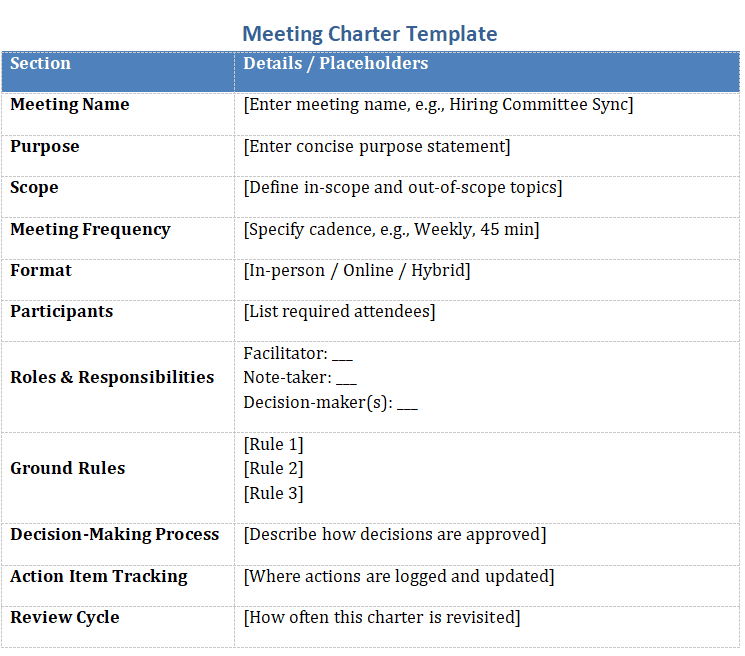
Ecco un modello pronto all'uso che puoi copiare, incollare e personalizzare. Puoi anche scaricare la versione Word qui.
Nome della riunione:[Come chiami questa riunione? Esempio: Sincronizzazione comitato assunzioni, Standup di prodotto, Revisione della leadership]
Scopo:[Perché esiste questa riunione? Sii breve e mirato. Esempio: “Per prendere decisioni settimanali sull'avanzamento dei candidati.”]
Ambito:[Quali argomenti sono inclusi? Quali sono esclusi? Esempio: “Discutiamo solo di posizioni aperte e candidati. Nessuna pianificazione di nuovi progetti.”]
Frequenza della riunione:[Ogni quanto si tiene questa riunione? Settimanale? Bisettimanale? Esempio: “Ogni lunedì alle 14:00, 45 minuti.”]
Formato:[È di persona, ibrida o da remoto? Esempio: “Da remoto – link Google Meet condiviso tramite calendario.”]
Partecipanti:[Elenca i partecipanti obbligatori. Esempio: “Recruiter, Hiring Manager, Coordinatore.”]
Ruoli e responsabilità:
- Facilitatore:
[Nome o ruolo a rotazione] – gestisce la riunione e tiene il tempo. - Verbalizzante:
[Nome o ruolo a rotazione] – registra i punti chiave e le decisioni.] - Responsabile/i delle decisioni:
[Chi ha l'ultima parola sui risultati?] - Relatore/i:
[Opzionale – elenca le persone che guidano argomenti specifici]
Regole di base:
[Regola 1: ad es. Iniziare e finire in orario.][Regola 2: ad es. Una persona alla volta.][Regola 3: ad es. Tutte le attività vengono assegnate prima della fine della riunione.]
Processo decisionale:[Descrivi come vengono prese le decisioni. Esempio: “Il responsabile delle assunzioni prende la decisione finale con il contributo della commissione.”]
Monitoraggio delle attività:[Dove vengono tracciate le attività? Chi le aggiorna? Esempio: “Le attività vengono registrate su Notion dopo ogni riunione da chi prende gli appunti.”]
Ciclo di revisione:[Ogni quanto verrà revisionato questo statuto? Esempio: “Ogni 3 mesi durante una retrospettiva.”]
Riunioni di team orientate all'azione con l'IA: Noota

Prendere appunti manualmente ti rallenta.
Noota risolve il problema.
- Trascrizione in tempo reale. Resta concentrato sulla conversazione mentre Noota cattura ogni parola con timestamp e identificazione dei parlanti.
- Riassunti istantanei. Subito dopo la chiamata, ricevi un riepilogo conciso con i punti chiave, le domande e i passaggi successivi.
- Rilevamento automatico delle decisioni. L'IA individua frasi come “Abbiamo deciso di…” e le contrassegna come decisioni ufficiali nel tuo registro.
- Estrazione delle attività. I compiti vengono evidenziati e assegnati ai responsabili, così nessuno dimentica il proprio follow-up.
- Modelli personalizzati. Personalizza le sezioni del riassunto—obiettivi, ostacoli, rischi—per adattarle al tuo statuto delle riunioni.
- Integrazioni avanzate. Invia trascrizioni, decisioni e attività su Notion, Slack, il tuo CRM o ATS con un solo clic.
- Cronologia ricercabile. Ti serve il contesto di una chiamata dello scorso trimestre? Digita una parola chiave e vai dritto al momento in cui è stata pronunciata.
- Privacy fin dalla progettazione. Tutte le registrazioni sono crittografate e archiviate nell'UE, così i tuoi dati rimangono al sicuro.
Prova Noota gratuitamente e trasforma ogni riunione in progressi concreti, senza muovere un dito.
Chi è l'autore

Anais scrive di tecniche di colloquio, AI nelle assunzioni, verbali delle riunioni e registrazione delle chiamate, con anni di esperienza come redattrice specializzata in HR.
FAQ
Una meeting charter è un documento che definisce lo scopo, la struttura e le regole di una riunione ricorrente.
- Stabilisce il perché della riunione
- Definisce ruoli e responsabilità
- Fissa cadenza e durata
Coinvolgi il team nella creazione per aumentare l'adesione alle regole stabilite insieme.
- Organizza un workshop con i partecipanti chiave
- Definisci insieme lo scopo e gli obiettivi
- Stabilisci regole condivise e misurabili
La meeting charter rimane stabile nel tempo e fornisce struttura permanente, mentre l'agenda cambia ad ogni sessione. Con Noota registri e riassumirai automaticamente ogni riunione, garantendo coerenza con la charter.
- Charter: documento fisso e duraturo
- Agenda: documento variabile per sessione
- Noota: traccia conformità e risultati
Noota automatizza la registrazione, il riassunto e il tracciamento delle riunioni, risparmiando 6,4 ore settimanali di admin. Perfetto per mantenere le tue meeting charter coerenti e misurabili nel tempo.
- Registra e riassume automaticamente ogni riunione
- Traccia azioni e decisioni dalla charter
- Prova Noota gratis — nessuna carta di credito richiesta