Gestion des Réunions
8 min de lecture
Mis à jour le :
Jul 28, 2025
Charte de réunion : guide et modèle
Vous souhaitez obtenir un modèle de charte de réunion pour votre équipe ? Voici votre guide.
Et si chaque réunion avait un objectif clair, des règles strictes et des résultats prévisibles ?
C'est exactement ce qu'offre une charte de réunion.
Dans ce guide, vous découvrirez ce qu'est une charte de réunion et obtiendrez un modèle prêt à l'emploi, personnalisable en quelques minutes.
Qu'est-ce qu'une charte de réunion ?
Une charte de réunion est un document court et clair qui définit l'objectif et la structure d'une réunion récurrente. Elle établit les règles de base avant même que vous ne franchissiez la porte.
Considérez-la comme un manuel de jeu. Elle indique à chacun pourquoi la réunion existe, qui doit y assister, à quelle fréquence elle a lieu et ce qui est attendu de chaque participant.
Contrairement à un ordre du jour, qui change à chaque session, une charte de réunion reste identique. Elle apporte à vos réunions une structure et une cohérence sur le long terme.
Voici ce qu'une charte de réunion comprend généralement :
- Objectif : La raison d'être de cette réunion et ce qu'elle doit accomplir.
- Périmètre : Les sujets abordés ou exclus. Fini les digressions hors sujet.
- Rôles : Qui anime la réunion ? Qui prend des notes ? Qui prend les décisions ?
- Fréquence : À quelle fréquence vous réunir, pour quelle durée et sous quel format (en présentiel, à distance, hybride).
- Règles de vie : Les attentes en matière de ponctualité, d'engagement, de temps de parole et de suivi.
- Indicateurs de succès : Comment savoir si la réunion est efficace.
Bonnes pratiques pour une charte de réunion
Voici six bonnes pratiques pour rendre votre charte de réunion efficace.
1. Élaborez-la avec votre équipe
Ne rédigez pas la charte seul. Invitez votre équipe principale à participer à sa création.
Pourquoi ? Lorsque les collaborateurs co-créent les règles, ils sont plus enclins à les respecter.
Commencez par un court atelier. Posez ces questions aux participants clés :
- Sur quoi cette réunion doit-elle se concentrer ?
- Que voulons-nous éviter ?
- Comment pouvons-nous rendre notre temps précieux ?
2. Définissez un objectif clair
Votre réunion doit avoir une raison d'être."
Est-ce pour prendre des décisions d'embauche ? Faire le point sur l'avancement ? Débloquer des situations ? Partager des mises à jour ?
Si vous ne pouvez pas expliquer l'objectif en une phrase, la réunion doit probablement être repensée. Un objectif vague mène à des résultats vagues.
Exemples d'énoncés d'objectifs percutants :
- « S'aligner chaque semaine sur les décisions de recrutement pour maintenir la dynamique. »
- « Suivre l'avancement des campagnes marketing et lever les blocages. »
- « Examiner les indicateurs clés du produit et définir les priorités pour la suite. »
3. Définissez les rôles et les responsabilités
Qui anime ? Qui prend des notes ? Qui dirige chaque sujet ?
Listez les rôles directement dans la charte. Cela permet de garder les choses organisées et d'éviter toute confusion.
Conseil : faites tourner les rôles chaque semaine pour que personne ne soit coincé à faire la même tâche indéfiniment.
4. Choisissez une fréquence durable
Hebdomadaire ? Bimensuelle ? Mensuelle ?
Définissez une fréquence adaptée à l'importance et à l'urgence de la réunion. Trop de réunions mènent à l'épuisement. Pas assez, et vous risquez de perdre le cap.
Définissez également la durée. Ne choisissez pas systématiquement 60 minutes. Essayez des formats plus courts, comme 30 ou 45 minutes. Les réunions concises sont souvent plus efficaces.
5. Établissez des règles de base simples
Exemples :
- Commencez et terminez à l'heure.
- Gardez les caméras allumées (pour les équipes à distance).
- Pas d'ordinateur portable, sauf pour présenter.
- Ne coupez pas la parole : laissez les autres finir de s'exprimer.
- Chaque sujet doit aboutir à une action ou une décision claire.
Inutile d'avoir dix règles. Deux ou trois suffisent pour protéger votre temps et votre concentration.
6. Révisez et ajustez régulièrement
Votre équipe évolue, votre charte doit en faire autant.
Faites le point chaque trimestre ou lors de changements dans la structure de l'équipe. Qu'est-ce qui fonctionne toujours ? Qu'est-ce qui doit être mis à jour ?
Demandez l'avis de votre équipe : « Cette réunion nous est-elle toujours utile ? » Si ce n'est pas le cas, ajustez la charte. Ou supprimez la réunion.
Une charte n'est pas figée. C'est un document vivant.
Modèle de charte de réunion
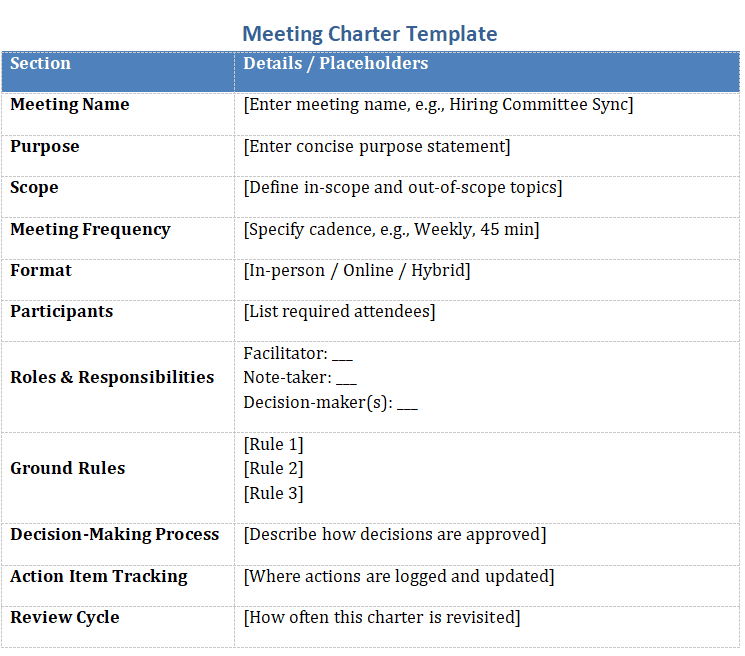
Voici un modèle prêt à l'emploi que vous pouvez copier, coller et personnaliser. Vous pouvez également télécharger la version Word ici.
Nom de la réunion :[Comment appelez-vous cette réunion ? Exemple : Point comité de recrutement, stand-up produit, revue de direction]
Objectif :[Pourquoi cette réunion existe-t-elle ? Soyez bref et précis. Exemple : « Prendre des décisions hebdomadaires sur l'avancement des candidats. »]
Périmètre :[Quels sujets sont abordés ? Quels sujets sont exclus ? Exemple : « Nous discutons uniquement des postes ouverts et des candidats. Pas de planification de nouveaux projets. »]
Fréquence de la réunion :[À quelle fréquence cette réunion a-t-elle lieu ? Hebdomadaire ? Bimensuelle ? Exemple : « Tous les lundis à 14h, 45 minutes. »]
Format :[Est-ce en présentiel, hybride ou à distance ? Exemple : « À distance – lien Google Meet partagé via le calendrier. »]
Participants :[Listez les participants requis. Exemple : « Recruteur, responsable du recrutement, coordinateur. »]
Rôles et responsabilités :
- Animateur :
[Nom ou rôle tournant] – dirige la réunion et gère le temps. - Preneur de notes :
[Nom ou rôle tournant] – consigne les points clés et les décisions.] - Décideur(s) :
[Qui a le dernier mot sur les résultats ?] - Présentateur(s) :
[Optionnel – listez les personnes en charge de sujets spécifiques]
Règles de base :
[Règle 1 : ex. Commencer et terminer à l'heure.][Règle 2 : ex. Une seule personne parle à la fois.][Règle 3 : ex. Toutes les actions sont assignées avant la fin de la réunion.]
Processus de prise de décision :[Décrivez comment les décisions sont prises. Exemple : « Le responsable du recrutement prend la décision finale avec l'avis du jury. »]
Suivi des actions :[Où les actions sont-elles suivies ? Qui les met à jour ? Exemple : « Les actions sont consignées dans Notion après chaque réunion par la personne chargée de la prise de notes. »]
Cycle de révision :[À quelle fréquence cette charte sera-t-elle révisée ? Exemple : « Tous les 3 mois lors d'une rétrospective. »]
Réunions d'équipe axées sur l'action avec l'IA : Noota

La prise de notes manuelle vous ralentit.
- Transcription en direct. Restez concentré pendant que Noota capture chaque mot avec horodatage et identification des intervenants.
- Résumés instantanés. Juste après l'appel, vous recevez un compte-rendu concis avec les points clés, les questions et les prochaines étapes.
- Détection automatique des décisions. L'IA repère des expressions comme « Nous avons décidé de… » et les signale comme décisions officielles dans votre journal.
- Extraction des plans d'action. Les tâches sont mises en évidence et attribuées aux responsables, pour que personne ne manque son suivi.
- Modèles personnalisés. Adaptez les sections de vos résumés — objectifs, obstacles, risques — pour qu'elles correspondent à l'ordre du jour de vos réunions.
- Intégrations poussées. Transférez vos transcriptions, décisions et tâches vers Notion, Slack, votre CRM ou votre ATS en un seul clic.
- Historique consultable. Besoin du contexte d'un appel du trimestre dernier ? Tapez un mot-clé et accédez directement au moment où il a été prononcé.
- Confidentialité dès la conception. Tous les enregistrements sont chiffrés et stockés dans l'UE, pour que vos données restent en sécurité.
Essayez Noota gratuitement et transformez chaque réunion en progrès concret, sans lever le petit doigt.
À propos de l'auteur
.avif)
Adesh écrit sur les outils de prise de notes IA, l'enregistrement de réunions, les entretiens structurés et le recrutement, à partir de son travail dans la croissance pilotée par l'IA et les opérations de recrutement.
FAQ
Impliquez votre équipe dans la création, définissez un objectif clair en une phrase, listez les rôles et responsabilités, choisissez une fréquence durable.
- Co-créer avec les participants clés
- Fixer un but unique et mesurable
- Assigner des rôles précis
- Adapter la cadence à l'urgence
La meeting charter est un document permanent qui structure les réunions récurrentes, tandis que l'agenda change à chaque session et reste temporaire.
- Charter : structure long-terme stable
- Agenda : contenu spécifique à chaque réunion
- Charter : règles et rôles définis
- Agenda : points à traiter variables
Noota économise 6,4h/semaine en automatisant la documentation, réduit l'admin de 80%, et fonctionne en 80+ langues avec 4,9/5 sur G2 par 5000+ équipes.
- Automatisation complète des notes
- Réduction drastique du travail administratif
- Support multilingue et intégrations natives
- Confiance validée par milliers d'utilisateurs
Noota capture automatiquement les décisions et actions de vos réunions, synchronise les charters avec vos notes, et garantit zéro perte d'information.
- Capture automatique des décisions
- Synchronisation avec vos charters
- Traçabilité complète des actions
- Essayer Noota gratuitement