Integrationen
8 Min. Lesezeit
Updated on:
Sep 16, 2025
Detaillierte Anrufprotokoll-Vorlage
Sie suchen eine benutzerfreundliche Protokollvorlage? Hier ist Ihr Leitfaden.
Was ist eine Anrufprotokoll-Vorlage?
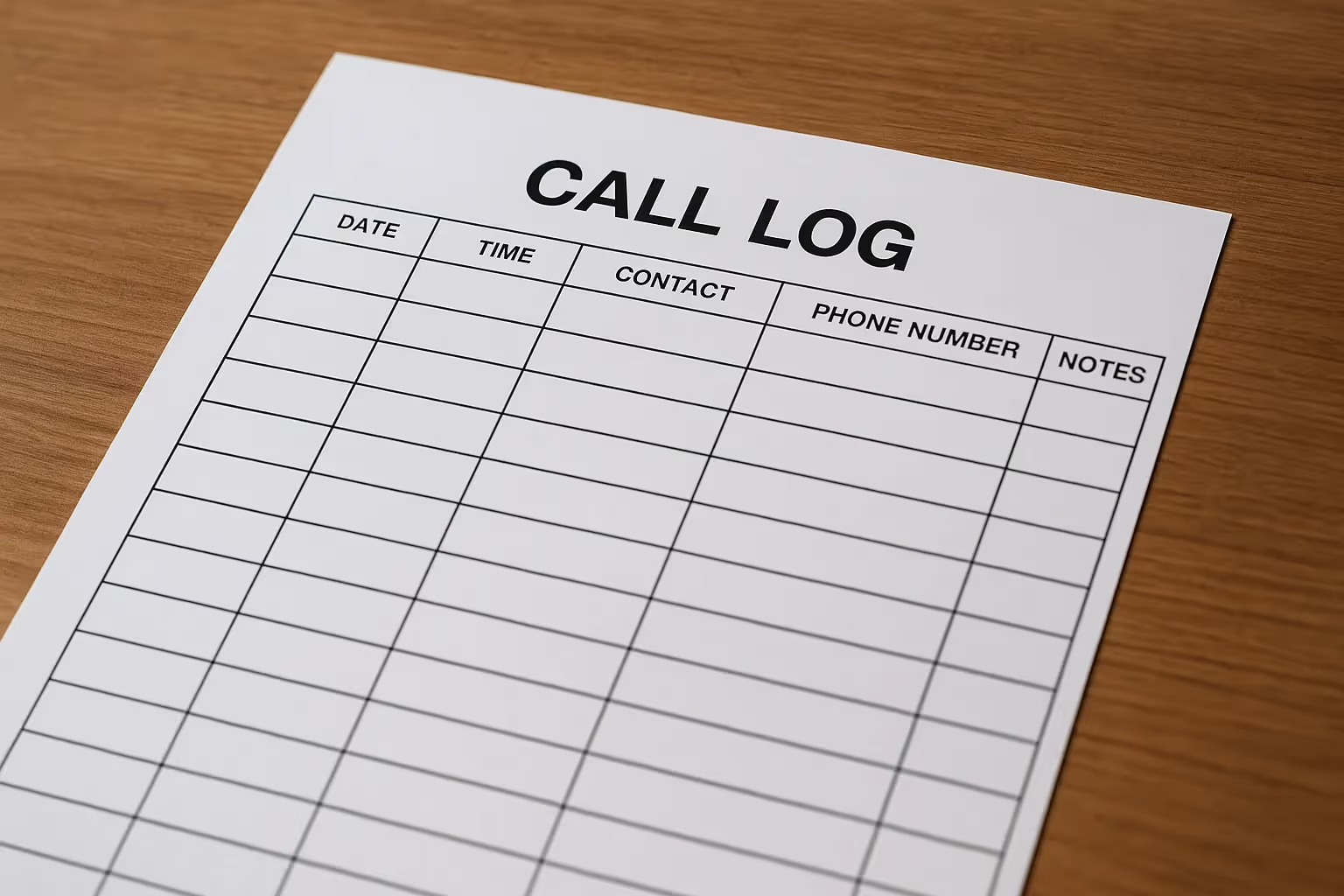
Eine Anrufprotokoll-Vorlage ist eine strukturierte Tabelle für Ihre Telefongespräche. Sie standardisiert, was Sie erfassen und wo diese Informationen gespeichert werden.
Ihre Vorlage reduziert die Entscheidung darüber, „was ich notieren sollte“. Das spart an arbeitsreichen Tagen Zeit. Zudem macht sie die spätere Berichterstattung mühelos.
Eine gute Protokollvorlage funktioniert für Vertrieb, Support, Personalbeschaffung und Betriebsabläufe gleichermaßen. Sie können für jedes Team einige Felder ergänzen.
Was eine solide Anrufprotokoll-Vorlage enthalten sollte
- Datum & Uhrzeit. Halten Sie genau fest, wann der Anruf stattfand.
- Anrufer / Angerufener. Namen, Unternehmen und Kontaktdaten.
- Zweck / Anruftyp. Bedarfsanalyse, Support, Vertragsverlängerung, Bewerber-Screening usw.
- Dauer. Nützlich für Kapazitäts- und SLA-Prüfungen.
- Notizen / Kernpunkte. Kurze Stichpunkte, keine Aufsätze.
- Ergebnis / Status. Abgeschlossen, Mailbox, Terminverschiebung, Eskalation.
- Nächste Schritte & Verantwortlicher. Wer erledigt was bis wann.
- Wiedervorlagedatum. Hält Pipelines und Prozesse in Bewegung.
Varianten zur Unterstützung verschiedener Teams
- Vertrieb. Deal-ID, Phase, Betrag, Wettbewerber.
- Support. Ticketnummer, Priorität, Produktbereich, Workaround.
- Recruiting. Rolle, Phase, Quelle, Verfügbarkeit.
- Finanzen/Recht. Vertragsreferenz, Status der Bedingungen, Korrekturen.
Behalten Sie die Basis bei. Fügen Sie 2–3 Spalten pro Funktion hinzu. So bewahren Sie die Ordnung, ohne die Flexibilität einzuschränken.
Wo das Protokoll geführt werden sollte
Tabellenkalkulationen sind ein schneller Einstieg. Sie ermöglichen schnelles Filtern und Teilen. Druckversionen helfen in Umgebungen mit schlechter Internetverbindung.
Work-Management-Tools erleichtern die Zusammenarbeit.
Die beste Vorlage für Anrufprotokolle

Sie benötigen eine Vorlage, die einfach, schnell und flexibel ist. Diese funktioniert hervorragend in Google Sheets & Excel mit detaillierten Feldern & Reitern.
FAQ
Was ist der Unterschied zwischen einem Anrufprotokoll und Besprechungsnotizen?
Ein Anrufprotokoll erfasst die Fakten eines einzelnen Gesprächs in einer Zeile. Besprechungsnotizen fassen eine längere Sitzung detaillierter zusammen. Nutzen Sie bei Bedarf beides.
Brauche ich eine Vorlage, wenn mein CRM Anrufe protokolliert?
Ja, wenn die CRM-Felder uneinheitlich sind. Eine Vorlage stellt sicher, dass jedes Mal dieselben Daten erfasst werden. Sie können die Daten dennoch mit Ihrem CRM synchronisieren oder dorthin importieren.
Wo sollte mein Protokoll gespeichert werden?
Starten Sie für mehr Schnelligkeit in Sheets oder Excel. Wechseln Sie zu Ihrem CRM oder einem Projektmanagement-Tool, wenn Sie Automatisierungen und Dashboards benötigen. Wählen Sie das System, das Ihr Team ohnehin täglich nutzt.
Wie viele Felder sollte ich anlegen?
Beginnen Sie mit 10–12 Spalten. Fügen Sie nur das hinzu, was die Handlungsfähigkeit oder das Reporting verbessert. Entfernen Sie alles, was niemand nutzt.
Was ist mit langen Gesprächen mit vielen Details?
Halten Sie die Zeile kompakt und verlinken Sie auf eine ausführlichere Notiz oder ein Transkript. Nutzen Sie die Notizen -Zelle für drei Stichpunkte. Fügen Sie den Link in derselben Zeile hinzu.
Wie stelle ich sicher, dass die Vorlage auch wirklich ausgefüllt wird?
Sorgen Sie für einen reibungslosen Ablauf. Fixieren Sie die Kopfzeile, fügen Sie Dropdown-Menüs hinzu und hinterlegen Sie Standardwerte. Etablieren Sie zudem ein tägliches Review-Ritual.
Wie kann ich das Protokoll in konkrete Aufgaben umwandeln?
Nutzen Sie die Spalten Verantwortlicher und Fälligkeitsdatum Spalten als Auslöser. Erstellen Sie eine Ansicht für „Heute fällig“ und „Überfällig“. Gehen Sie diese in Ihrem Stand-up durch.
Kann ich KPIs aus dem Protokoll nachverfolgen?
Ja. Erstellen Sie Pivot-Tabellen für Anrufvolumen, Antwortrate, durchschnittliche Dauer und Ergebnisse nach Zweck. Fügen Sie einen kleinen Dashboard-Reiter hinzu und überprüfen Sie diesen wöchentlich.
Wie sieht es mit Compliance und Datenschutz aus?
Speichern Sie nur, was Sie wirklich benötigen. Vermeiden Sie sensible personenbezogene Daten in Freitextfeldern. Wenn Anrufe aufgezeichnet werden, beachten Sie die geltenden Gesetze zur Einwilligung.
Wie gehe ich mit mehreren Tags in einer Zeile um?
Verwenden Sie kommagetrennte Tags in einer einzigen Zelle. Legen Sie eine standardisierte Tag-Liste in einem ausgeblendeten Tabellenblatt an. Nutzen Sie die Datenüberprüfung für mehr Konsistenz.
Wir arbeiten mobil – funktioniert eine Vorlage trotzdem?
Ja, aber halten Sie die Felder auf ein Minimum beschränkt. Verwenden Sie ein mobilfreundliches Tabellenblatt oder ein Formular, das direkt in Ihr Protokoll schreibt. Kurze Felder sind unterwegs besser als lange Absätze.
Wann sollte ich über Vorlagen hinausgehen?
Wenn das Volumen wächst und die manuelle Eingabe nachlässt. Erwägen Sie ab diesem Punkt eine Automatisierung. Tools wie Noota erstellen automatisch Transkripte und strukturierte Protokolle für Sie.
Wie oft sollte ich das Protokoll bereinigen?
Einmal pro Woche. Schließen Sie veraltete nächste Schritte ab, korrigieren Sie Tippfehler in den Tags und archivieren Sie alte Zeilen in einem separaten Tab. So bleiben Ihre Ansichten schnell.
Was ist der schnellste Weg zur Einführung?
Teilen Sie ein vorbereitetes Tabellenblatt mit fixierten Kopfzeilen, Dropdown-Menüs und Beispielzeilen. Schulen Sie das Team für 10 Minuten. Beginnen Sie mit der Protokollierung beim nächsten Anruf – nicht erst nächste Woche.
Noota: Automatisierte Protokolle ohne Tabellenkalkulation

Noota erfasst Anrufe und Meetings für Sie. Es zeichnet auf, transkribiert und erstellt in Sekundenschnelle ein strukturiertes Protokoll. Sie erhalten eine klare Zusammenfassung mit Entscheidungen und Aufgaben.
Sie können Ergebnisse direkt an Ihr CRM oder ATS übertragen. Notizen, Verantwortliche und Fälligkeitsdaten werden mit dem Datensatz synchronisiert.
Möchten Sie Ihre Anrufe automatisch protokollieren? Testen Sie Noota jetzt kostenlos.
Über den Autor

FAQ
Eine gute Vorlage erfasst Datum, Anrufer, Zweck, Dauer, Notizen und nächste Schritte strukturiert.
- Standardisierte Felder sparen Zeit bei der Dokumentation
- Dropdowns und Vorlagen reduzieren Eingabefehler deutlich
- Verknüpfungen zu Tickets oder Deals ermöglichen schnelle Navigation
Call Logs erfassen Fakten einer Konversation in einer Zeile, Besprechungsnotizen fassen längere Sessions detailliert zusammen.
- Logs sind prägnant und filterbar für Berichte
- Notizen dokumentieren Diskussionen und Entscheidungen ausführlich
- Beide zusammen ermöglichen vollständige Nachverfolgung
Noota automatisiert Call Logs mit KI-Transkription und synchronisiert direkt in CRMs – ohne manuelle Eingaben oder Fehler.
- Noota spart 80% Admin-Zeit durch automatische Dokumentation
- Konsistente Datenqualität über alle 5000+ Teams hinweg
- Echtzeit-Sync zu Salesforce, HubSpot und anderen Tools
Noota kombiniert intelligente Transkription, automatische Zusammenfassungen und nahtlose CRM-Integration in 80+ Sprachen.
- Noota: 4,9/5 Sterne auf G2, 6,4h/Woche Zeitersparnis
- Automatische Protokolle ohne manuales Ausfüllen oder Fehler
- Noota kostenlos testen – keine Kreditkarte erforderlich