Vergleich von KI-Notiztools
8 Min. Lesezeit
Updated on:
Sep 22, 2025
Die 6 besten KI-gestützten CRMs aktuell
Sie möchten wissen, was KI-CRMs sind? Hier ist Ihr Leitfaden.

Wie oft hatten Sie schon das Gefühl, dass Ihr CRM nur Daten speichert – während Sie die ganze harte Arbeit erledigen?
Genau hier kommen KI-gestützte CRMs ins Spiel.
In diesem Artikel stellen wir Ihnen die besten KI-CRMs vor, die echten Mehrwert bieten – und nicht nur mit Schlagworten glänzen.
1) Pipedrive AI
Was es ist.
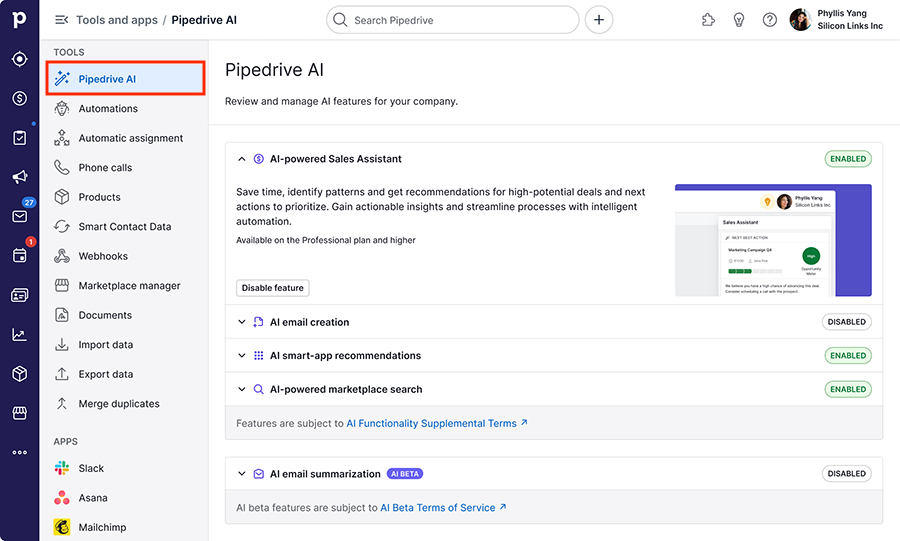
Pipedrive ist ein auf Pipelines spezialisiertes CRM mit integrierter KI. Sie erhalten visuelle Deal-Verfolgung, Automatisierungen und einen KI-Verkaufsassistenten direkt in Ihrem Arbeitsbereich. Mit den jüngsten Tarif-Updates ist die KI nun in verschiedenen Paketen enthalten.
Warum Sie sich dafür entscheiden könnten.
Sie suchen ein einfaches CRM, das Ihr Team auch wirklich nutzt. Zudem möchten Sie, dass die KI Ihre Vertriebsmitarbeiter unterstützt, E-Mails entwirft und den nächsten Schritt vorschlägt – ganz ohne zusätzliche Tools.
Wie es Ihren Alltag erleichtert.
Ihr Verkaufsassistent markiert heiße Deals und schlägt Maßnahmen vor. Ihr Posteingang erhält E-Mail-Entwürfe basierend auf Ihren Vorgaben, direkt in Pipedrive. Sie verbringen weniger Zeit mit der Suche nach Informationen und mehr Zeit mit dem Abschluss von Deals.
Hauptfunktionen
- KI-Verkaufsassistent. Erhalten Sie Benachrichtigungen, Tipps und Erinnerungen, die direkt mit Ihrer Pipeline und Ihren Aktivitäten verknüpft sind. Stellen Sie Fragen zu Deals und Kontakten, um schnell Antworten zu finden.
- KI-E-Mail-Assistent. Verwandeln Sie einfache Anweisungen in versandfertige Entwürfe. Aktivieren Sie die Funktion in den E-Mail-Synchronisierungseinstellungen und erstellen Sie in Sekundenschnelle Outreach- oder Follow-up-Nachrichten.
- Automatisierungen & Hinweise. Verhaltensbasierte Karten empfehlen nächste Schritte, Integrationen und Aufräumaktionen. So reduzieren Sie Routineaufgaben, ohne komplexe Workflows erstellen zu müssen.
- Datenanreicherung & Scoring. In den Premium-Tarifen erhalten Sie benutzerdefiniertes Scoring und Unternehmensanreicherung, damit Sie die richtigen Konten schneller ansprechen können.
- Gesprächsanalyse (via Apps). Ergänzen Sie Anrufaufzeichnungen, Transkripte und KI-Notizen mit Marketplace-Tools wie Avoma und synchronisieren Sie Zusammenfassungen direkt mit Ihren Deals.
- Ökosystem & Benutzerfreundlichkeit. Eine übersichtliche Benutzeroberfläche, volle mobile Funktionalität und Hunderte von Integrationen erleichtern kleinen und mittleren Unternehmen die Einführung.
Preise (Tarifnamen wurden 2025 geändert; Beträge variieren je nach Region).
- Lite – Einstiegstarif für das Kern-CRM. Visuelle Pipeline, grundlegende Automatisierung und das Wesentliche.
- Growth – ergänzt um vollständige E-Mail-Synchronisierung, Tracking, Automatisierungen, Lead-Nurturing und jetzt „Jetzt mit KI“-Funktionen. Die Preisübersicht zeigt 39 £/Nutzer/Monat bei jährlicher Abrechnung als Beispiel.
- Premium – Lead-Routing, Scoring, Anreicherung, Verträge und „KI-gestützte Multi-E-Mail-Tools“. Gelistet mit 49 £/Nutzer/Monat bei jährlicher Abrechnung auf der britischen Seite.
- Ultimate – erweiterte Sicherheit, Telefon- & E-Mail-Anreicherung, höhere Limits und Sandbox. Gelistet mit 79 £/Nutzer/Monat bei jährlicher Abrechnung auf der britischen Seite.
2) Zoho CRM (mit Zia KI)

Was es ist.
Zoho CRM ist ein Full-Stack-CRM mit einem integrierten KI-Assistenten namens Zia. Sie erhalten Pipelines, Automatisierung und Analysen sowie eine KI, die Leads bewertet, Ergebnisse vorhersagt und nächste Schritte vorschlägt. Es wurde für Teams entwickelt, die Wert auf Funktionsumfang und Vielseitigkeit legen.
Warum Sie sich dafür entscheiden sollten.
Sie suchen ein erschwingliches CRM, das dennoch leistungsstarke KI-Funktionen bietet. Zudem profitieren Sie von einem großen Marktplatz und einer engen Integration in Google Workspace, Microsoft 365 sowie die gesamte Zoho-Suite.
Wie es Ihren Arbeitsalltag erleichtert.
Zia bewertet Ihre Leads und Deals, damit Sie sich auf das Wesentliche konzentrieren können. Es erkennt Anomalien in Ihrer Pipeline und weist auf Risiken hin, bevor diese zu Kundenabwanderung führen. So ersetzen Sie Vermutungen durch gezielte Handlungen.
Hauptfunktionen
- Prädiktive Lead- und Deal-Bewertung. Priorisieren Sie Ihre Anrufe basierend auf der Konvertierungswahrscheinlichkeit.
- Anomalieerkennung. Erkennen Sie ungewöhnliche Einbrüche oder Spitzen bei wichtigen Kennzahlen und handeln Sie frühzeitig.
- KI-Prognosen & Einblicke. Erhalten Sie Prognosebereiche und Einflussfaktoren statt manueller Zusammenfassungen.
- Conversation Intelligence. Nutzen Sie Transkripte, Zusammenfassungen und Stimmungsanalysen für das Coaching und die Dokumentation von Gesprächen.
- Datenanreicherung & Automatisierung. Reduzieren Sie manuelle Dateneingaben durch Anreicherung und Workflow-Trigger, die mit Zia-Signalen verknüpft sind.
- Individuelle/agentische KI. Erstellen Sie maßgeschneiderte Prompts und Agenten-Workflows direkt in Zoho, passend zu Ihren Prozessen.
- Ökosystem & Integrationen. Verbinden Sie über 600 Apps und native Zoho-Tools für E-Mail, Chat, Dokumente und Analysen.
Preise (auf einen Blick)
- Kostenlos – Bis zu 3 Benutzer. CRM-Grundfunktionen für sehr kleine Teams.
- Standard – Einstiegs-Tarif mit Automatisierung und Berichten. Ideal für kleine und mittlere Unternehmen.
- Professional – Bietet erweiterte Vertriebstools und Integrationen. Die ideale Lösung für wachsende Unternehmen.
- Enterprise – Beliebt bei wachsenden Teams; beinhaltet Zia KI-Assistentenfunktionen gemäß Tarifdokumentation und Partnerleitfäden.
- Ultimate – Top-Tarif mit erweiterten Analysen und vollem Funktionsumfang. Öffentliche Preislisten beginnen bei 52 $/Benutzer/Monat bei jährlicher Abrechnung.
Hinweis: Die Funktionen von Zia variieren je nach Edition und Region. Die leistungsstärksten KI-Funktionen sind in der Regel in den Enterprise- und Ultimate-Tarifen enthalten – bitte prüfen Sie den genauen Leistungsumfang auf der aktuellen Preisseite.
3) Vtiger CRM (mit Calculus AI)
Was es ist.
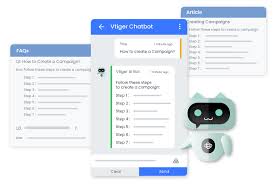
Vtiger ist ein All-in-One-CRM mit einer nativen KI-Ebene namens Calculus AI. Sie erhalten Vertrieb, Marketing und Service an einem Ort, ergänzt durch prädiktive und generative KI, die Ihr Team unterstützt. Es ist auf Erschwinglichkeit und einen breiten Funktionsumfang ausgelegt.
Warum Sie sich dafür entscheiden könnten.
Sie möchten ein gutes Preis-Leistungs-Verhältnis, ohne auf grundlegende KI-Funktionen zu verzichten. Zudem wünschen Sie sich Unterstützung in verständlicher Sprache und nicht nur durch Dashboards. Calculus beantwortet Fragen, weist auf Risiken hin und schlägt basierend auf Ihren CRM-Daten konkrete Maßnahmen vor.
Wie es Ihren Arbeitsalltag erleichtert.
Fragen Sie Calculus nach dem Kontext eines Geschäftsabschlusses oder den nächsten Schritten und erhalten Sie eine Antwort in natürlicher Sprache. Das System analysiert E-Mails, Chats und Gesprächsprotokolle, um Stimmungslagen, Themen und Muster zu erkennen. Führungskräfte erhalten prägnante Zusammenfassungen, sodass das Coaching schneller beginnen kann.
Hauptfunktionen
- GPT-gestützter Assistent. Fragen Sie Ihr CRM in Alltagssprache ab und erhalten Sie Antwortvorschläge, Entwürfe oder Empfehlungen für die nächsten Schritte.
- Analyse von E-Mail, Chat und Sprache. Calculus wertet Konversationen auf Stimmung, Themen und Coaching-Ansätze aus.
- Live-Chat + Chatbot. Interagieren Sie direkt aus Vtiger heraus mit Website-Besuchern und setzen Sie einen GPT-basierten Bot ein, der auf Ihrer Wissensdatenbank trainiert wurde.
- Zusammenfassungen für Abschlüsse und Service. Erhalten Sie prägnante Berichte, die Aktivitäten über verschiedene Kanäle hinweg kompakt zusammenfassen.
- Workflow-Automatisierung. Verknüpfen Sie KI-Signale mit Aufgaben, Benachrichtigungen und SLAs in Vertrieb und Support.
- Flexible Editionen. Wählen Sie „One“-Editionen für All-in-One-Pakete oder entscheiden Sie sich für One AI für den vollen Funktionsumfang mit prädiktiver und generativer KI.
Preise auf einen Blick.
Vtiger bietet verschiedene „One“-Editionen mit einer kostenlosen Stufe und kostenpflichtigen Lizenzen an. Auf den öffentlichen Seiten wird One AI als „Enterprise-CRM mit prädiktiver und generativer KI“ beworben, ergänzt durch weitere Editionen wie One Growth, One Professionalund One Enterprise . Die genauen Preise in USD und der Funktionsumfang können je nach Region und Angeboten variieren – bitte prüfen Sie die aktuellen Preis- und Vergleichsseiten.
4) monday sales CRM
Was es ist.
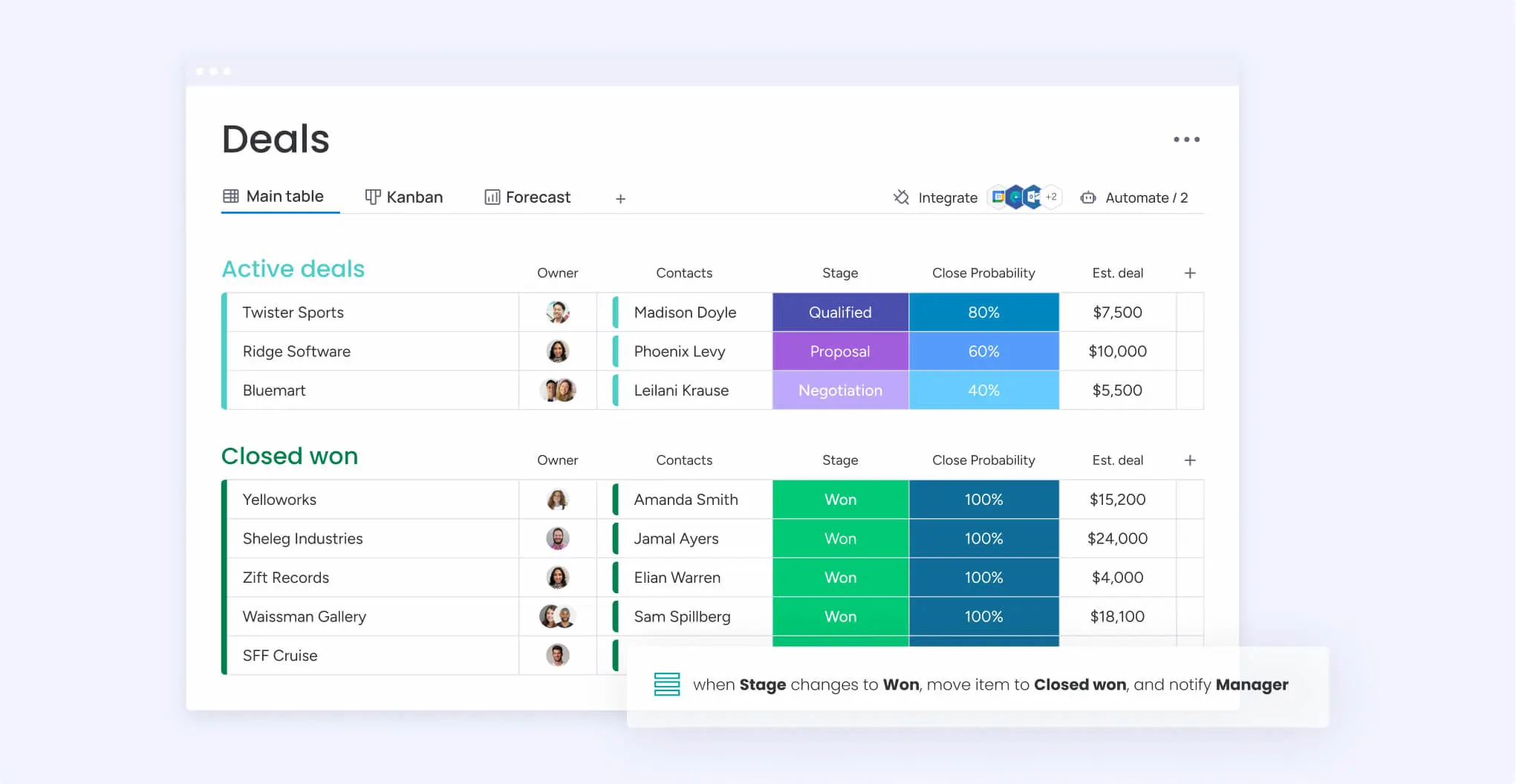
monday sales CRM ist ein visuelles, anpassbares CRM mit integrierter KI. Nutzen Sie Boards, Automatisierungen und KI-Assistenten, um Deals zu verfolgen und Verwaltungsaufwand zu reduzieren. Neue KI-Blöcke erweitern die KI-Funktionen auf Workflows, Spalten und Automatisierungen.
Warum Sie sich dafür entscheiden sollten.
Sie suchen ein CRM, das Ihr Team auch wirklich nutzt. Sie möchten, dass die KI Zeitpläne zusammenfasst, E-Mails verfasst und Felder für Sie ausfüllt. Sie bevorzugen Drag-and-Drop gegenüber komplexen Konfigurationen.
So unterstützt es Ihren Arbeitsalltag.
Ihre Timeline für E-Mails & Aktivitäten wird nach jedem Kontakt zu einer kurzen Zusammenfassung. Der E-Mail-Assistent entwirft kontextbezogene Antworten, die Sie nur noch bearbeiten und versenden müssen. Die KI kann sogar Board-Spalten automatisch aus Freitext ausfüllen.
Hauptfunktionen
- KI-Timeline-Zusammenfassungen. Erhalten Sie prägnante Zusammenfassungen aller Interaktionen zu einem Datensatz. Manager und Vertriebsmitarbeiter erfassen Updates in Sekundenschnelle.
- KI-E-Mail-Assistent. Verfassen Sie E-Mails direkt in E-Mails & Aktivitäten mit Vorschlägen zu Tonfall und Struktur.
- KI-Blöcke & Automatisierungen. Erweitern Sie die KI auf Workflows, Felder und Routinen über Boards und Teams hinweg.
- Prädiktive Inhalte & Prognosen. Der monday-Vertriebsblog beleuchtet prädiktive Vertriebs-KI und Prognose-Leitfäden, die direkt in den Produktansatz integriert sind.
- Service-Agent (Add-on). KI-Vorschläge für Support-Teams zur Analyse von Tickets und früheren Lösungen. Nützlich, wenn Vertrieb und Service dieselbe Plattform nutzen.
- Ökosystem & Apps. Arbeiten Sie über Web, Desktop und Mobilgeräte hinweg mit Vorlagen für Pipelines, Aktivitäten und Übergaben nach dem Verkauf.
Preise (öffentliche Seiten, jährliche Abrechnung; regional unterschiedlich).
- Basic – ab ca. 12 $/Nutzer/Monat. Zentrale CRM-Boards, unbegrenzte Pipelines/Kontakte und Standardfunktionen. Ideal für die Organisation von Deals.
- Standard – ab 17 $/Nutzer/Monat. Bietet tiefgreifendere Zusammenarbeit und Automatisierungen, die die meisten Teams benötigen.
- Pro – ab 24 $/Nutzer/Monat in vielen Angeboten. Schaltet erweiterte Funktionen und höhere Limits für wachsende Teams frei.
- Enterprise – individuell. Sicherheit, Governance und höhere Automatisierungsgrenzen.
- monday.com erläutert die Produkt-/Planstruktur und die Abrechnung (monatlich vs. jährlich) im Hilfe-Center für Preise. Überprüfen Sie immer die Plannamen und KI-Kontingente für Ihren Standort.
5) Creatio (KI-natives CRM + No-Code)
Was es ist.
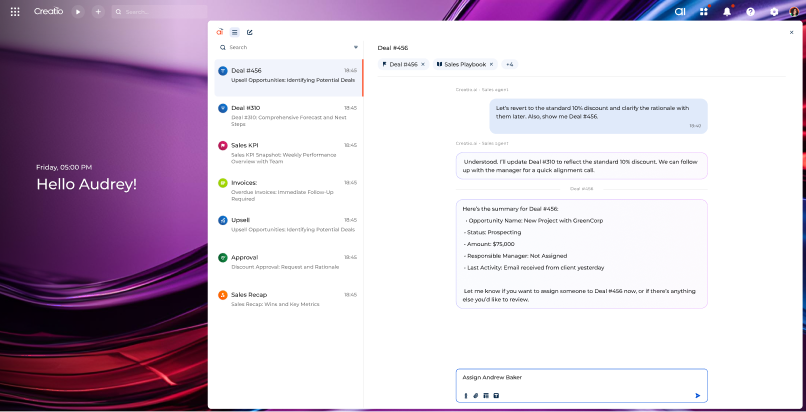
Creatio ist ein KI-natives CRM und eine Workflow-Plattform mit No-Code als Kern. Sie entwerfen Prozesse per Mausklick und fügen dann KI für Vorhersagen, Generierung und agentenbasierte Automatisierung hinzu. Mit dem Creatio Copilot können Sie GenAI-Anwendungsfälle für Vertrieb, Marketing und Service konfigurieren und bereitstellen.
Warum Sie sich dafür entscheiden könnten.
Sie suchen ein Enterprise-CRM mit flexibler Automatisierung. Außerdem möchten Sie eine KI, die Nutzer ohne Programmierung anpassen können. Das neueste „Twin“-Release ergänzt rollenbasierte KI-Agenten und eine einheitliche Konversationsschnittstelle, um die tägliche Arbeit zu beschleunigen.
Wie es Ihren Alltag erleichtert.
Beschreiben Sie eine Änderung in einfacher Sprache und generieren Sie eine App, eine Benutzeroberfläche oder einen Workflow. Bitten Sie den Copilot, Konten zusammenzufassen oder Follow-ups zu erstellen, und lassen Sie die agentenbasierte KI Aufgaben planen oder Datensätze aktualisieren. Ihr Team setzt Verbesserungen um, ohne aufwendige Entwicklungszyklen.
Hauptfunktionen
- Copilot-Arbeitsbereich. Konfigurieren Sie sofort einsatzbereite GenAI-Anwendungsfälle oder erstellen Sie Ihre eigenen für CRM und App-Entwicklung.
- KI-native Architektur. Prädiktive, generative und agentenbasierte KI vereint auf einer Plattform zum Bewerten, Entwerfen und Handeln.
- Rollenbasierte KI-Agenten. Vorgefertigte Agenten und eine konversationelle Benutzeroberfläche, eingeführt in 8.3 „Twin“, um Routineaufgaben zu beschleunigen.
- No-Code-Builder. Entwerfen Sie Prozesse, Datenmodelle und Benutzeroberflächen visuell; implementieren Sie Integrationen ohne Programmierung.
- Vertriebs-/Marketing-/Service-Suiten. End-to-End-CRM-Produkte auf einer gemeinsamen Plattform für ein einheitliches Datenmodell.
- Vertrauen & Governance. Unternehmensweite Kontrollen für den Datenzugriff und die Datenspeicherung durch KI-Modelle (dokumentiert in den Preis-/KI-Abschnitten).
Preise (öffentliche Referenzen, pro Nutzer/Monat).
- Growth – ab $25. Kern-CRM auf der KI-nativen Plattform für KMU-Automatisierung.
- Enterprise – ab $55. Umfassende Automatisierung für Unternehmensanforderungen; erweiterte KI-Funktionen und Governance.
- Unbegrenzt – höherer Tarif mit erweiterten Limits und Plattformfunktionen. Preis auf Anfrage.
- Marktplatz- und Support-Pläne sind kostenpflichtig; G2 nennt einen Einstiegspreis von 25 $ und weist auf jährliche Mindestabnahmemengen für bestimmte Editionen hin. Überprüfen Sie immer die Seite für Ihre Region.
6) Breakcold (Social-Selling-CRM)
Was es ist.
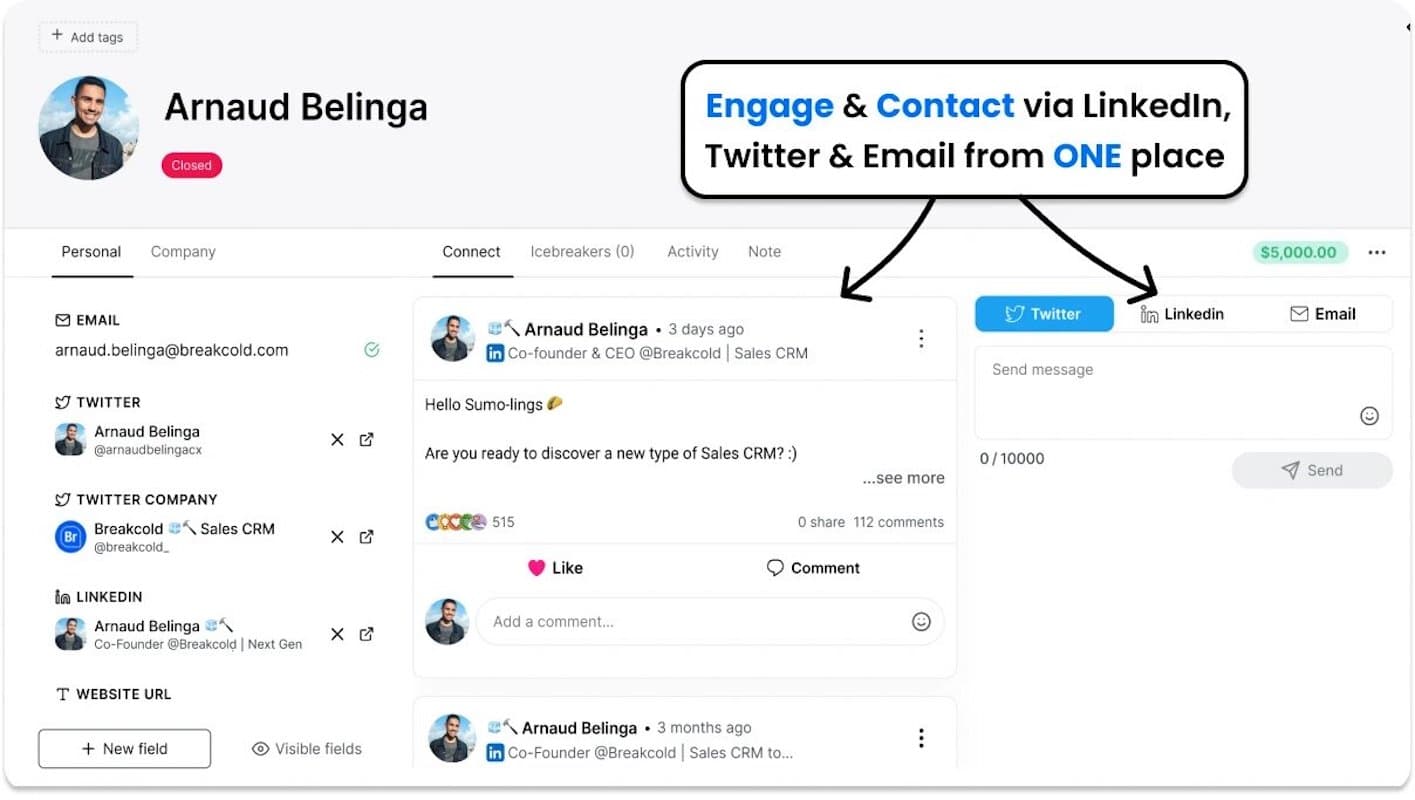
Breakcold ist ein schlankes, KI-basiertes CRM, das speziell für Social Selling entwickelt wurde. Sie verwalten E-Mails, LinkedIn und Ihre Pipeline an einem zentralen Ort. Es richtet sich an Agenturen, Startups und Berater, die ihre Geschäfte durch beziehungsorientierte Akquise abschließen.
Warum Sie sich dafür entscheiden sollten.
Sie betreiben täglich LinkedIn-Akquise und haben keine Lust auf ständiges Tab-Wechseln. Sie möchten, dass Ihr CRM Beiträge, Kommentare und Signale direkt anzeigt, damit Ihre Ansprache persönlich wirkt. Zudem suchen Sie nach einer einfachen Preisgestaltung und einer schnellen Einrichtung.
Wie es Ihren Arbeitsalltag erleichtert.
Sie importieren Leads, verknüpfen LinkedIn sowie E-Mail und arbeiten direkt aus einem Engagement-Feed heraus. Sie liken und kommentieren direkt aus dem CRM und senden anschließend eine maßgeschneiderte Nachricht oder E-Mail, ohne zwischen verschiedenen Anwendungen hin- und herzuspringen. Ihre Pipeline aktualisiert sich automatisch während Ihrer Interaktionen.
Hauptfunktionen
- Social CRM + LinkedIn-Posteingang. Interagieren Sie mit Beiträgen von Interessenten, antworten Sie auf Direktnachrichten und verfolgen Sie Kontaktpunkte, ohne dutzende Tabs zu öffnen. Ideal für tägliches Social Selling.
- Zentraler E-Mail-Posteingang. Versenden und verfolgen Sie E-Mails direkt neben Ihren sozialen Aktivitäten, damit Ihre Sequenzen stets koordiniert bleiben.
- Engagement-Feed. Sehen Sie, wer etwas gepostet, kommentiert oder erwähnt hat, und reagieren Sie mit einem Klick mit einem persönlichen Einstieg.
- Pipelines und Erinnerungen. Verwalten Sie unbegrenzt viele Kontakte und Phasen mit Notizen und Aufgaben, damit Sie Ihren Zeitplan einhalten.
- Analysen. Starten Sie mit einer 30-Tage-Historie und erweitern Sie diese in höheren Tarifen auf unbegrenzt, um zu sehen, was funktioniert.
- Integrationen & APIs. Nutzen Sie native Schnittstellen sowie Zapier/Make, um Ihre Tools zu synchronisieren.
Preise (öffentliche Referenzwerte, monatliche Abrechnung; bitte Region prüfen).
- CRM Essentials — ca. 29 $/Nutzer/Monat. Beinhaltet einen zentralen E-Mail-Posteingang, einen Engagement-Feed, unbegrenzte Kontakte/Pipelines, Erinnerungen und Analysen (letzte 30 Tage). Ideal für Einzelnutzer oder kleine Teams.
- CRM Pro — ca. 59 $/Nutzer/Monat. Ergänzt um einen zentralen LinkedIn-Posteingang, unbegrenzte Analysehistorie sowie erweiterte Ansichten für Leads und Quellen. Die beste Wahl, wenn LinkedIn Ihr Hauptkanal ist.
- CRM Max — ca. 79,99 $/Nutzer/Monat. Höhere Limits und umfassendere Analysen für aktive Teams, die Social Selling skalieren.
- Testversionen und Sonderaktionen sind häufig verfügbar; auch Drittanbieter-Tracker und Vergleichsportale weisen auf eine 14-tägige kostenlose Testphase hin. Prüfen Sie vor dem Kauf immer die aktuelle Preisseite.
Noota – KI-Integration für jedes CRM

Was es ist.
Noota ist ein KI-Meeting-Assistent, der sich in Ihr CRM oder ATS integriert und strukturierte Notizen direkt dorthin überträgt, wo Sie arbeiten. Er zeichnet Gespräche auf, transkribiert und fasst sie zusammen und wandelt sie in Aufgaben, E-Mails und Datenfelder um, die Ihre Systeme direkt nutzen können. So erhalten Sie Meeting-Intelligence direkt in Salesforce, HubSpot, Bullhorn und weiteren Plattformen.
Warum Sie sich dafür entscheiden sollten.
Sie möchten, dass saubere Notizen und Aufgaben automatisch in Ihrem CRM landen. Zudem suchen Sie einen einzigen Assistenten für Zoom, Meet, Teams, Webex, VoIP und persönliche Gespräche. Noota standardisiert Ihre Nachbereitung, ohne dass zusätzliche manuelle Schritte erforderlich sind.
Wie es Ihren Arbeitsalltag erleichtert.
Ihr Bot nimmt am Meeting teil oder Sie starten die Aufnahme über die Chrome-Erweiterung. Noota erstellt eine strukturierte Zusammenfassung sowie Aufgabenlisten und synchronisiert die wichtigsten Daten mit Ihrem CRM oder ATS. Sie prüfen das Ergebnis, passen es bei Bedarf an und machen weiter – ganz ohne doppelte Dateneingabe.
Hauptfunktionen
- CRM- & ATS-Integrationen. Verbinden Sie Salesforce, HubSpot, Bullhorn, Notion/Slack und tausende weitere Anwendungen über Zapier, um Notizen, Aufgaben und Links direkt zu übertragen.
- KI-Zusammenfassungen & Highlights. Erhalten Sie Meeting-Protokolle mit Entscheidungen und nächsten Schritten, die Sie direkt in Ihre Datensätze übernehmen können.
- Aufgaben mit Verantwortlichkeiten. Erkennen Sie Verantwortliche und Fälligkeitsdaten und synchronisieren Sie diese mit Ihren Tools.
- Plattformübergreifende Erfassung. Funktioniert mit Google Meet, Zoom, Microsoft Teams, Webex, persönlichen Treffen und Noota VoIP-Anrufen.
- Chrome-Recorder & Ein-Klick-Start. Zeichnen Sie direkt über Ihren Browser auf jeder Website auf und behalten Sie den Kontext der Seite bei, auf der Sie sich gerade befinden.
Preise (öffentliche Website).
- Kostenlos — 300 Minuten/Monat, unbegrenzte Meetings, mobile Apps, VoIP-Anrufaufzeichnung und über 50 KI-Berichte. Ideal zum Testen von CRM-Synchronisierung und Zusammenfassungen.
- Pro — 29 $/Nutzer/Monat (monatlich) mit 1.000 Minuten und Standard-Integrationen. Die jährliche Preisgestaltung finden Sie auf der Seite mit den Tarifen.
- Business — höhere Limits, Admin-Kontrollen und mehr Team-Plätze (siehe Preistabelle). Enterprise basiert auf individuellen Angeboten inklusive SSO und Sicherheitsüberprüfungen.
Über den Autor
.webp)
FAQ
AI-CRMs automatisieren Datenanalyse, Lead-Scoring und E-Mail-Entwürfe statt nur Daten zu speichern.
- Predictive Lead Scoring priorisiert automatisch Kontakte
- Intelligente Automationen reduzieren manuelle Admin-Aufgaben
- KI-Assistenten schlagen nächste Schritte vor
Pipedrive AI überzeugt mit einfacher Bedienung und integriertem Sales Assistant für SMBs.
- Visuelle Pipeline macht Deals sofort sichtbar
- AI-Emailer spart Zeit bei Outreach-Kampagnen
- Mobile App ermöglicht Arbeit von überall
Ja – Noota spart 6,4h/Woche durch automatische Meeting-Notizen und -Zusammenfassungen statt manueller Dateneingabe.
- 80% weniger Admin-Arbeit als traditionelle CRM-Systeme
- 4,9/5 G2-Rating von 5000+ Teams weltweit
- Funktioniert in 80+ Sprachen für globale Teams
Noota ist spezialisiert auf KI-gestützte Meeting-Notizen und CRM-Integration – perfekt für Sales-Teams.
- Automatische Transkription und Zusammenfassung aller Calls
- Direkte Synchronisation mit Pipedrive, Zoho und HubSpot
- Noota kostenlos testen – keine Kreditkarte erforderlich