Vergelijkingen van AI-notulisten
8 min leestijd
Bijgewerkt op:
Oct 27, 2025
Sonix Review & Alternatieven
Wil je weten of Sonix nog steeds de moeite waard is? Hier is je gids
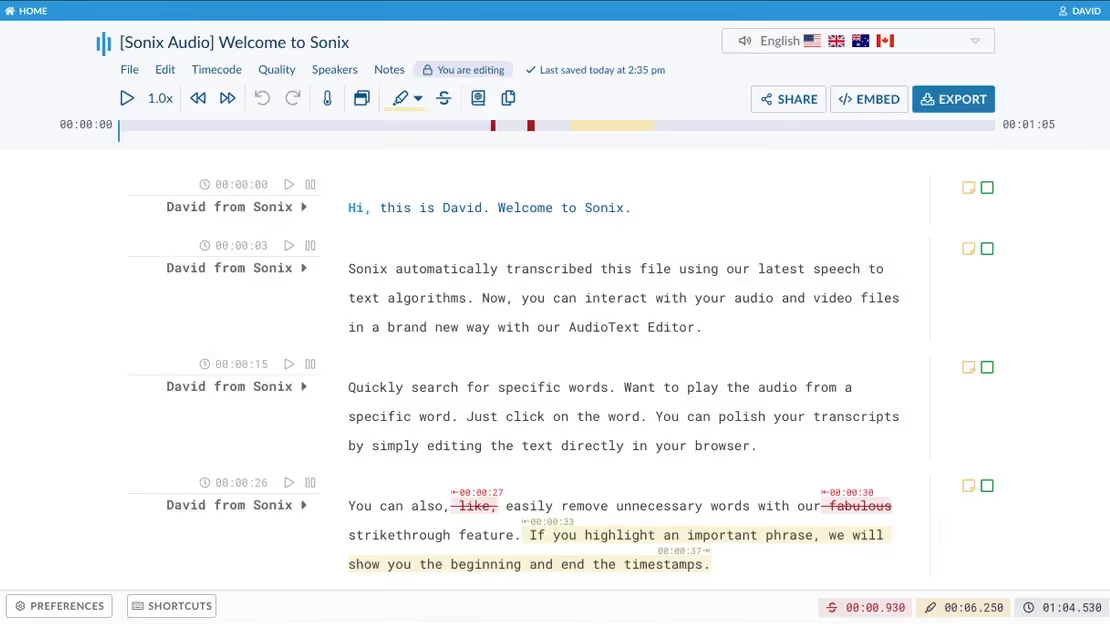
Sonix belooft om elke toespraak om te zetten in heldere, doorzoekbare tekst waar je echt iets aan hebt.
Maar met zoveel AI-transcriptietools die nu beschikbaar zijn, vraag je je misschien af: Is Sonix nog steeds de moeite waard? Hoe presteert het in vergelijking met nieuwere alternatieven?
In dit artikel vind je een volledige, to-the-point review van Sonix + de beste alternatieven
Wat zijn de unieke functies van Sonix
Kernmogelijkheden
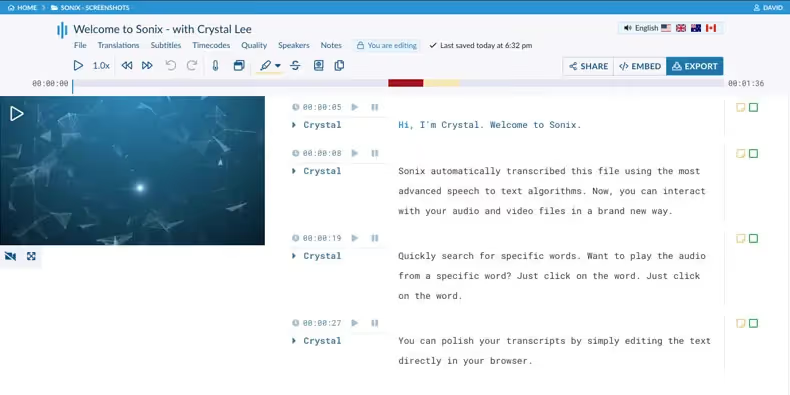
Direct vanaf het begin biedt Sonix de mogelijkheid om automatisch zowel audio- als videobestanden om te zetten naar tekst. Je uploadt je bestand (wav, mp3, m4a, videoformaten), selecteert de taal en de AI-engine levert een transcriptie op.
Sonix ondersteunt vele talen (meer dan 40, afhankelijk van hoe je telt), dus je bent niet beperkt tot alleen Engels. Het ondersteunt ook functies zoals automatische interpunctie, sprekerherkenning (in veel gevallen) en gesynchroniseerde audio-tekstmarkering, zodat je op een tekstfragment kunt klikken en de bijbehorende audio kunt horen.
Aanvullende functies
Naast eenvoudige transcriptie voegt Sonix extra waarde toe.
- Het biedt geautomatiseerde vertaling van transcripties naar andere talen.
- Het ondersteunt ook het genereren van ondertitelsAls je videocontent hebt waarvoor ondertiteling nodig is of die je op websites wilt insluiten, kan Sonix SRT/VTT-bestanden genereren en ondertitels voor je aanpassen (lettertype, timing, inbranden).
- AI-analyse van transcripten. Dit omvat automatische samenvattingen, detectie van onderwerpen en thema's, sentimentanalyse en zelfs betrouwbaarheidsscores die aangeven hoe zeker het systeem is van specifieke zinnen. In plaats van je simpelweg een lap tekst te geven, zet Sonix content om in waardevolle inzichten.
Flexibele workflow en export
Vanuit praktisch oogpunt is Sonix zo gebouwd dat het zich aanpast aan jouw manier van werken, in plaats van je een rigide proces op te leggen. Je kunt bestanden uploaden vanaf je lokale schijf, Dropbox, Google Drive of in sommige gevallen zelfs via een link.
Zodra het transcript is gegenereerd, krijg je een in-browser editor waarin je de tekst kunt controleren en bewerken (vaak terwijl je naar de audio luistert), het transcript kunt doorzoeken, belangrijke passages kunt markeren en bestanden kunt exporteren.
De exportmogelijkheden zijn uitgebreid: Word (docx), platte tekst, SRT/VTT voor ondertiteling, CSV voor data, en eventueel integratie in videobewerkingsworkflows of je eigen contentproces.
Sonix biedt ook functies voor teamsamenwerking : je kunt medewerkers uitnodigen, bewerkingsrechten toewijzen, mappen organiseren en koppelingen maken met je workflow via integraties zoals Zapier, Google Drive, Dropbox, enzovoort.
Voor jouw professionele gebruik betekent dit minder gedoe: je uploadt één keer, het systeem transcribeert, je voert kleine correcties uit en deelt of exporteert het bestand naar de plek waar je workflow verdergaat. Geen gedoe meer met meerdere tools voor alleen transcriptie.
Beveiliging, schaalbaarheid en zakelijke inzetbaarheid
Als je transcriptie gebruikt in een professionele omgeving—zoals klantgesprekken, vertrouwelijke besprekingen of regelgevende content—zul je dit aspect waarderen. Sonix legt de nadruk op end-to-end encryptie, naleving van gegevensbeschermingsnormen en beveiliging op bedrijfsniveau.
Schaalbaarheid is ingebouwd: het platform verwerkt moeiteloos grote hoeveelheden audio/video, meerdere gebruikers, teambeheer en zakelijke behoeften (mappen, facturatieoverzichten, verbruiksgegevens). Of je nu één vergadering of honderden verwerkt, Sonix is ontworpen om met je mee te groeien.
Hoe goed is de transcriptie van Sonix?
Hoe betrouwbaar is het voor jouw werk? Het korte antwoord voor Sonix is: behoorlijk sterk, maar er zijn wel wat kanttekeningen waar je rekening mee moet houden.
Nauwkeurigheid en gebruikerservaringen
Veel gebruikers melden hoge nauwkeurigheidscijfers bij het gebruik van Sonix. Op het beoordelingsplatform Software Advice stelt een gebruiker bijvoorbeeld:
“AI levert bijna 95% nauwkeurig werk, zelfs in het Duits, niet alleen in het Engels.”
Ook op G2 is de feedback positief:
“Sonix Speech2Text is extreem nauwkeurig en makkelijk in gebruik. Zelfs minder duidelijk ingesproken opnames met wat achtergrondgeluid zijn verrassend goed…”
Sonix claimt bovendien als beste uit de bus te zijn gekomen in een onafhankelijke vergelijking van automatische transcriptiediensten op het gebied van nauwkeurigheid.
Dus als je zorgt voor een redelijke audiokwaliteit, met duidelijke spraak en minimale overlap, kun je rekenen op zeer goede transcriptieresultaten.
Snelheid en prestaties
Voor jou en je team is de doorlooptijd belangrijk. Uit eigen gegevens van Sonix blijkt dat het platform audio vrij snel verwerkt: een bestand van 10 minuten kan onder goede omstandigheden bijvoorbeeld “in minder dan een paar minuten” worden getranscribeerd.
Gebruikers bevestigen dit:
“Het uploaden van de audiobestanden werkt vrij snel, net als de transcriptie zelf.”
Dankzij deze snelheid heb je minder vertraging tussen het opnemen van een vergadering of audio en het moment dat je met de transcriptie aan de slag kunt.
Sterke punten die je zult waarderen
- Werkt goed met meerdere talen en accenten. Veel gebruikers benadrukken dat Sonix goed omgaat met niet-moedertaalsprekers en verschillende talen, waardoor er minder correcties nodig zijn.
- Krachtige interface: nabewerking van transcripties, exporteren en het synchroniseren van audio en tekst maken je werk een stuk makkelijker. Een gebruiker zei hierover: “De manier waarop je audio kunt afspelen terwijl je door de tekst loopt, of op een willekeurig deel van de tekst kunt klikken om de audio te horen, is fantastisch.”
- Handig bij een goede audiokwaliteit: een heldere microfoon, minimaal achtergrondgeluid en één spreker tegelijk.
Belangrijke beperkingen
- De nauwkeurigheid neemt af onder minder gunstige omstandigheden: sprekers die door elkaar praten, zware accenten, achtergrondgeluid of opnameapparatuur van lage kwaliteit. TechRadar merkte bijvoorbeeld op:
“Niet de meest nauwkeurige oplossing, maar wel snel en met een zeer eenvoudige interface.”
- Live of real-time transcriptie kan beperkt of minder robuust zijn. Sommige reviews wijzen erop dat Sonix is geoptimaliseerd voor geüploade bestanden in plaats van live vergaderstreams.
- Zelfs bij een hoge nauwkeurigheid zul je het transcript waarschijnlijk moeten controleren en bewerken. Onder ideale omstandigheden haal je 90-95% nauwkeurigheid, maar zelden 100%. Een gebruiker merkte op:
“Het brengt ons consequent voor zo'n 90% op weg... daarna beginnen we met bewerken om de 100% te halen.”
Prijzen van Sonix
Sonix biedt een gelaagde prijsstructuur die is afgestemd op verschillende gebruikspatronen:
- Standaard (Pay-as-you-go): Je betaalt geen maandelijks bedrag; je betaalt simpelweg op basis van de lengte van je geüploade audio of video. Volgens Sonix betaal je alleen per uur aan geüploade audio/video.
- Premium (Abonnement + gebruikskosten): Als je regelmatig transcribeert en behoefte hebt aan samenwerkings- of teamfuncties, bevat het Premium-abonnement een vast maandelijks (of jaarlijks) bedrag plus een gereduceerd uurtarief voor transcriptie. Bijvoorbeeld: $22 per gebruiker/maand + $5 per uur aan transcriptie.
- Enterprise (Maatwerk): Voor grote organisaties met een hoog volume, aangepaste integraties en geavanceerde beheer- en beveiligingsfuncties biedt Sonix prijzen op maat.
Nieuwe gebruikers kunnen ook een gratis proefversie van ongeveer 30 minuten krijgen.
Dit is hoe je kosten zijn opgebouwd:
- Transcriptiekosten per uur: De belangrijkste kostenpost in het Standaard-model. Sonix geeft duidelijk aan dat de vergoeding gebaseerd is op de lengte van de geüploade audio/video, niet op de verwerkingstijd.
- Abonnementskosten (Premium en hoger): Met het Premium-abonnement betaal je een maandelijks terugkerend bedrag (bijv. $22/gebruiker) voor samenwerkingsfuncties, teamopslag, API-toegang, enz.
- Bijkomende kosten voor functies: Voor vertaling, ondertitelingssynchronisatie, burn-in en andere geavanceerde mogelijkheden kunnen extra kosten in rekening worden gebracht.
- Opslag & team-/gebruikersbeheer: In hogere pakketten betaal je ook voor extra opslag, gebruikerslicenties, beheerdersfuncties, enz.
Beste alternatieven voor Sonix: Noota
Sonix is een robuust transcriptieplatform, maar het dekt wellicht niet alles wat je nodig hebt. Misschien vereisen je vergaderingen:
- Real-time vastlegging en integratie met live vergaderingen in plaats van alleen het uploaden van bestanden.
- Diepere automatisering: het extraheren van actiepunten, besluiten en pijplijn-metadata in plaats van alleen tekst.
- Betere aansluiting op je workflow: vergadersamenvattingen die direct gekoppeld zijn aan je CRM, ATS of projectbeheersysteem.
- Betere samenwerking in teamverband of meertalige ondersteuning op het niveau dat jij nodig hebt.
Als een van de bovenstaande punten jouw uitdagingen beschrijft, is het logisch om alternatieven te verkennen. Het artikel “5 Best Sonix Alternatives in 2025” wijst bijvoorbeeld op tools als Otter.ai en Trint, en suggereert impliciet dat Sonix wellicht niet voor elke workflow de perfecte oplossing is.
Hier komt Noota in beeld:
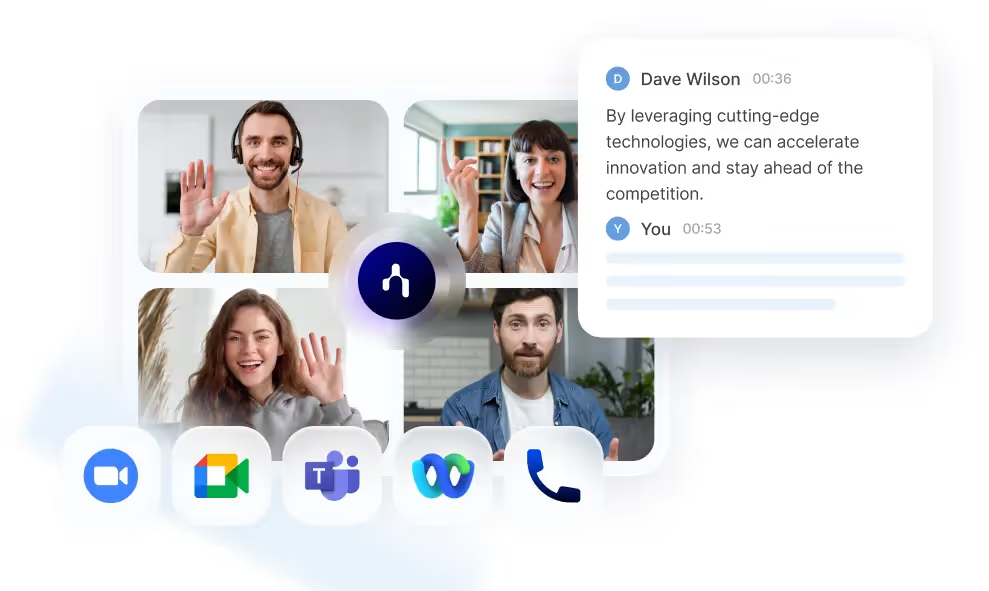
- Het biedt real-time vastlegging van vergaderingen: “Neem met één klik deel aan elke online vergadering; leg vast, transcribeer en vat samen in real-time.”
- Het ondersteunt meer dan 60 talen en claimt “minder dan 1% foutmarge” in het spraak-naar-tekstmodel.
- Het genereert automatisch gestructureerde notities, besluitenlijsten en toegewezen vervolgstappen, waardoor vergaderingen worden omgezet in actiegerichte verslagen.
- Het integreert met je workflow-stack: agenda, vergadertools (Zoom, Meet, Teams), CRM/ATS en meer.
Kortom: waar Sonix je een zeer goede transcriptie geeft, biedt Noota je de vergaderasset — de tekst + structuur + acties.
PROBEER NOOTA NU GRATIS
Maak kennis met de auteur
.avif)
Adesh schrijft over AI-notulisten, vergaderopnames, gestructureerd interviewen en werven, vanuit zijn werk in AI-gedreven groei en recruitment-operations.
Veelgestelde vragen
Sonix transcribeert audio en video automatisch naar tekst in 40+ talen met punctuatie en spreker-scheiding.
- Upload wav, mp3, m4a of videobestanden
- AI verwerkt en genereert doorzoekbare transcripten
- Ondersteunt meerdere talen tegelijk
Sonix biedt end-to-end encryptie, samenwerking, integraties en enterprise-beveiliging voor vertrouwelijke inhoud.
- Team collaboration met bewerkingsrechten
- Integraties met Zapier, Google Drive, Dropbox
- GDPR-compliant en schaalbaar
Noota bespaart 6,4 uur/week met -80% admin en 4,9/5 G2-rating van 5000+ teams wereldwijd.
- Automatische samenvattingen en actie-items
- Real-time transcriptie tijdens vergaderingen
- Gratis proberen zonder creditcard nodig
Noota is ideaal voor vergaderingen: real-time transcriptie, samenvattingen en integratie met je workflow.
- 6,4 uur/week bespaard per team
- 80+ talen ondersteund
- Probeer Noota gratis — geen creditcard vereist