Comparativas de Asistentes de Notas con IA
8 min de lectura
Updated on:
Nov 13, 2025
Reseña de Dialpad y alternativas
¿Quieres saber si Dialpad merece la pena? Aquí tienes tu guía.
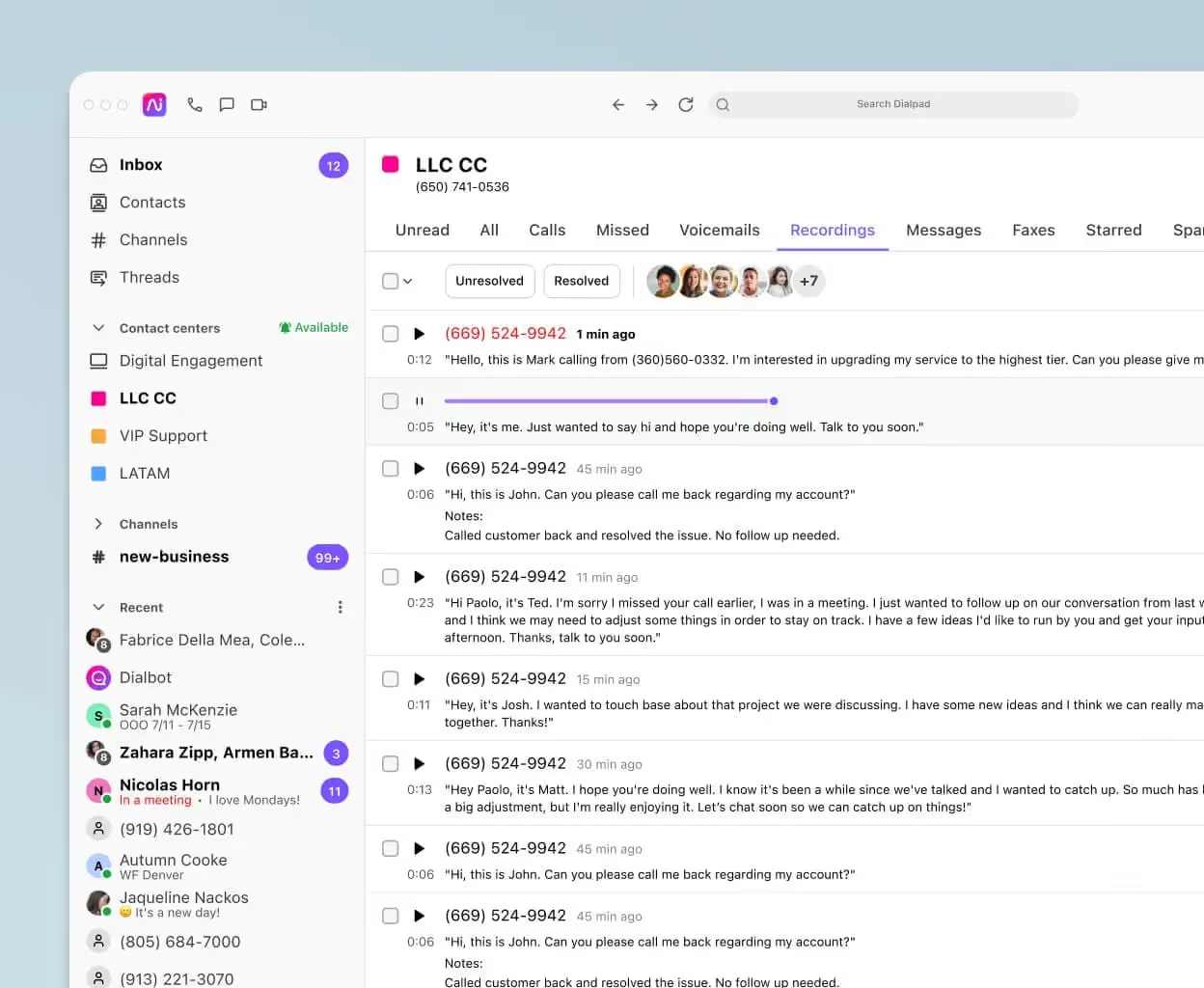
Dialpad está considerada como una de las plataformas de VoIP y comunicaciones unificadas más modernas del mercado.
Pero, ¿qué hace que Dialpad sea realmente única? ¿Es tan buena como dicen?
En esta guía, te explicaremos todo lo que necesitas saber sobre Dialpad:
¿Cuáles son las características únicas de Dialpad?
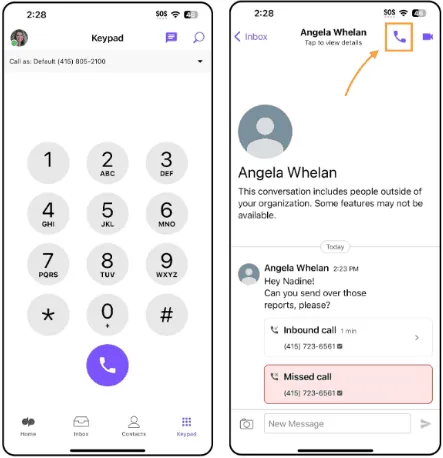
En esencia, Dialpad es una plataforma UCaaS (Comunicaciones Unificadas como Servicio) basada en la nube que integra voz, vídeo, chat, SMS/MMS y un centro de contacto, todo en uno.
Lo que hace que Dialpad destaque son sus avanzadas funciones impulsadas por IA y su compatibilidad flexible con dispositivos. A continuación, te presentamos las funciones clave que debes conocer:
Transcripción de llamadas/reuniones en tiempo real y resúmenes automatizados
Dialpad utiliza IA integrada para transcribir llamadas telefónicas, reuniones por vídeo y mensajes de voz en directo, para que no tengas que preocuparte por tomar notas mientras hablas.
Después de la llamada, Dialpad puede enviar automáticamente resúmenes post-llamada que incluyen puntos destacados, tareas pendientes y decisiones clave.
Por qué es importante: Si sueles saltar de una reunión a otra, esta función te ayuda a capturar información valiosa mientras mantienes tu atención en la conversación, no en tu libreta.
Coaching en vivo, análisis de sentimiento e inteligencia conversacional
Para equipos de ventas o soporte, Dialpad ofrece herramientas en tiempo real como Tarjetas de coaching en vivo (ventanas emergentes con sugerencias o guiones durante una llamada), análisis de sentimiento para detectar el estado de ánimo o riesgos, y momentos personalizados donde defines palabras clave o frases para realizar un seguimiento.
Por qué es importante: Con este nivel de información, puedes ayudar a los agentes nuevos durante las llamadas, supervisar la calidad sin estar presente en cada conversación y detectar cuándo un cliente está frustrado para actuar con rapidez.
Aplicación todo en uno: voz, videoconferencias, mensajería, móvil y escritorio
Dialpad integra tu sistema telefónico, SMS/MMS, videoconferencias y chat de equipo en una sola aplicación, disponible en cualquier dispositivo.
Ya sea que estés en tu escritorio, en tu smartphone o trabajando de forma remota, puedes realizar o recibir llamadas profesionales usando tu número de empresa, sin exponer tu número móvil personal.
Por qué es importante: Tu equipo no necesita saltar entre cinco herramientas diferentes. Todo está unificado, lo que reduce la fricción y la pérdida de contexto.
Funcionalidades avanzadas de centro de llamadas y contacto
Dialpad no es solo para llamadas de negocios básicas; ofrece una funcionalidad completa de centro de contacto: menús IVR, enrutamiento de llamadas (basado en habilidades, FIFO), gestión de colas, opciones de devolución de llamada, paneles de análisis y más.
Por qué es importante: Si tienes un equipo de soporte o de ventas de alto volumen, apreciarás que Dialpad puede escalar desde un sistema telefónico para pequeñas empresas hasta un centro de contacto empresarial en la misma plataforma.
Integraciones fluidas y movilidad global
Dialpad admite integraciones con los principales CRM, herramientas de colaboración y suites de productividad. Por ejemplo: Salesforce, Zendesk, Microsoft Teams y Google Workspace.
Además, con el enfoque de "cualquier dispositivo", tu equipo puede usar sus portátiles, smartphones o tablets, y mantener un número de empresa consistente dondequiera que vayan.
Por qué es importante: Tu ecosistema tecnológico permanece conectado y móvil, evitando silos entre las herramientas de voz, chat, CRM y reuniones.
Análisis e informes detallados
Dialpad le ofrece paneles con el volumen de llamadas, el rendimiento de los agentes, las tendencias de sentimiento y el seguimiento de palabras clave, para que convierta las conversaciones en datos.
Por qué es importante: Si desea medir la eficacia con la que su equipo interactúa con los clientes, identificar lagunas en la formación u optimizar sus procesos, obtendrá la visibilidad que necesita.
¿Cómo se comparan los precios de Dialpad con los de la competencia?
Dialpad (Comunicaciones empresariales).
El plan Standard cuesta 15 $/usuario/mes, el plan Pro cuesta 25 $/usuario/mes, y el plan Enterprise es personalizado.
Las transcripciones y resúmenes con IA están incluidos en todos los niveles; la mayoría de los equipos optan por el plan Pro para obtener integraciones con CRM y asistencia 24/7.
RingCentral (RingEX).
El plan Core comienza en 20 $/usuario/mes (anual), el plan Advanced en 25 $, y el plan Ultra en 35 $; la facturación mensual es más elevada (por ejemplo, 30 $/35 $/45 $).
Si desea integrar Salesforce y disponer de supervisión avanzada, considere los planes Advanced o Ultra. T
Aircall.
Los precios públicos varían según la región y el estado de la página, pero los análisis fiables de 2025 sitúan a Essentials en unos 30 $/usuario/mes (facturación anual) y Professional en unos 50 $/usuario/mes (facturación anual); el nivel Custom requiere un mínimo de 25 licencias.
Ten en cuenta que los complementos (IA, analítica) afectarán al coste total.
Zoom Phone.
Zoom ofrece opciones de llamadas medidas e ilimitadas; las guías de terceros resumen el plan U.S./Canada Unlimited desde unos 15-20 $/usuario/mes y Global Select por unos 20 $/usuario/mes dependiendo del paquete.
Si ya utilizas Zoom Workplace, consulta los precios de los paquetes antes de comparar las cifras de los servicios independientes.
Vonage Business Communications.
Niveles basados en el conjunto de funciones y el volumen de líneas: Mobile 19,99 $, Premium 29,99 $, Advanced 39,99 $ por línea/mes (mensual), con promociones periódicas para planes anuales.
Es una referencia sencilla si buscas una base de VoIP tradicional.
Opiniones de los usuarios de Dialpad
👍 Lo que gusta a los usuarios
- Muchos usuarios destacan las funciones de IA de Dialpad —transcripción, resúmenes tras las llamadas y reconocimiento de palabras clave— como un punto muy positivo. En Trustpilot, los usuarios comentan cosas como:
“Lo que me encanta de Dialpad… el buzón de voz, los resúmenes de las conversaciones…”
- En Software Advice, entre los “pros” citados se incluyen la capacidad de dirigir llamadas a equipos, la integración con CRM y la posibilidad de que los equipos remotos vean el historial de comunicaciones.
- Un usuario (a través de GetVOIP) escribió:
“Acabamos de abrir una pequeña consulta familiar… usando Dialpad… ¡la experiencia ha sido genial! La instalación fue fácil…”
- Desde la plataforma Gartner Peer Insights, un usuario comentó:
“Hemos tenido una de las experiencias más positivas con Dialpad Connect. Algunos de los puntos destacados son la productividad impulsada por IA. La interfaz de usuario es una de las mejores”.
- Los usuarios valoran la movilidad y la experiencia de aplicación unificada; el hecho de poder llamar, enviar mensajes y reunirse a través de un único número de empresa en cualquier dispositivo se menciona con frecuencia.
Así que, si tu prioridad es capturar los detalles de las reuniones, dar soporte a equipos remotos o híbridos y contar con herramientas de comunicación integradas, Dialpad obtiene una puntuación alta.
👎 Lo que no gusta a los usuarios
- Varias reseñas plantean dudas sobre la fiabilidad y el soporte. Por ejemplo, en Reddit:
“Odié Dialpad por completo… simplemente no pudo escalar con nuestro tamaño y complejidad… múltiples aumentos de precio… soporte deficiente… nunca lo recomendaría”.
- En el listado de HubSpot Marketplace, las valoraciones de los usuarios para la aplicación de Dialpad promediaron alrededor de 3.8/5, con quejas recurrentes:
- Las aplicaciones móviles y de escritorio son "terribles" o tienen errores.
- La integración con HubSpot es "quisquillosa" o limitada.
- En el sitio de Better Business Bureau, los usuarios reportan problemas como cobros excesivos, dificultades en la portabilidad numérica y tickets de soporte sin resolver. Uno escribió:
“Llamadas que se cortan, el sonido se interrumpe… tenemos 80 tickets al mes sobre problemas con Dialpad…”
- En Software Advice, algunas de las "contras" incluyen: conexión de llamadas lenta, problemas con el servicio de SMS e interfaz de usuario desactualizada.
Alternativas a Dialpad

A continuación, presentamos alternativas sólidas
Aircall
A menudo citada como una de las mejores alternativas a Dialpad, especialmente para equipos de ventas y soporte. Es conocida por su facilidad de configuración y su potente integración con CRM y servicios de atención al cliente.
Si te enfocas en el volumen de llamadas y los informes de CRM, vale la pena considerar Aircall.
RingCentral
Un peso pesado en el sector de UCaaS: voz, video, chat, SMS, además de amplias integraciones y controles administrativos. Ideal para organizaciones más grandes con flujos de trabajo complejos.
Vonage
Ofrece precios más sencillos, funciones básicas sólidas y puede adaptarse a equipos más pequeños o con presupuestos ajustados.
Zoom Phone
Si ya utilizas el ecosistema de Zoom, esta opción es atractiva: voz y video en una sola plataforma, una interfaz familiar y una integración sólida.
8×8
Orientado a equipos globales y al uso tipo centro de contacto: llamadas globales ilimitadas, análisis detallados y un gran potencial de escalabilidad.
Notas e informes de llamadas con IA: Noota

Incluso si eliges Dialpad o alguna de las alternativas anteriores, es posible que aún te falte algo: captura de reuniones, notas automatizadas, actualización del CRM. Ahí es donde Noota encaja a la perfección.
- Noota es un asistente de reuniones con IA: ofrece transcripciones, resúmenes, próximos pasos y se integra con aplicaciones de CRM y de reuniones.
- Caso de uso: Tienes muchas llamadas o reuniones virtuales y quieres obtener resultados estructurados que se integren en tu CRM (ya sea que utilices Dialpad, RingCentral, Zoom Phone, etc.).
- Por lo tanto: o eliges una plataforma de comunicaciones y añades Noota para tomar notas, o eliges una que incluya algunas funciones de notas con IA y aun así incorporas Noota para obtener resúmenes mejorados y conexión con el CRM.
¿Quieres automatizar la toma de notas en tus llamadas? Prueba Noota gratis ahora.
Conoce al autor

Jean-marc is an AI expert helping recruiters & professionnals leverage these tools in the everyday.
Preguntas frecuentes
Dialpad proporciona transcripción en tiempo real, análisis de sentimiento y Live Coach Cards para entrenar representantes durante llamadas activas.
- Detección automática de mood del cliente
- Scripts y prompts en tiempo real
- Seguimiento de palabras clave personalizadas
Dialpad usa IA integrada para transcribir llamadas, videollamadas y voicemails en vivo, generando resúmenes automáticos con acciones clave.
- Transcripción simultánea sin tomar notas
- Resúmenes post-llamada con decisiones
- Disponible en 80+ idiomas globales
Noota supera a Dialpad: ahorra 6,4h/semana en admin, reduce -80% tareas manuales y tiene 4,9/5 en G2 con 5000+ equipos confiando.
- Resúmenes automáticos sin configuración compleja
- Integración nativa con 80+ herramientas
- Mejor ROI para equipos pequeños y medianos
Noota es ideal: automatiza transcripción, resúmenes y análisis, liberando 6,4h/semana por equipo para atender clientes mejor.
- Reduce documentación manual en -80%
- Integración directa con CRM y helpdesk
- Prueba Noota gratis sin tarjeta de crédito