AI Note Taker Comparisons
8 min reading
Updated on:
Nov 13, 2025
Dialpad Rewiew & Alternatives
You want to know if Dialpad is worth it ? Here's your guide.
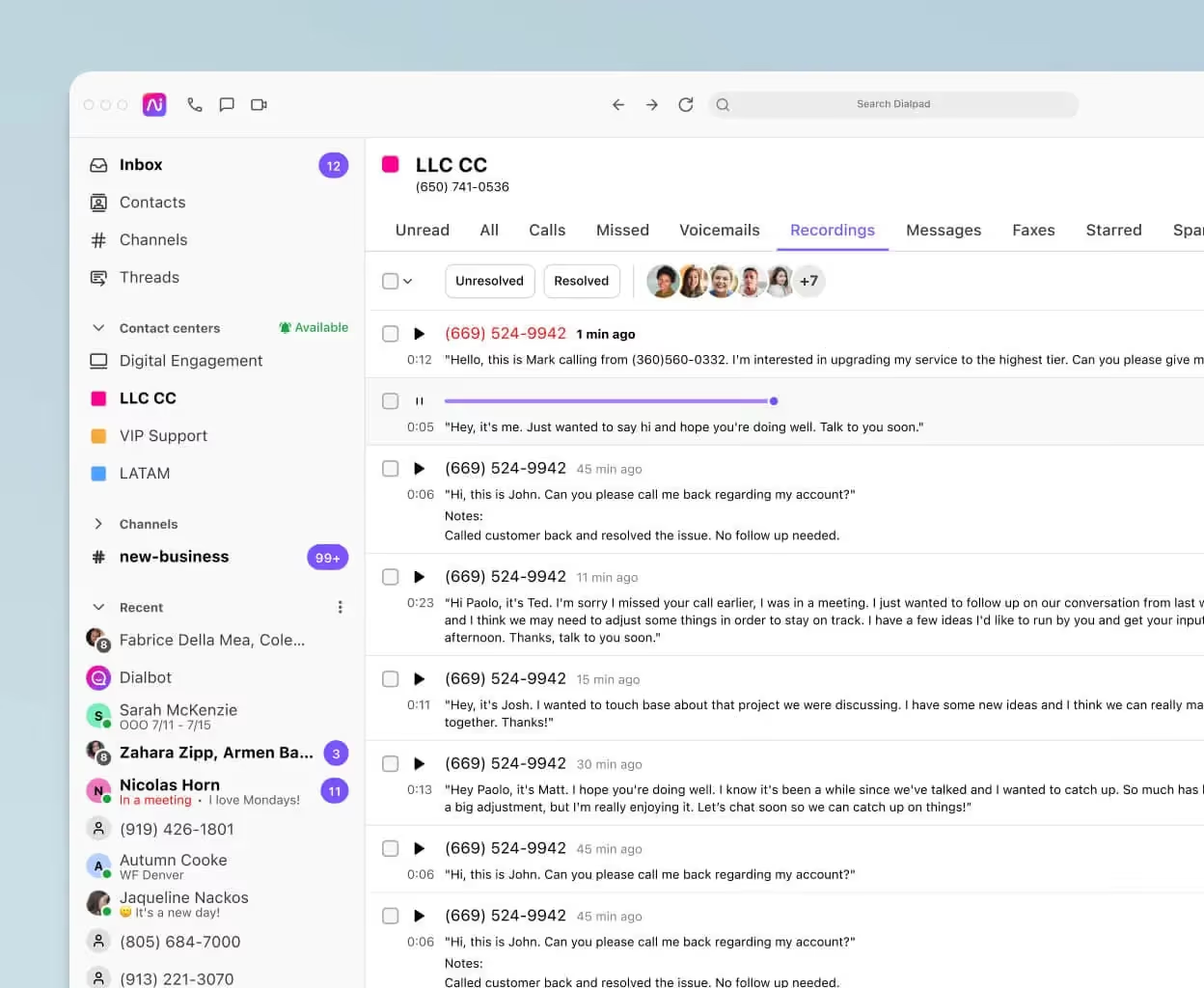
Dialpad is seen as one of the most modern VoIP and unified communications platforms out there .
But what really makes Dialpad unique? Is it really that good ?
In this guide, we’ll walk you through everything you need to know about Dialpad:
What are the unique features of Dialpad
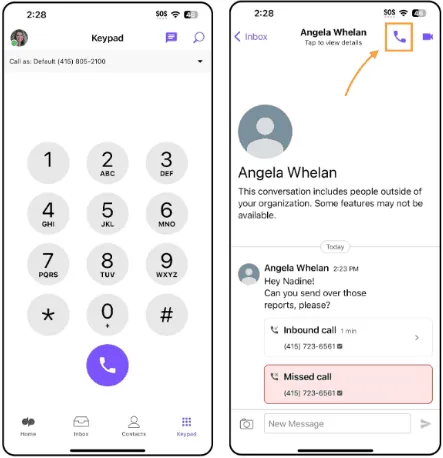
At its core, Dialpad is a cloud-based UCaaS (Unified Communications as a Service) platform that integrates voice, video, chat, SMS/MMS and a contact centre—all in one.
What makes Dialpad stand out are its advanced AI-powered features and flexible device support. Below are the key features you should know
Real-time call/meeting transcription & automated summaries
Dialpad uses built-in AI to transcribe phone calls, video meetings and voicemails live—so you don’t need to scramble to take notes while you’re speaking.
After the call, Dialpad can automatically send post-call summaries including highlights, action items and key decisions.
Why it matters: If you’re regularly hopping between meetings, this feature helps you capture insight while your attention is on the conversation—not on your notebook.
Live coaching, sentiment analysis & conversation intelligence
For sales or support teams, Dialpad offers real-time tools such as Live Coach Cards (pop-ups with prompts or scripts during a call), sentiment analysis to detect mood or risk, and custom moments where you define keywords or phrases to track.
Why it matters: With this level of insight, you can support newer reps during calls, monitor quality without being in every conversation, and spot when a customer is frustrated—so you act fast.
All-in-one app: voice, video meetings, messaging, mobile & desktop
Dialpad brings your phone system, SMS/MMS, video conferencing and team chat into one app, across any device.
Whether you’re at your desk, on your smartphone, or remote, you can make or receive business-grade calls using your business number, without exposing your personal mobile number.
Why it matters: Your team doesn’t need to jump between five different tools. Everything is unified, which reduces friction and context loss.
Advanced call-centre & contact-centre capabilities
Dialpad isn’t just for basic business calling—it offers full contact centre functionality: IVR menus, call routing (skills-based, FIFO), queue handling, callback options, analytics dashboards, and more.
Why it matters: If you’ve got a support or high-volume sales team, you’ll appreciate that Dialpad can scale from small business phone system to enterprise contact-centre level in the same platform.
Seamless integrations & global mobility
Dialpad supports integrations with major CRMs, collaboration tools and productivity suites. For example: Salesforce, Zendesk, Microsoft Teams, and Google Workspace.
Plus, with the “any-device” approach, your team can use their laptops, smartphones or tablets, and carry a consistent business number wherever they go.
Why it matters: Your tech stack stays connected and mobile, and you avoid silos between voice, chat, CRM and meeting tools.
Detailed analytics & reporting
Dialpad gives you dashboards with call volume, agent performance, sentiment trends, and keyword tracking—so you turn conversations into data.
Why it matters: If you want to measure how effectively your team is engaging customers, identify training gaps, or optimise your process—you’ll get the visibility you need.
What’s Dialpad pricing compared to competitors?
Dialpad (Business Communications).
Standard is $15/user/mo, Pro is $25/user/mo, and Enterprise is custom.
AI transcripts and summaries are included at every tier; most teams land on Pro for CRM integrations and 24/7 support.
RingCentral (RingEX).
Core starts at $20/user/mo (annual), Advanced at $25, and Ultra at $35; monthly billing runs higher (e.g., $30/$35/$45).
If you want Salesforce and advanced monitoring, plan on Advanced or Ultra. T
Aircall.
Public pricing fluctuates by region and page state, but reputable 2025 breakdowns peg Essentials at ~$30/user/mo (annual $) and Professional at ~$50/user/mo (annual $); a Custom tier requires 25+ licenses.
Expect add-ons (AI, analytics) to impact the total.
Zoom Phone.
Zoom lists metered and unlimited calling options; third-party guides summarize U.S./Canada Unlimited from ~$15–$20/user/mo and Global Select around ~$20/user/mo depending on bundle.
If you’re already on Zoom Workplace, check bundle pricing before comparing standalone numbers.
Vonage Business Communications.
Tiered by feature set and line volume: Mobile $19.99, Premium $29.99, Advanced $39.99 per line/mo (monthly), with periodic promos for annual terms.
It’s an easy yardstick if you want a traditional VoIP baseline.
Dialpad User Reviews
👍 What users like
- Many reviewers highlight Dialpad’s AI features—transcription, post-call summaries, recognition of keywords—as a strong positive. On Trustpilot, users say things like:
“What I love about Dialpad … the voice mail, the summaries of conversations …”
- From Software Advice, the “Pros” cited include the ability to route calls to teams, CRM integration, and enabling remote teams to see communication history.
- One user (via GetVOIP) wrote:
“We just opened a small family-owned practice … using Dialpad … experience has been great! Installation was easy …”
- From the Gartner Peer Insights platform, one reviewer said:
“We have had one of the most positive experiences with Dialpad Connect. Few of the highlights are that AI powered productivity. User interface is one of the best.”
- Users appreciate the mobility and unified app experience—being able to call, text, and meet via one business number on any device comes up frequently.
So if you prioritise capturing meeting details, supporting remote/hybrid teams, and having integrated communication tools, Dialpad scores high.
👎 What users dislike
- Several reviews raise concerns about reliability and support. For example, on Reddit:
“I absolutely hated Dialpad … it simply could not scale with our size and complexity … multiple price increases … poor support … would never recommend.”
- On the HubSpot Marketplace listing, user ratings for the Dialpad app averaged around 3.8/5, with recurring complaints:
- Mobile and desktop apps being “terrible” or buggy.
- HubSpot integration being “finicky” or limited.
- On the Better Business Bureau site, users report issues like over-billing, number porting problems, and unresolved support tickets. One wrote:
“Dropped calls, sound cutting out … we have 80 tickets a month about Dialpad issues …”
- From Software Advice some “Cons” include: slow call connection, SMS service problems, and outdated UI.
Dialpad Alternatives

Below are strong alternatives
Aircall
Often cited as a top Dialpad alternative, especially for sales- and support-team use-cases. It’s known for ease-of-setup and strong CRM/Help-desk integration.
If you’re focused on call-volume + CRM reporting, Aircall is worth a look.
RingCentral
A heavyweight in the UCaaS space — voice, video, chat, SMS + extensive integrations and admin controls. Good for larger organisations with complex workflow.
Vonage
Offers simpler pricing, solid core features, and might suit smaller or budget-conscious teams.
Zoom Phone
If you already live in the Zoom ecosystem, this is appealing: voice + video in one platform, familiar UI and solid integration.
8×8
Geared toward global teams and contact-centre-style usage: unlimited global calling, deep analytics, strong scale potential.
AI Call Notes & Reports : Noota

Even if you pick Dialpad or one of the alternatives above, you still might have a gap: meeting capture, automated notes, CRM update. That’s where Noota slides in nicely.
- Noota is an AI meeting assistant: transcripts, summaries, next-actions, and it integrates with CRM/meeting apps.
- Use case: You have many calls or virtual meetings and want structured output that goes into your CRM (whether you use Dialpad, RingCentral, Zoom Phone, etc).
- So: either you pick a communications platform and add Noota for note-taking, or you pick one that includes some AI note features and still layer in Noota for enhanced recap and CRM link.
Want to automate your note taking on calls ? Try Noota for free now.
Meet the Writer

Jean-marc is an AI expert helping recruiters & professionnals leverage these tools in the everyday.
FAQ
Dialpad is a cloud-based UCaaS platform combining voice, video, chat, SMS and contact centre capabilities in one unified app.
- Real-time call transcription and automated post-call summaries
- Live coaching and sentiment analysis for support teams
- Advanced contact centre features like IVR and skills-based routing
Yes, Dialpad supports any-device mobility, allowing teams to use laptops, smartphones or tablets while maintaining their business number.
- Consistent business number across all devices
- Seamless integrations with Salesforce, Teams and Google Workspace
- No need to expose personal mobile numbers
While Dialpad offers call transcription, Noota delivers superior meeting intelligence with 80+ language support and 6.4 hours saved weekly per team.
- Noota saves -80% admin time versus manual note-taking
- 4.9/5 G2 rating trusted by 5000+ teams globally
- Automated summaries, action items and insights in minutes
Noota is ideal for sales teams, saving 6.4 hours weekly with automated call summaries and conversation intelligence across 80+ languages.
- Real-time transcription captures every customer interaction
- Automated action items and key decision tracking
- Try Noota free — no credit card needed