Hiring & Talent Acquisition
8 min reading
Updated on:
Feb 4, 2026
How to Find Candidates : 12 Advanced Techniques
You want to know where to find and source qualified candidates ? Here's your guide.

Finding quality candidates is harder than it’s ever been.
Because the old ways of sourcing no longer work as well as they used to. Great candidates don’t sit around waiting for job ads.
In this guide, you’ll discover 12 proven sourcing techniques that help you consistently find quality candidates.
1. Mine Your ATS & Re-engage “Silver Medalists”
When you start looking for quality candidates, the best place is often right under your nose in your own applicant tracking system (ATS).
You’ve probably encountered candidates in past hiring processes who came very close to being hired but weren’t selected in the end. Recruiters call these candidates “silver medalists” — strong contenders who fit most of your criteria and often just missed out due to timing or slight preference differences. These candidates already know your company, understand your interview process, and have demonstrated they’re capable : which makes them particularly valuable when a similar role opens up again.
So :
1. Tag and segment your silver medalists.
As soon as a candidate reaches late stages and isn’t selected, label them clearly in your ATS. Create a specific tag like “silver medalist – sales” or “silver medalist – engineering” so you can filter and retrieve these profiles quickly later.
2. Build simple re-engagement messages.
Send a personalized note within a few weeks of the hiring decision. Thank them for their time, mention why they stood out, and ask permission to keep them in mind for future roles. This reinforces a positive experience and keeps the door open.
3. Monitor and revisit before sourcing externally.
Before you start cold sourcing on LinkedIn or job boards, check your internal ATS first. There’s a good chance some silver medalists are precisely the candidates you need now.
2. Launch (or Fix) Your Employee Referral Engine
Employee referral programs systematically encourage your team to recommend people they know who would fit well in your organisation. Because these candidates come with context, they often require less screening and are more likely to succeed in interviews and beyond. They alsotend to be better cultural fits, more frequently advance through the recruitment process, and often stay longer in their roles than applicants from job boards or advertising alone.
So why not optimize your referral program ?
1. Make the program formal and transparent.
Great referral programs have clear rules, rewards, and expectations. Define who can refer referrals, how to submit them, what qualifies as a successful hire, and when rewards are paid. Making this transparent helps your whole team understand how to participate — and why it matters.
2. Communicate the benefits clearly.
Your employees won’t refer top talent if they don’t know why they should bother. Communicate how referrals help the company fill roles faster, improve team quality, and strengthen culture — and explain how participants benefit, whether that’s bonuses, recognition, or other perks.
3. Design meaningful incentives.
Rewards don’t always have to be financial, but real incentives motivate participation. Tiered bonuses (higher for harder-to-fill roles), extra time off, or even team recognition events can all work well. The goal is to make the effort feel worthwhile and appreciated.
4. Make participation easy and visible.
Your referral engine needs visibility. Post open roles where employees see them — internal newsletters, Slack channels, shared calendars — and simplify the submission process with forms or a dedicated portal. The easier it is to participate, the more referrals you’ll get.
5. Provide feedback and recognition.
When someone refers a candidate, keep them informed about that candidate’s progress. Celebrating successful referrals publicly strengthens engagement and signals that your program really works.
3. Use LinkedIn the Smart Way (Filters + Intent Signals)
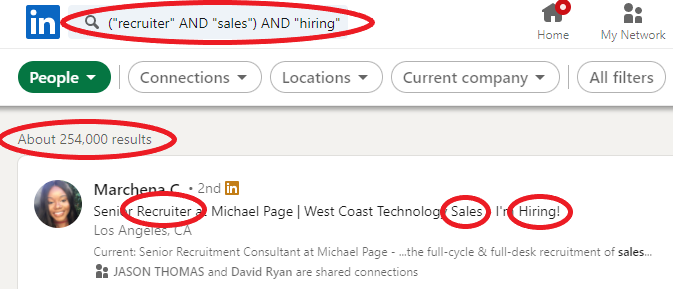
With more than 900 million professionals worldwide, LinkedIn gives you a huge pool to search within, but only if you use the right tools and tactics to narrow that pool down to those who truly fit your role.
LinkedIn offers powerful filters to help you zero in on candidates who match your qualifications and preferences. If you have LinkedIn Recruiter (or even Recruiter Lite), make use of these filters:
- Job titles and keywords: Focus on the exact roles or skills you’re targeting.
- Location and remote options: Pinpoint professionals in specific regions or people open to hybrid/remote work.
- Current and past companies: Target people at competitors or companies with similar missions.
- Skills and seniority level: Add skill filters and seniority tiers to match experience with your needs.
- Open-to-work or engagement signals: Spot candidates who may be more likely to respond, including those actively interacting with content or showing job openness.
Most simple searches rely on plain keywords, which can be too broad or too vague. Boolean search lets you get surgical:
- Narrow results with AND: Only show candidates whose profiles include all your specified terms — for example,
"software engineer" AND Python AND SQLto find engineers with both Python and SQL skills. - Broaden results with OR: Find profiles that match any of your terms, helpful when a role goes by different titles — for instance,
(“UX Designer” OR “Product Designer”). - Exclude noise with NOT: Remove unwanted results, like excluding junior talent from a senior role search:
Developer NOT Junior. - Use exact phrases with quotes: Searching
"project manager"ensures you find profiles with that exact title instead of every profile with “project” and “manager” scattered across it.
4. Run Google X-Ray Searches to Find Hidden Candidates
Some of the best candidates — especially passive talent — don’t apply to jobs online or show up prominently in built-in platform searches.
X-Ray search is a technique where you use Google — or other search engines — with advanced search operators to search within specific websites or domains. Instead of relying on LinkedIn’s internal search or job boards’ filters, you instruct Google to return only results from a particular site (like LinkedIn, GitHub, or personal portfolio pages) that match your criteria.
In practice, that might look like this in the Google search bar:
site:linkedin.com/in/ "product manager" "Paris" -job -jobs
This tells Google to only show LinkedIn public profiles with the title product manager based in Paris, and it excludes common job postings so you get actual candidate profiles.
Here are the building blocks of X-Ray sourcing:
- site: Limits results to a specific domain (e.g.,
site:linkedin.com/in). - quotation marks (“ ”): Make Google search for the exact phrase.
- - (minus): Excludes terms you don’t want (like jobs or careers).
- Boolean operators (AND/OR): Combine multiple conditions for precise targeting.
You can adapt these operators for different domains beyond LinkedIn — for example, searching GitHub for tech talent or personal portfolios for design candidates.
5. Source Developers on GitHub — Find Talent Hidden in Code
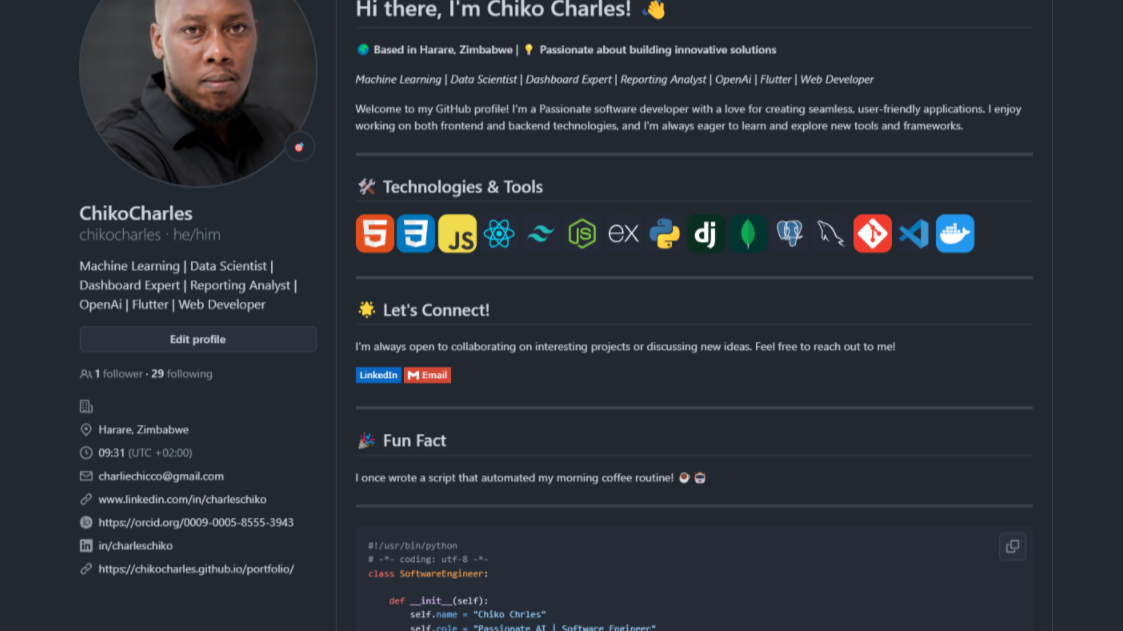
Some of the most valuable candidates are active on GitHub. This platform is the largest code-sharing and collaboration community in the world, with millions of developers contributing to open-source projects and personal repositories. Many recruiters miss this opportunity simply because GitHub’s search isn’t designed for talent sourcing out of the box, but once you know the tricks, it becomes a rich source of quality candidates that’s hard to replicate on other platforms.
How to Search Smart on GitHub
1. Use the platform’s advanced search tools.
GitHub lets you search by programming language, location, and even followers, so you can filter developers who match your technical requirements. For example, searching by language:python helps you find developers who actively work with Python code.
2. Focus on relevant repositories.
Popular or well-maintained repositories often indicate real commitment. Developers with pinned repositories that showcase meaningful work — or many recent commits — are worth paying attention to.
3. Review activity and contributions.
Don’t just glance at a user’s profile. Look at their commit history, pull requests, and issues they engage with, because these signals tell you how they work with others and contribute to real codebases.
Each of these filters helps you surface profiles that match your role’s technical demands, rather than guessing from titles or vague keywords. And because you’re seeing developers in action, you can tailor your outreach in a way that feels informed and specific to their body of work.
6. Source Designers via Portfolios (Dribbble, Behance & Beyond)
When you’re trying to hire designers, their portfolio is everything. Unlike technical roles where skills can sometimes be inferred from keywords, designers express their capability through visual work, case studies.. That’s why sourcing designers on portfolio platforms should be part of your sourcing playbook.
Here are the main places where designers showcase work you can discover and evaluate:
1. Dribbble — Visual Showcase & Creative Community
Dribbble is one of the most popular portfolio platforms for designers across graphic design, UI/UX, and product visuals. You can search portfolios using keywords and explore categories like web design, branding, or mobile UI. Many designers even display a “Hire Me” button to signal availability.
2. Behance — Creative Network with Millions of Portfolios
Behance hosts one of the largest creative communities online. Designers upload detailed projects, often with context, process, and visuals that help you understand how they think — not just what they make.
3. Personal Sites & Portfolio Networks
Many designers also host their own sites, often linked from Dribbble, Behance, or LinkedIn. These often contain even deeper case studies — perfect for deeper evaluation once you’ve identified potential candidates.
7. Go Where Your Candidates Already Gather
Professional communities like Slack workspaces, Discord servers, and niche groups are where people talk shop, share insights, and build their reputations before they ever think about applying to a job. These spaces are rich with engaged professionals who rarely show up in typical candidate searches, which means smart sourcing here gives you an edge.
Popular Community Channels
Slack Workspaces
Slack isn’t just for team chat — there are industry-specific public Slack groups where professionals congregate. You can request access to Slack communities that align with your roles and use the search feature to find discussions around relevant skills or topics.
Discord Servers
Once thought to be a gamer hub, Discord now hosts professional communities too — especially among tech talent, creatives, and developers. These servers often include channels dedicated to coding, tools, careers, and collaboration, making them fertile ground for sourcing.
Other niche communities
Professional forums, Reddit groups, and micro-communities on platforms like Slack and Discord can house diverse and targeted talent pools. They’re often overlooked by recruiters focused only on LinkedIn or job boards.
8. Attend (or Host) Recruitment Events
Recruitment events bring talent and recruiters together in one place, creating opportunities you won’t get from cold outreach or passive online searches alone.
Here are several formats you should consider including in your sourcing strategy:
1. Job Fairs & Career Expos
Traditional job fairs still work — especially when you want to fill multiple roles or entry-level positions. These expos let you collect resumes, check candidate interest quickly, and even conduct preliminary chats on the spot.
2. Industry-Specific Conferences & Meetups
These events are gold for domain expertise recruitment. Developers, marketers, sales pros, and many other specialists attend conferences specific to their profession. Being present — as an attendee or speaker — positions you as part of the community, not just someone trying to hire.
3. Virtual Career Events
Not all candidates can travel for in-person events. Virtual job fairs and online hiring platforms extend your reach across geographies without the logistics and cost of physical booths. The key? Choose platforms that emphasize engagement and allow 1:1 chats or live sessions with candidates.
4. Hosted Workshops and Company Events
You can create your own sourcing events, too. Hosting a workshop, panel discussion, or skills session related to your industry draws professionals who are actively learning and engaged — often a sign of high-quality candidates.
9. Build Partnerships with Schools, Bootcamps & Training Programs

If you want to tap into a steady stream of quality candidates, one of the most effective sourcing strategies is building partnerships with educational institutions, bootcamps, and professional training programs. Unlike one-off job postings, these relationships help you connect early and authentically with talent as they’re being trained
How to Start and Nourish Effective Partnerships
1. Identify the right institutions and programs.
Look for universities, specialised schools, and bootcamps whose graduates match the skills you most often hire for. For example, a tech bootcamp might be ideal if you’re hiring developers, while a design school could be a match for UI/UX roles.
2. Offer internships and apprenticeships.
Internships give students real hands-on experience and give you a low-risk way to see how they perform in your environment. Apprenticeship programs, especially when structured with clear goals, can feed directly into full-time roles once completed.
3. Host workshops and guest lectures.
Sharing your expertise not only helps students, but also raises your profile on campus and within bootcamp communities. These engagements let you showcase your culture early while students learn practical insights straight from your team.
4. Create mentor-and-mentee programs.
Longer-term mentorship — where your employees support students as they develop skills — strengthens ties and helps you spot rising talent before others notice.
5. Collaborate on real projects.
Offering real-world challenges for students to work on gives you the chance to evaluate how they solve problems, collaborate, and communicate — all before you bring them into your hiring pipeline.
10. Use Targeted Job Boards & Posting
Job boards canstill play a major role in your sourcing mix, especially for reaching active job seekers who are ready to engage, but you have to think beyond generic listings to get the best results. In France, for example, job boards lead the pack alongside candidatures spontanées and professional networks in delivering talent pipelines.
But there’s an important nuance: not all job boards are created equal. Some have massive reach while others serve niche communities or specific skill sets.
General vs. Specialized Job Boards
General job boards — like LinkedIn, Indeed, or Google for Jobs — give you access to large audiences across industries and levels. These platforms are especially useful when you need visibility for roles that appeal broadly or when you’re hiring for a variety of functions.
Specialized or niche job boards, on the other hand, help you reach specific talent pools. For example, sites dedicated to tech, design, or industry-specific roles attract candidates who already meet many of your criteria. That means the people who find your posting there are pre-qualified by interest or skill, reducing irrelevant applications and improving your shortlist quality.
Use AI Tools to Source Candidates in One Click
Ihere are powerful AI-driven tools that let you find quality candidates with just a few clicks. These tools take your job descriptions or role requirements and automatically search vast talent pools, score matches, and even automate outreach.
Top AI Tools to Source Candidates in One Step
Here are some of the leading AI platforms that recruiters use to find quality candidates fast:
• Juicebox AI — A powerful AI recruiting platform that searches over 800 million profiles across 30+ sources using natural language input. Describe the role in plain English and let the tool surface talent that matches your criteria. It also offers automated, personalized outreach and integrates with your ATS and CRM.
• hireEZ (formerly Hiretual) — Known for its AI-powered candidate sourcing and pipeline management. It crawls talent databases and your ATS to find and rank the best matches. The platform can automate communication and surface candidates you might never have found manually.
• Fetcher — Combines automated sourcing and screening with outbound recruitment. You input keywords or a job description and Fetcher’s AI will match candidate skills to the role and build a short list of high-fit profiles — all without the sourcing grunt work.
• SeekOut — A tool designed for advanced, data-driven sourcing, including diversity pipelines and semantic AI search. It helps you build balanced talent lists and find passive candidates with nuanced filters.
• AmazingHiring & Gem — These are specialized platforms that aggregate profiles from across niche communities and social networks. They help you find engineers, specialists, and hard-to-reach talent by combining multiple sourcing channels into one AI search interface.
Meet the Writer

Jean-marc is an AI expert helping recruiters & professionnals leverage these tools in the everyday.
FAQ
Silver medalists are strong candidates who nearly got hired but weren't selected, often due to timing or minor preference differences.
- They already know your company and interview process
- They've proven capability and cultural alignment
- They're ideal for similar roles opening later
Referrals come with built-in context from trusted employees, reducing screening time and improving hiring outcomes significantly.
- Better cultural fit and longer retention rates
- Faster advancement through recruitment pipeline
- Lower cost-per-hire compared to job boards
Noota automates candidate management and saves 6.4 hours weekly versus manual ATS processes, with 80% less admin work required.
- Automatically tags and segments silver medalists
- Generates personalized re-engagement messages instantly
- Trusted by 5000+ teams across 80+ languages
Noota streamlines referral program management with automation, saving teams significant time on candidate organization and outreach.
- 4.9/5 G2 rating from verified users
- Reduces administrative overhead by 80%
- Try Noota free — no credit card needed