Integrations
8 min reading
Updated on:
Nov 24, 2025
Knowledge Sharing : a Starter Guide
You want to know what knowledge sharing is and how to boost in in your team ? Here's your guide.

If you’ve ever thought, “We talked about this last month—why aren’t we using it?”, you’re already feeling the cost of poor knowledge sharing.
This article shows you how to fix that.
What Is Knowledge Sharing
Knowledge sharing is the process of exchanging information, skills, experiences or insights between individuals, teams or departments.
In your team—and across your organization—there are countless conversations, experiences, decisions and insights that never get formally recorded or passed on. That’s where knowledge sharing comes in.
Knowledge sharing covers a spectrum of activity:
- Explicit knowledge: Documented information—procedures, templates, best-practice guides—that can be written down and accessed.
- Tacit knowledge: Know-how developed through experience—e.g., how you personally manage a client call, which questions you ask, how you handle objections.
- Implicit knowledge: The skills or routines people develop without consciously articulating them; sometimes these need the right environment to emerge.
How to Boost Knowledge Sharing in Your Organization

If you want your team to move from isolated efforts to a place where insights flow freely, you need to build a strong knowledge-sharing system.
1. Build the Right Culture and Leadership Habits
Knowledge sharing is less about tools and more about people. Your first move is shaping the mindset.
- Lead by example: When you as a leader, consultant or senior creator share your lessons learned, your failures and your successes openly, you send a message that knowledge sharing matters.
- Build trust and psychological safety: People won’t share their best insights if they fear criticism or judgement. Encouraging openness and acknowledging contributions helps.
- Make sharing part of the norm: Instead of “someone might share this someday,” embed deliberate prompts: “What did we learn?” or “Here’s a tip my client just discovered.” This shifts sharing from optional to expected.
2. Put Processes and Tools in Place to Make Sharing Easy
Even with the right culture, if knowledge is hard to share, it won’t happen.
- Use shared platforms: A central, accessible repository helps — whether it’s a cloud-storage folder, a wiki, or a dedicated knowledge-base.
- Define simple workflows: For example: after every client call or content-campaign review, someone logs the key take-aways into a shared doc. If this becomes routine, you start capturing knowledge before it disappears.
- Promote peer-to-peer communities: Encourage small groups or “guilds” around topics (e.g., “AI-content workflow”, “SEO strategy best practices”) where people share insights regularly.
3. Recognise & Reward Sharing Behaviour
When sharing knowledge becomes visible and valued, you’ll see more of it.
- Acknowledge contributors: Call out the team member who posted a useful tip or shared a useful client insight. Public praise reinforces that knowledge sharing matters.
- Link sharing to career growth: Frame knowledge sharing as a part of success metrics or professional development.
- Gamify or set friendly challenges: For example, “Who will share one client-insight per week?” This helps to make sharing a habit rather than a checkbox.
4. Measure, Review & Improve Continually
You can’t improve what you don’t measure — and that applies to knowledge sharing too.
- Track engagement: Metrics like “number of shared insights per month”, “views of knowledge-base entries”, or “how many people reference shared docs in meetings”.
- Ask for feedback: “Was the shared knowledge useful?”, “Could you apply it?”, “What was missing?” Use this to refine your process.
- Close the loop: If you discover a gap (e.g., “We don’t have good content-brief templates”), act on it. Packaging knowledge is only useful if your team uses it.
- Iterate: Knowledge sharing is never done. As your business changes (new services, new clients, new tools) your knowledge-sharing routines must adapt.
How to Conduct Knowledge Sharing Sessions

These sessions give you a space to exchange what’s working, what’s not, and what’s next — instead of leaving everything locked in people’s heads.
🧭 Choosing the Right Format
Knowledge-sharing sessions come in many shapes. Here are some that work well:
- Workshops or lunch-and-learns: informal, typically 30-60 minutes, where someone shares a recent success (or failure) and the team digs into what can be reused.
- Peer-to-peer sessions: Smaller groups or pairs exchange insights from recent client calls or content campaigns.
- Retrospectives or debriefs: After a project ends, you gather to reflect: what happened, what we learned, what we’ll do differently next time.
- Shadowing / mentoring sessions: Senior team members show how they work—especially useful for tacit knowledge (how they ask questions, handle clients, manage approvals).
📝 Planning the Session
Good results don’t just “happen” — you plan them. Here’s a simple prep checklist:
- Define a clear objective: e.g., “Share top insights from last month’s content audits”, or “Discuss client-onboarding techniques for new services”.
- Create an agenda: something like 10 minute review, 15 minute case share, 20 minute discussion, 10 minute wrap-up with action items.
- Choose a facilitator, someone who keeps the session on track and makes sure everyone participates.
- Decide how you’ll capture outcomes: Will you record? Use a shared doc? Assign someone to summarise key take-aways and action items?
🎤 Executing the Session
During the session, aim for interaction and clarity:
- Encourage participants to share stories, not just facts: For example, “Here’s how I triaged content backlog when the client changed priorities.” This helps capture tacit knowledge.
- Use visual aids or live notes: If you have a shared doc or whiteboard, others can see what’s being captured and jump in.
- Focus on actionable take-aways: When one person shares an insight, ask: “What concrete step will you take next time?”
- Assign responsibilities and deadlines: At the end, each insight should link to “Who will do what by when?” to avoid it vanishing.
🔁 Follow-through and Reinforcement
A session isn’t complete when it ends — its value depends on how you document and act on it:
- Immediately after the meeting, publish a summary with the key points, responsibilities and deadlines.
- Add the summary to your team’s knowledge-base or shared drive so others can discover it later.
- Review at your next session: what action items were completed, what still needs work? This reinforces that it’s not just chatting — it’s improving.
- Encourage team members to apply what they learned: For example, if the session produced a checklist for briefing clients, use that checklist in the next project and track its impact.
Make Meeting Knowledge Available in Your Team: Using Noota
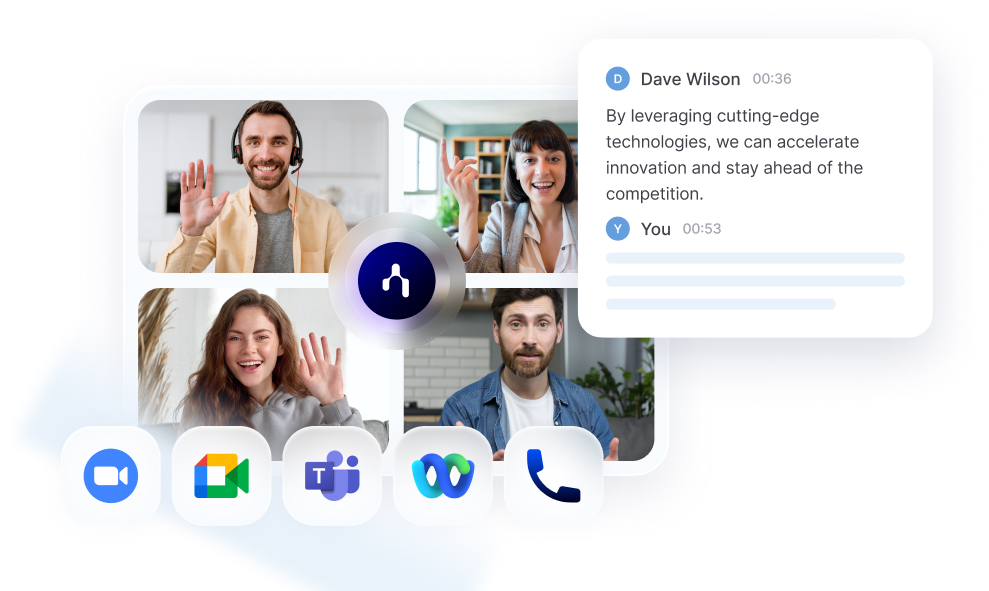
You find that insights get lost, never shared, or drift into obscurity ?This is where Noota helps :
- Record and transcribe every relevant meeting
- Use Noota to join meetings (via browser extension or calendar bot) and capture audio/transcript automatically.
- Generate structured summaries
- Noota produces summaries built around decisions, action items, and insights—not just a raw transcript. This means you don’t have to sift through pages to find the value.
- Store in a searchable hub
- Every meeting summary is indexed: you and your team can search for keywords, names, past decisions. Noota calls this “everyone stays on the same page with clear, searchable meeting records.”
- Share and integrate with your tools
- Integrate with your content-workflow, CRM, project management or knowledge base. Noota has integrations with Slack, Notion, Google Drive, and more.
- Use for team knowledge workflows
- After each session, tag relevant information (“client wants faster AI-content output”, “look into budget objections”). Then use those tags to feed into your knowledge base, content templates, or process improvements.
Your conversations don't lead anywhere ? Try Noota for free to turn talks into actions.
Meet the Writer

Jean-marc is an AI expert helping recruiters & professionnals leverage these tools in the everyday.
FAQ
Explicit knowledge is documented information like procedures and templates. Tacit knowledge is experience-based know-how developed through practice.
- Explicit: written, structured, easily transferable across teams
- Tacit: personal skills, harder to document but highly valuable
- Both matter for complete organizational learning
Culture and mindset drive sharing more than technology. Leaders must model openness, build psychological safety, and normalize sharing as expected behavior.
- Share your own failures and lessons learned publicly
- Ask deliberate questions like 'What did we learn?' after meetings
- Acknowledge and praise team members who contribute insights
Noota captures knowledge automatically from conversations, saving 6.4 hours weekly and reducing admin by 80%—no manual logging required. Traditional tools demand extra work.
- Auto-transcribes and summarizes meetings across 80+ languages
- Eliminates manual documentation burden that kills adoption
- 5000+ teams trust Noota; rated 4.9/5 on G2
Noota automatically records, transcribes, and summarizes meetings—saving your team 6.4 hours weekly while capturing tacit knowledge before it's lost.
- Works across 80+ languages for global teams
- Reduces admin by 80% compared to manual processes
- Trusted by 5000+ teams worldwide