Management
8 min reading
One to One Meeting : a Guide
You want to know what a one-to-one meeting is and how to run it well? Here's your guide.

If you manage people, you already know that 1-to-1 conversations shape performance.
But here’s the challenge: many one-to-ones fall flat. Your teammate leaves with more questions than clarity.
In this article, you’ll learn how to run one-to-one meetings that actually help your team.
What are one-to-one meetings?
One-to-one meetings are recurring conversations between you and a team member. They give you a dedicated space to leave day-to-day urgency aside and focus on what truly moves someone forward. In just 30 minutes, you can solve misunderstandings, unlock motivation, and strengthen your working relationship.
A one-to-one isn’t a status meeting though! You’re not here to walk through task lists or chase deadlines. You’re here to understand how your team member is doing, what’s energizing them, and what’s slowing them down.
Most teams use one-to-one meetings to talk about performance and goals. You use them to ask honest questions, exchange feedback, and explore ideas that don’t always fit in group meetings. Your direct report also gets a safe space to raise concerns they wouldn’t share in a crowded room.
When done consistently, these meetings help you build trust. Your team starts to see you as a partner rather than just a manager. This shift makes people more open, more proactive, and much more aligned with your expectations.
What to talk about in a one-to-one meeting
When you set up a one-to-one with a team member, the conversation can cover many different areas :
🔎 Key topics to cover
Progress & ongoing work
Start with what’s currently on the table. Ask the person to walk you through their projects or tasks since your last check-in. What’s going well? What’s lagging? Which tasks feel highest priority, and which might be re-evaluated? This lets you both calibrate expectations and give clarity on what truly matters.
Challenges, roadblocks & support needs
One-to-ones give your teammates a safe space to share what’s slowing them down. Maybe they’re blocked by unclear instructions, lack resources, or feel overloaded. Ask questions like: “Where do you need help?” or “What’s preventing you from moving forward?” Then use their answers to plan how you can support them.
Motivation, engagement & wellbeing
Work goes beyond just delivering tasks. Use part of the meeting to check in on how they’re feeling — about their work, about balance, about energy. Questions like “How are you doing?” or “What’s been a highlight for you since our last meeting?” open the door to honest feedback on morale, stress or satisfaction.
Career growth & personal development
A one-to-one is also the right moment to talk long-term. Ask what skills they’d like to build, which roles or projects interest them, and how you can help them grow. You can discuss what ambition looks like for them now, and what support or resources they need to get there. This shows you invest in their future — and keeps them engaged.
Feedback and two-way communication
It isn’t just about what you think as a manager — give space for your team member to speak freely. Encourage them to give feedback on your leadership, on team processes, or on how meetings are run. Ask them what could be improved, and what works well. This kind of openness helps build trust and stronger collaboration.
Team dynamics, alignment and big picture
Sometimes, what a person does day to day feels disconnected from the larger vision. Use 1:1s to discuss how their work ties to team or company strategy. Ask how they perceive team collaboration and what they see as key obstacles at team or organizational level. This helps you align their contribution to shared goals.
One-to-one meeting — biggest mistakes and what to do instead
Below are the most common pitfalls, and how you can avoid them to make every 1:1 count.
🚩 Mistake: canceling or rescheduling too often
One of the most frequent mistakes is skipping or constantly rescheduling 1:1s. When you do that, you send the signal: “this isn’t really a priority.”
What to do instead: Treat your 1:1s as fixed commitments. Schedule recurring meetings — for example with a regular cadence — and don’t cancel them except for true emergencies.
🚩 Mistake: turning the one-to-one into a status-update meeting
If most of your time is spent reviewing tasks, deadlines, or project statuses, you’re missing the point. 1:1s are meant to go beyond tasks — to explore growth, wellbeing, obstacles, feedback.
What to do instead: Separate “project update” sessions from “development & support” sessions. Use your 1:1s to dig into what’s really happening for your team member: their challenges, growth, feelings, ambitions.
🚩 Mistake: no agenda, no preparation
Showing up without an agenda, or expecting the other person to come ready, often leads to awkward silence or shallow conversations.
What to do instead: Collaborate on an agenda. Ideally use a shared doc where both of you can add items before the meeting. Take a few minutes to review prior notes and think about what you want to cover. Preparation makes the difference.
🚩 Mistake: you (the manager) do most of the talking
If you dominate the conversation, you deprive the other person of the chance to express what’s important to them. 1:1s should be their time.
What to do instead: Ask open questions. Encourage them to lead part of the agenda. Listen more than you speak. Give space for honest answers, concerns, ideas.
🚩 Mistake: failing to follow up — no notes, no action
If you don’t document key points, decisions or next steps after the meeting, everything discussed can vanish — and trust erodes.
What to do instead: Note down takeaways, commitments, support needed. Share them, revisit them in the next 1:1. Turn conversation into accountability and progress. That way, 1:1s build over time instead of being “just talk.”
🚩 Mistake: keeping the tone too rigid — making 1:1s feel like checkboxes
If you read off a bullet list as if ticking boxes, the meeting becomes mechanical and superficial. That kills trust and spontaneity.
What to do instead: Keep the tone human and flexible. Be open, approachable, empathetic. Let the conversation flow. Allow your team member to steer a bit — they might bring up what matters most. That’s often more valuable than anything you had on your list.
One-to-one meeting — Best agenda & structure

Below is a practical agenda along with sample questions. Feel free to copy, personalize, and reuse.
🔄 Suggested Agenda (30–45 min)
1. Personal check-in & wellbeing
Build rapport, understand how things are going beyond tasks
3–5 min
2. Review recent work, progress & wins
See what’s been accomplished, what’s working, and what’s pending
7–10 min
3. Discuss challenges, roadblocks, workload & support needed
Uncover issues, obstacles or overload — and find ways to help
5–8 min
4. Growth, development & long-term goals
Talk about aspirations, learning, career path, skill development
7–10 min
5. Feedback & communication — two-way
Give and receive feedback; discuss team processes, collaboration, alignment
5–7 min
6. Wrap-up: actions & next steps
Agree on concrete next steps, responsibilities, and follow-up items
3–5 min
💬 Sample Questions to Use (or Adapt)
Here are ready-to-use questions organized by meeting segment. Mix and match based on what feels most relevant to your team member.
1. Personal check-in & wellbeing
- How are things going for you — at work and more broadly?
- How do you feel about your work/life balance lately?
- What’s something outside of work that’s influencing how you feel at the moment?
2. Recent work, progress & wins
- What have been your biggest wins since our last meeting? What are you proud of?
- Which tasks or projects are going well — and which feel stalled or need attention?
- Are there deliverables or goals coming up that you’d like clarity on?
3. Challenges, roadblocks & support needed
- What feels harder than it should be at the moment? What’s blocking you?
- Do you have everything you need to make progress — resources, clarity, time?
- Is there something I can do to support you or remove obstacles?
4. Growth, development & long-term goals
- What skills or knowledge would you like to build in the next 6–12 months?
- What types of projects or roles interest you moving forward?
- Are there training, mentorship, or other support that would help you get there?
5. Feedback & communication (two-way)
- How are we doing as a team — communication, collaboration, clarity on direction?
- Is there anything I (as manager) could do differently to help you feel more supported?
- What’s working well in our one-to-ones? What could be improved?
6. Wrap-up & next steps
- Based on what we discussed: what are 2–3 concrete actions we agree on before our next 1:1?
- What support or check-ins do you need from me in the coming period?
- When should we meet again — and is there anything specific you’d like to prepare or think about?
One-to-one actionable notes & follow up: Noota
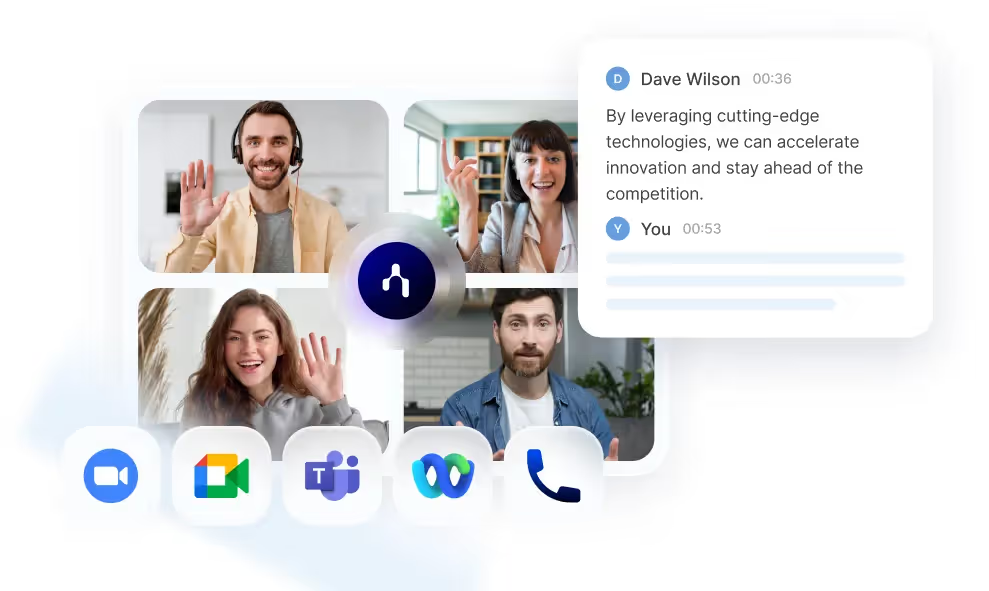
When you run one-to-one meetings, you don't want the conversation to be buried under forgotten follow-ups or fuzzy memories. That’s where Noota steps in
- Automatic recording & transcription: Noota captures every spoken word — whether the meeting is in person, on the phone, or via video (Zoom, Google Meet, Teams…). No typing, no distracted note-taking.
- Instant, structured summaries: As soon as the meeting ends, Noota generates a clean, organized recap: main discussion points, decisions, action items. That means you walk out of the meeting with a ready-to-use summary, not a mess of scattered notes.
- Automatic follow-up & action-item tracking: Noota doesn’t stop at summarizing — it pulls out next-steps, tasks, and important commitments. That helps you and your colleague stay aligned and accountable.
- Searchable archive & retrieval: Over time you build a full history of conversations. With Noota you can search past meetings — even ask “@Noota” to retrieve important decisions, documents, or deadlines discussed months ago. No more digging through long email threads or chat logs.
Want to make your one-to-one more actionable ? Try Noota for free now.
Meet the Writer

Jean-marc is an AI expert helping recruiters & professionnals leverage these tools in the everyday.
FAQ
One-to-ones focus on understanding your team member's growth, challenges, and wellbeing rather than task lists.
- Status meetings chase deadlines and deliverables only.
- One-to-ones build trust and unlock motivation through honest dialogue.
- They create safe space for concerns people won't share publicly.
Consistency matters more than frequency for building trust and alignment with your team.
- Weekly or bi-weekly meetings work best for most teams.
- 30 minutes is typically enough to cover progress, challenges, and growth.
- Regular cadence signals you prioritize their development and wellbeing.
Noota automates meeting notes and action tracking, saving managers 6.4 hours weekly versus manual documentation.
- Noota captures decisions and follow-ups automatically with 80% less admin work.
- Traditional notes require manual typing, creating gaps and forgotten action items.
- Teams using Noota rate it 4.9/5 on G2 for meeting productivity.
Noota is the best choice for managers running frequent one-to-ones, trusted by 5000+ teams globally.
- Automatically transcribes and summarizes meetings in 80+ languages.
- Eliminates manual note-taking so you focus on the conversation itself.
- Tracks action items and ensures nothing falls through the cracks.
Try Noota free — no credit card needed.