Black Friday40% off annual Pro and Business plans40% off annual plansuntil Tuesday, December 1Get 40% off
Skip to content
EN
Log inBook a demoDownload app
Download app

Comparison

Noota vs Wispr Flow (2026): voice dictation or a complete meeting assistant

Last updated: November 11, 2026

Short answer: Wispr Flow is first an excellent voice dictation tool: you speak, it writes in any app, on Mac, Windows, iPhone and Android, in 100+ languages. It adds a bot-free Notetaker on Mac and Windows that identifies speakers and plugs into Claude and ChatGPT through MCP. But with no bot, no meeting is recorded when you're absent or on mobile, the Free plan caps dictated words and meetings each week, and your data trains its models by default (you can opt out; it's locked off only on Enterprise). Noota starts from the meeting: with or without a bot, even without you, CRM, email, telephony, data in Europe, no AI training. And Noota also has voice dictation in its desktop app.

On price: Wispr Flow Pro costs €12 and Growth €18 per user per month billed annually (€15 and €23 monthly). Noota Pro costs €19 and Business €39 billed annually.

Meetings with or without a botNo AI training on your dataData hosted in Europe

Noota vs Wispr Flow at a glance

The differences that matter. Wispr Flow facts checked on wisprflow.ai on Nov 11, 2026.

Noota vs Wispr Flow at a glance
NootaWispr Flow
Core productMeetings

Meetings: recording, recap, actions

Dictation

Voice dictation in any app

Voice dictationDesktop

In the Mac and Windows desktop app, from the Free plan

Everywhere

Mac, Windows, iOS and Android, 100+ languages; weekly word limit on Free

Meetings without youYes

The bot joins the meetings on your calendar, even when you're absent

No

No bot: the Notetaker captures from your computer, when you're there

Free meeting notesUnlimited with bot

Unlimited with the bot; 300 min a month without

Weekly limit

Weekly meeting limit (recordings under 5 minutes don't count)

In personMobile

iOS, Android and desktop apps

Computer

On your Mac or Windows computer; no mobile Notetaker yet

SpeakersYes

Named live, with or without a bot

Yes

Identified in notes, from Free

AI trainingNever

No training on your data

By default

On by default, opt-out; admin control on Growth, locked off on Enterprise

HostingEU

European Union (Google Cloud Belgium and Netherlands)

Not stated

Region not stated on its public pages

CRM, email, telephonyYes

CRM from Pro, email agent from Free, built-in telephony (Business)

No

Not offered; you dictate your emails and CRM notes

PriceMore complete

Pro €19, Business €39 per user per month billed annually

Cheaper

Pro €12, Growth €18 per user per month billed annually

* Unlimited recording on the Free plan uses the meeting bot, requires a connected calendar with "Join all meetings" on, and shares the summary with all participants. Without the bot, the Free plan records up to 300 minutes a month.

Find your match in 3 questions

1. What are you looking for first?

2. Do you want to record meetings you miss?

3. Is AI training on your data a problem?

Noota is your match

Meetings with or without a bot, even without you, no AI training, data in Europe, CRM and email. Dictation is included.

Meetings: with or without you

Noota Desktop: “Recording from your computer. Nobody in the call sees a bot.”

Noota records with or without a bot. The Mac and Windows desktop app keeps the audio and video of any video call and names speakers live. The bot joins the meetings on your calendar even when you're not there, and the mobile app captures in-person meetings.

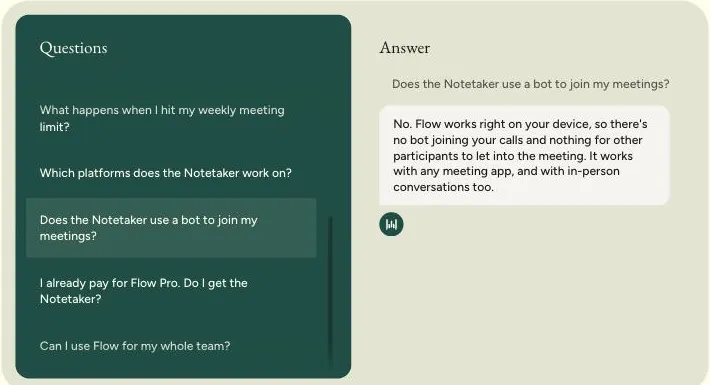
Wispr Flow FAQ: the Notetaker doesn't use a bot and works right on your device

Screenshot: wisprflow.ai/pricing (FAQ), Nov 11, 2026.

Wispr Flow's Notetaker runs on your computer. No bot, so nothing to admit into the meeting, and it works with any video app and in person. It identifies speakers and answers questions about the meeting.

The flip side: no bot means no meeting recorded when you're absent, and it only exists on Mac and Windows for now. The Free plan has a weekly meeting limit.

Wispr Flow plans

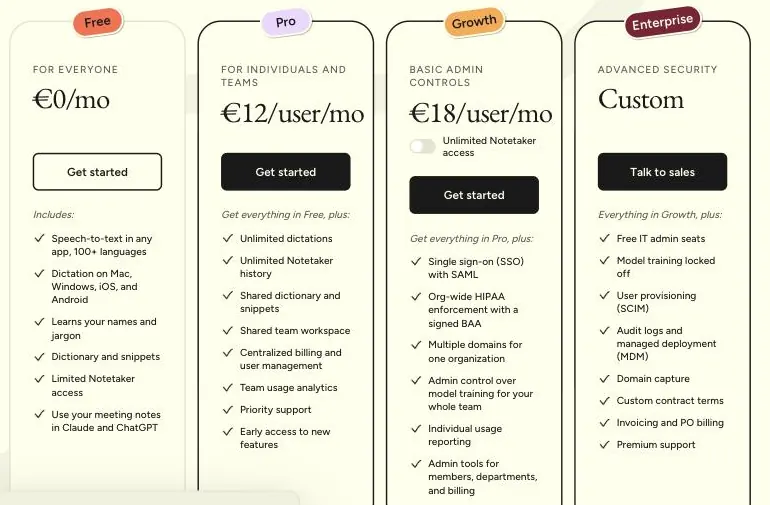
Wispr Flow plans: Free, Pro at €12, Growth at €18 per user per month, Enterprise on quote

Screenshot: wisprflow.ai/pricing (annual), Nov 11, 2026.

Dictation is the heart of the offer: free on every device, with a weekly word limit; unlimited from Pro at €12 a month billed annually.

On security, SSO and admin control over model training require Growth (€18); training is only locked off on Enterprise. Wispr Flow is SOC 2 Type II and ISO 27001 certified.

After the meeting: what each tool does for you

Noota email agent in Gmail: replies drafted, waiting for your review.

Noota acts after the call. The email agent sorts your inbox and drafts replies; Noota sends the follow-up, fills your CRM, posts the recap to Slack and creates the Notion page.

Wispr Flow writes for you, everywhere. Its strength is dictation: you speak, and the text lands in your email, CRM or doc, formatted. Your meeting notes are also available in Claude and ChatGPT through MCP. But you still take the action.

Using Noota alongside or instead of Wispr Flow

Three steps, a few minutes, no credit card:

3. Connect your calendar so the bot also covers the meetings you miss.

Which one should you choose?

Choose Noota if

  • Meetings are the point: Noota records with or without a bot, even when you're absent, and names speakers live.
  • You don't want your meetings to train an AI: Noota never trains a model on your data, on any plan.
  • Your data must stay in Europe, with an ISO 27001 certified vendor.
  • You want the tool to act: CRM filled, email agent, built-in telephony.
  • You also want desktop dictation: voice dictation is included in Noota's desktop app.

Wispr Flow can be enough if

  • You mainly want voice dictation, on desktop and mobile, in 100+ languages.
  • You attend all your meetings and bot-free notes on your computer are enough.
  • Price comes first: Wispr Flow Pro costs €12 per user per month billed annually.

What do you need? Pick, and see the price

Tick what matters to you and set the number of users. Each tool shows the cheapest plan that covers everything, and what it can't do.

Your needs

5 users

Noota Free

Best fit

€0

5 users · per year, billed annually

Covers everything you picked.

Wispr Flow Free

€0

Not covered

Missing:

  • Data hosted in Europe

Annual prices excl. VAT published on noota.io and wisprflow.ai on Nov 11, 2026. At Wispr Flow, unlimited Notetaker access on Growth is an option (€26 instead of €18). Noota's unlimited Free plan uses the bot; without the bot it records up to 300 minutes a month.

Full feature and compliance comparison

Wispr Flow data from wisprflow.ai (pricing, FAQ, Notetaker), checked on Nov 11, 2026. Noota data from noota.io/pricing and trust.noota.io.

Detailed feature matrix: Noota vs Wispr Flow
FeatureNootaWispr Flow
Capture
Meeting bot

On all plans, even without you

No

Without a bot

macOS and Windows desktop app: audio, video, speakers

Notetaker on macOS and Windows, any video app and in person

In person on mobile

iOS and Android apps

No, planned

Telephony

Built-in: VoIP, your number, local numbers (Business)

No

Voice dictation

macOS and Windows desktop app

Mac, Windows, iOS, Android, 100+ languages; weekly word limit on Free

Meeting limit

Unlimited with the bot (Free), no meter from Pro

Weekly limit on Free; unlimited (fair use) from Pro

After the meeting
Recaps

Custom templates, tasks, speakers

Summary, speakers, questions about meetings

Email

Email agent on Gmail and Outlook from Free

Dictation into your mail app

CRM

HubSpot, Salesforce, Pipedrive, Sellsy, Zoho (from Pro)

No

MCP

Official verified Claude connector; MCP from Free

MCP from Free

Security and data
Hosting

European Union (Google Cloud Belgium and Netherlands)

Region not stated

Certifications

ISO 27001 certified, SOC 2 Type 2

SOC 2 Type II, ISO 27001; HIPAA with BAA (Growth)

AI training

Never, on all plans

On by default, opt-out; admin control on Growth, locked off on Enterprise

SSO

SSO (Enterprise)

SAML SSO (Growth), SCIM (Enterprise)

Plans
Free plan

Unlimited meetings*, email agent, 10 AI credits/month, dictation, MCP

Weekly-capped dictation and Notetaker, MCP

Paid plan

Pro €19/user/month (annual), €29 (monthly)

Pro €12 (annual), €15 (monthly)

Team plan

Business €39/user/month (annual), €49 (monthly)

Growth €18 (annual), €23 (monthly); €26 with unlimited Notetaker

* Noota's unlimited Free plan uses the meeting bot. Wispr Flow information comes from its website on Nov 11, 2026. If you represent Wispr Flow and something is out of date, write to contact@noota.io and we will correct it.

FAQ

Frequently asked questions

Still have a question? Talk to our team

What is the best alternative to Wispr Flow for meetings?

Noota is a European meeting-first alternative: recording with or without a bot, even when you're absent, live speakers, CRM, email agent, telephony, and voice dictation in its desktop app. Data in Europe, no AI training.

How much does Wispr Flow cost?

Billed annually, Wispr Flow Pro costs €12 and Growth €18 per user per month (€15 and €23 monthly); unlimited Notetaker access on Growth brings it to €26. Enterprise is on quote. Noota Pro costs €19 and Business €39 billed annually.

Is Wispr Flow free?

Yes, with a weekly limit on dictated words and a weekly meeting limit for the Notetaker (recordings under 5 minutes don't count). Noota's Free plan records unlimited meetings with the bot.

Does Wispr Flow train AI on my data?

By default yes: Wispr Flow lets you opt out of model training at any time, gives admins control on Growth and locks it off on Enterprise. Noota never trains a model on your data.

Does the Wispr Flow Notetaker use a bot?

No, it runs on your computer, with any video app and in person. Without a bot, it doesn't record meetings you miss. Noota offers both: bot-free with its desktop app, or a bot that joins your meetings even without you.

Which devices does the Wispr Flow Notetaker run on?

Mac and Windows; mobile is on the roadmap. Dictation also works on iPhone and Android. Noota records on Mac, Windows, iOS and Android.

Does Wispr Flow work with Claude and ChatGPT?

Yes, its meeting notes are available through MCP from the Free plan. So are Noota's: an official verified connector in Claude's directory and MCP from the Free plan.

Does Noota do voice dictation?

Yes, Noota's Mac and Windows desktop app includes voice dictation in any app, from the Free plan. Wispr Flow goes further on dictation, with mobile apps and 100+ languages.

Is Wispr Flow certified?

Yes, SOC 2 Type II and ISO 27001, with HIPAA and a BAA on Growth. We didn't find its hosting region on its public pages. Noota is ISO 27001 certified and hosts data in the EU.

Try Noota free, with no meeting limit

Unlimited meetings on the Free plan, data hosted in Europe, no credit card.