There is no single best AI note taker for every team. A sales representative logging customer commitments in HubSpot, an engineering team running sprint standups in Google Meet, a recruiter conducting candidate panel interviews, and a compliance officer handling confidential client calls have completely different operational constraints.
Some teams need deep CRM automation, while others just need a quick, free summary of a Zoom call.
This guide routes you to the right tool across eight common meeting scenarios, showing where built-in platform features or specialized tools make sense, and where Noota fits best. For full platform breakdowns across pricing, security, and feature depth, browse our tool comparisons hub for side-by-side evaluations of the 10 leading AI note takers.
Quick Decision Matrix
| If your primary situation is... | Recommended Tool | Why this pick fits | Deep-Dive Guide |
|---|---|---|---|
| Testing AI notes with zero budget | Noota Free or Otter.ai Basic | Pick Noota Free for unlimited notes in 50+ languages; pick Otter Basic if 300 min/mo in English is plenty | Free Guide |
| Microsoft Teams enterprise calls | Noota Desktop or Microsoft Copilot | Pick Noota Desktop if your IT restricts bots; pick Copilot if your team already licenses Teams Premium | Teams Guide |
| Daily customer Zoom meetings | Noota Desktop or Zoom AI Companion | Pick Noota Desktop for cross-tool CRM sync; pick Zoom AI Companion for quick notes staying inside Zoom | Zoom Guide |
| In-person meetings & site visits | Noota Mobile or Plaud Note | Pick Noota Mobile for software recording on your phone; pick Plaud Note if you prefer carrying a hardware card | In-Person Guide |
| Google Meet browser calls | Noota Desktop or Gemini in Meet | Pick Noota Desktop to sync structured tasks to your CRM; pick Gemini in Meet to export notes to Google Docs | Meet Guide |
| Sales discovery & CRM follow-up | Noota (Pro/Business) or Leexi | Pick Noota for auto-CRM fields and staged email drafts; pick Leexi for conversation coaching and talk ratios | Sales Guide |
| Candidate interviews & hiring | Noota (Pro/Business) | Pick Noota for 20 native ATS integrations, speaker-separated transcripts, and 24h retention purging | Recruiter Guide |
| Strict EU privacy & sovereign hosting | Noota Enterprise | Pick Noota Enterprise for ISO 27001 + SOC 2 Type II with EU/France hosting; Granola trains on anonymized data | GDPR Guide |
What Has Changed in How Teams Choose
Three industry shifts now shape meeting tool selection:
- Bot-free capture is common, but privacy terms differ. While legacy cloud bots join as visible attendees, modern desktop tools capture audio locally. However, data privacy policies diverge: tools like Granola train their AI models on anonymized user data (with an opt-out toggle in settings), whereas privacy-focused tools maintain a policy that customer meeting audio and transcripts are never used for model training across any plan.
- Consent and regulatory enforcement have tightened. European data protection authorities and US state wiretapping statutes enforce strict recording consent rules. Recording without notifying attendees creates legal and professional risk. Always inform participants before capturing audio.
- Transcription is only the starting point. The primary value is post-meeting execution: syncing custom CRM properties, organizing action items across meetings, and staging follow-up emails in your outbox for review.
1. Which Free AI Note Taker Is Best to Start With?
If you need a zero-dollar tool for occasional calls in English, Otter.ai is the fastest starting point; if you want unlimited meetings across multiple languages without per-meeting duration caps, Noota Free provides far greater operational runway.
The alternatives:
- Otter.ai (Basic Free tier): Provides 300 minutes of transcription per month (capped at 30 minutes per conversation, with 3 lifetime audio file imports). Otter joins calls as an external attendee bot and stores transcripts in the US on AWS.
- Platform Built-in Notes (Zoom AI Companion / Teams): Zero cost if your company already pays for qualifying commercial licenses, but notes stay locked within that single video provider.
When Noota Free fits best:
- Unlimited meeting notes: Connect your Google or Outlook calendar with "Join all meetings" enabled for unlimited calendar-bot recordings.
- 50+ languages: Transcribes and summarizes discussions across more than 50 languages natively.
- Rolling archive: Review full transcripts, audio playback, and action items with 50 AI credits per month and no credit card required.
Compare all free and paid features on our pricing page or sign up free with 50 credits/month.
Read next: How to get Noota for free
2. Which AI Note Taker Works Best on Microsoft Teams?
Organizations already heavily invested in Microsoft 365 licensing get clean native recaps from Copilot, but teams working with external clients or tight bot restrictions need an audio capture method that leaves no footprint in the attendee list.
The alternatives:
- Microsoft Copilot in Teams: Works natively without a guest bot, provided your organization licenses Microsoft 365 (Business Standard/Premium or Enterprise E3/E5) plus a Copilot add-on, or Teams Premium for intelligent recaps. It does not map data to external CRMs like HubSpot or Pipedrive.
When Noota Desktop (Pro and above) fits best:
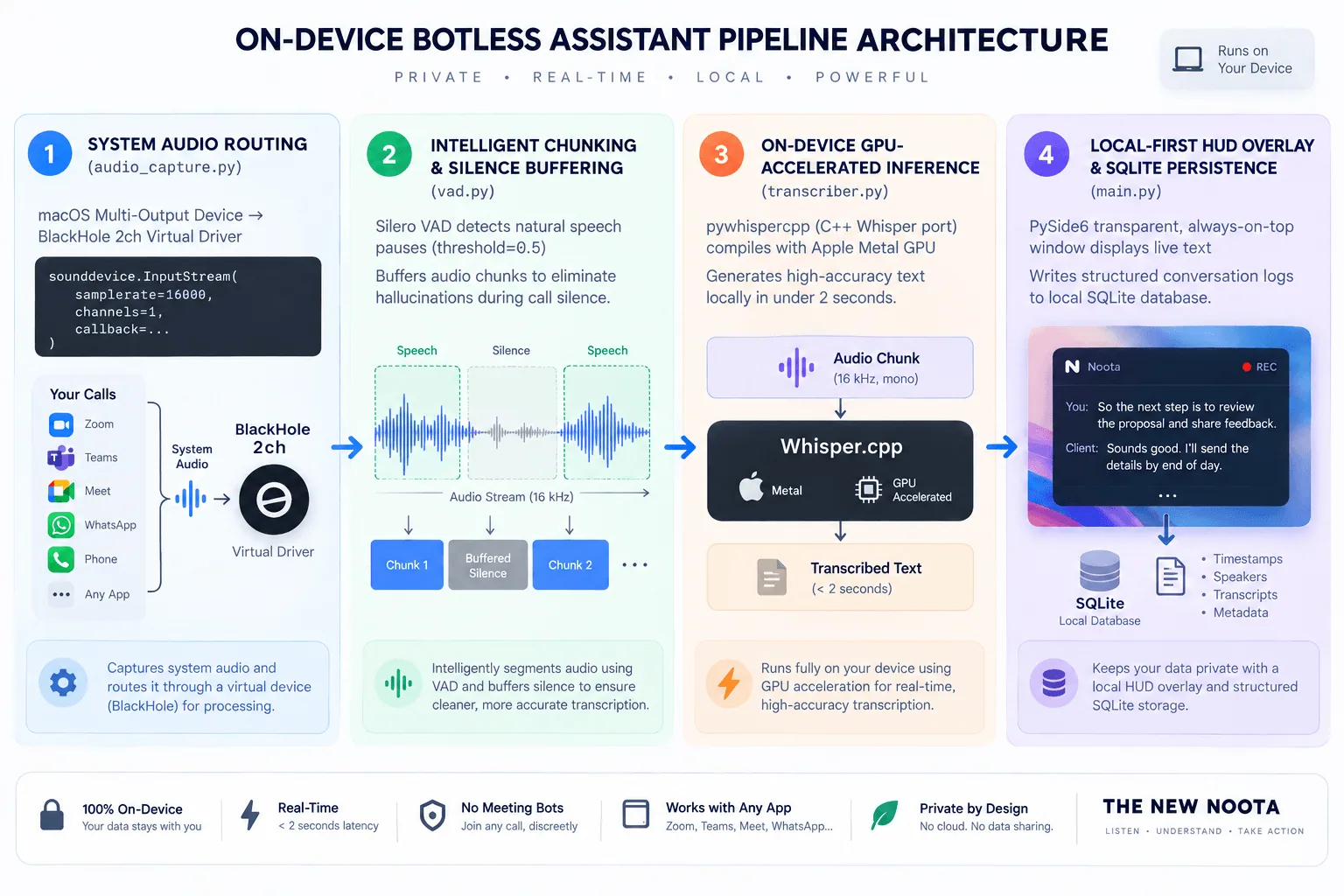
- Restricted enterprise calls: Noota Desktop (macOS and Windows) records meeting audio locally without sending an external bot to the meeting roster. Always verify your organization's internal recording and consent guidelines before capturing audio.
- Zero attendee distraction: External clients and enterprise partners see a normal call with no third-party bots sitting in the room.
- Calendar bot backup: If you prefer automated invite joining for internal team calls, a calendar bot is also available across all plans, including Free. For example, Benoit (IT Support Team Leader at NSC Global) reports saving 1 to 2 hours every day by sending the Noota bot to capture and summarize internal meetings he cannot attend in person.
Read next: Microsoft Teams AI note taker guide
3. Which AI Note Taker Works Best on Zoom?
For quick internal summaries that never leave Zoom, the built-in AI Companion is already there; if meeting action items must flow into your CRM and project management tools, a cross-platform note taker is required.
The alternatives:
- Zoom AI Companion: Included with paid Zoom Workplace accounts; convenient for quick recaps if your team does not need meeting notes exported outside the Zoom ecosystem.
When Noota fits best (Desktop on Pro and above, or Calendar Bot on Free):
- Local bot-free capture (Pro and above): Noota Desktop records Zoom system audio directly on macOS and Windows without joining as a visible meeting bot. On the Free plan, Noota connects via calendar bot.
- Cross-platform continuity: Use consistent templates, summaries, and action item structures across Zoom, Teams, Google Meet, and phone calls.
- Direct CRM & task routing: Automatically sync structured meeting notes into HubSpot, Salesforce, Pipedrive, Notion, or Slack (available on Pro and Business).
- Audio playback archive: Replay key conversation moments with synchronized timestamps and audio playback up to 10 hours per session.
Read next: Zoom AI note taker guide
4. Which AI Note Taker Is Best for In-Person Meetings and Phone Calls?
For face-to-face meetings and calls, choose Plaud Note if you want a dedicated pocket hardware card; choose Noota Mobile to capture room audio directly on your phone with zero extra gadgets.
The alternatives:
- Plaud Note: A slim hardware recorder that magnetically attaches to a smartphone or sits flat on a table, capturing room conversations with dual microphones. A solid pick if you prefer a dedicated physical gadget, though it requires carrying separate hardware, charging batteries, and syncing files via Bluetooth.
When Noota fits best (Mobile app and Desktop):
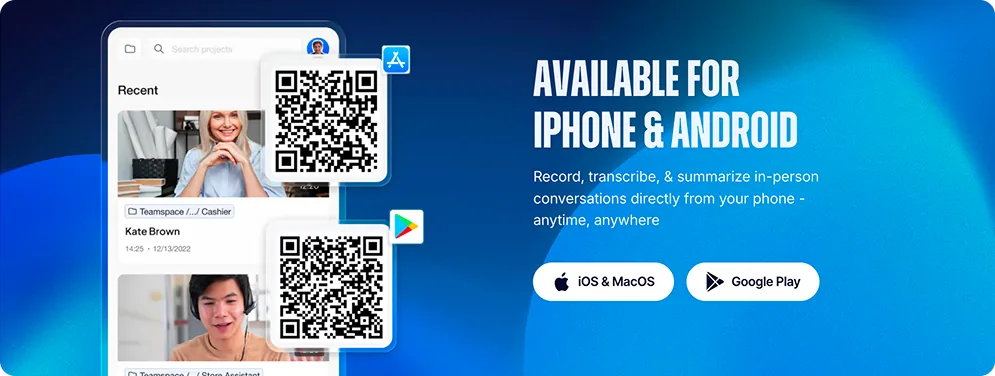
- Zero extra hardware: Noota Mobile (iOS and Android) turns your existing phone into an on-the-go room recorder for face-to-face meetings, client site visits, and conferences.
- Conference room capture: Noota Desktop records boardroom discussions around a table using your laptop microphone with automatic speaker separation.
- Direct phone call recording: Make and record phone calls directly on Business and Enterprise plans through our built-in call recorder, generating the same structured summary as a video conference.
Read next: AI note takers for in-person meetings
5. Which AI Note Taker Works Best on Google Meet?
Teams operating strictly inside Google Workspace can leverage Gemini for document creation, whereas teams requiring automated pipeline updates need direct synchronization to external business tools.
The alternatives:
- Google Gemini in Meet: Built into Google Workspace (available on Business Standard, Business Plus, and Enterprise plans, or via Gemini add-on); exports recaps cleanly into Google Docs.
When Noota fits best (Desktop on Pro and above, or Calendar Bot on Free):
- Local browser capture (Pro and above): Noota Desktop captures Google Meet audio directly from your machine without dispatching a guest bot into the call. The Free plan connects via automated calendar bot.
- Connected tools workflow: Routes structured action items and summaries directly to your CRM, Notion, or Slack instead of stranding them in isolated Docs files.
Read next: Google Meet AI note taker guide
6. Which AI Note Taker Is Best for Sales Calls and CRM Follow-Up?
For sales teams focused on speech coaching and talk ratios, Leexi is built for that purpose; if your priority is automatically updating CRM deal fields and drafting follow-up emails in your outbox, Noota fits best.
The alternatives:
- Leexi: A European conversation intelligence platform focusing on sales coaching metrics (talk-to-listen ratios, question frequency) and CRM sync, starting at €23/user/month billed annually for AI-Meeting (€29 monthly) or €39 for Business (€49 monthly).
When Noota (Pro or Business) fits best:
- 50+ integrations with two-way CRM mapping: Direct two-way custom property updates for Salesforce, HubSpot, and Pipedrive included on the Pro plan (€19/user/month billed annually).
- Automated deal extraction: Captures pain points, competitors mentioned, budget numbers, and agreed next steps into CRM deal records without manual copy-pasting.
- Staged outbox email drafts: The AI Mailbox Agent drafts context-aware follow-up emails directly in your Gmail or Outlook drafts, ready for a 30-second review before sending.
- Customer-reported outcome: Consultant Neil O. (OBVI-US) reports saving about 30 minutes per meeting using Noota's automated notes and analysis.
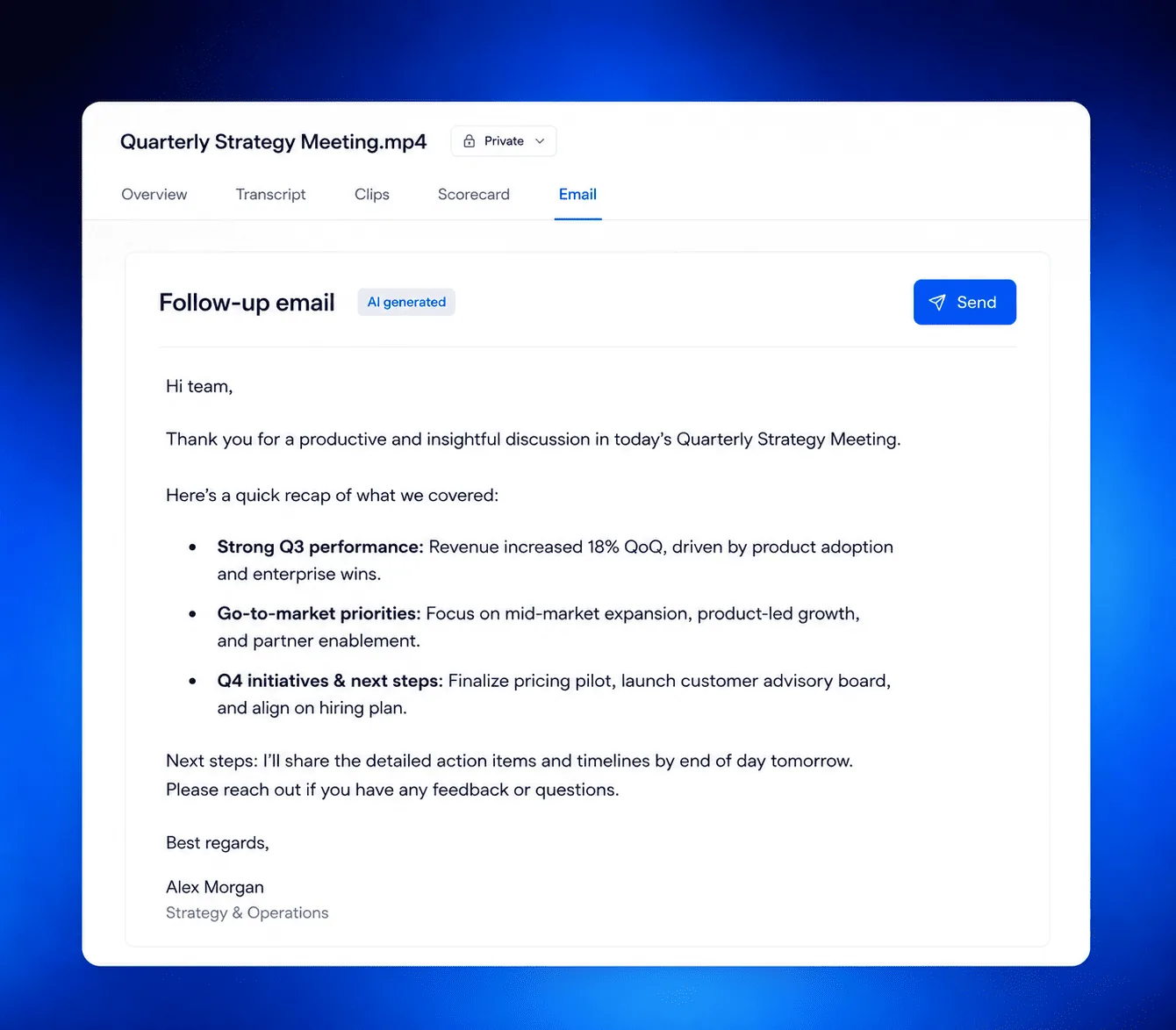
Explore CRM property sync on Noota Pro or view all supported CRM integrations.
Read next: The best AI note taker for sales
7. Which AI Note Taker Is Best for Recruiters and Hiring Interviews?
If you run candidate interviews, general-purpose note takers only capture raw transcripts; Noota structures feedback directly into 20 applicant tracking systems and enforces automated 24-hour candidate data deletion rules. We have not reviewed specialized recruiting-only tools in this general comparison.
The alternatives:
- General transcription tools: Standard meeting assistants (such as Otter.ai or Zoom AI Companion) capture transcripts, but we did not find native ATS field mapping in their standard tiers.
When Noota (Pro or Business) fits best:
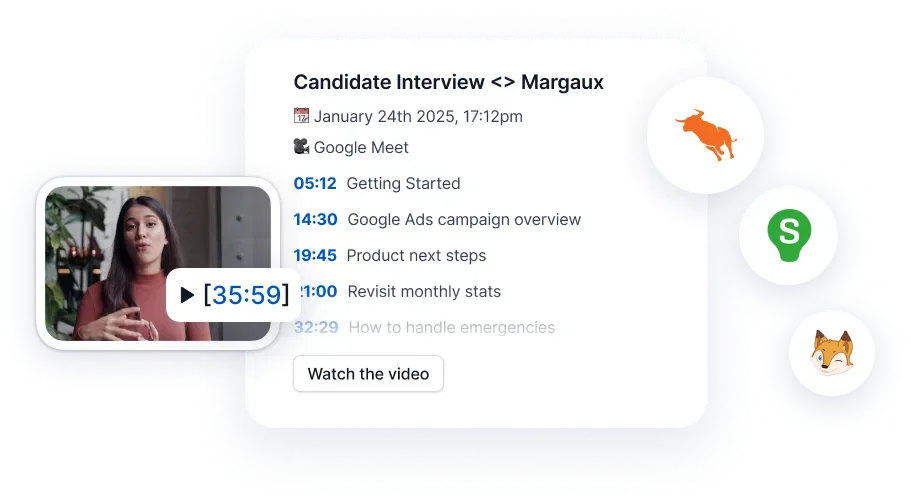
- 20 native ATS integrations: Automatically synchronizes candidate notes, competency scores, and interview recaps into Greenhouse, Workable, Teamtailor, SmartRecruiters, and Lever. See our full integrations directory.
- Structured interview evaluation: Organizes candidate responses with speaker-separated transcripts across multi-interviewer panel rounds.
- Strict candidate data governance: Configurable retention rules permanently delete candidate data within 24 hours upon request, with text-only retention modes that keep written reports while discarding raw audio.
- Customer-reported outcome: Beatrice A., Recruiter at CO-CTO, reports reducing candidate interview note synthesis from 90 minutes down to 20 minutes, while Antoine H. (Mercato de l'emploi) reports saving 3 to 5 hours weekly across candidate debriefs.
Read next: AI note takers for recruiters
8. Which AI Note Taker Is Best for Privacy, EU Hosting, and Compliance?
If you require verified European data residency with ISO 27001 and SOC 2 Type II audits, choose Noota Enterprise; if you prefer local-first desktop notes and are comfortable opting out of model training on anonymized data, Granola is a strong desktop option.
The alternatives:
- Granola: Supports macOS 14+, Windows, iOS, and Android and does not store raw audio, but trains its AI models on anonymized user data (with an opt-out toggle in settings, turned off by default only on Enterprise) and hosts data in the US on AWS.
When Noota fits best (Standard & Enterprise):
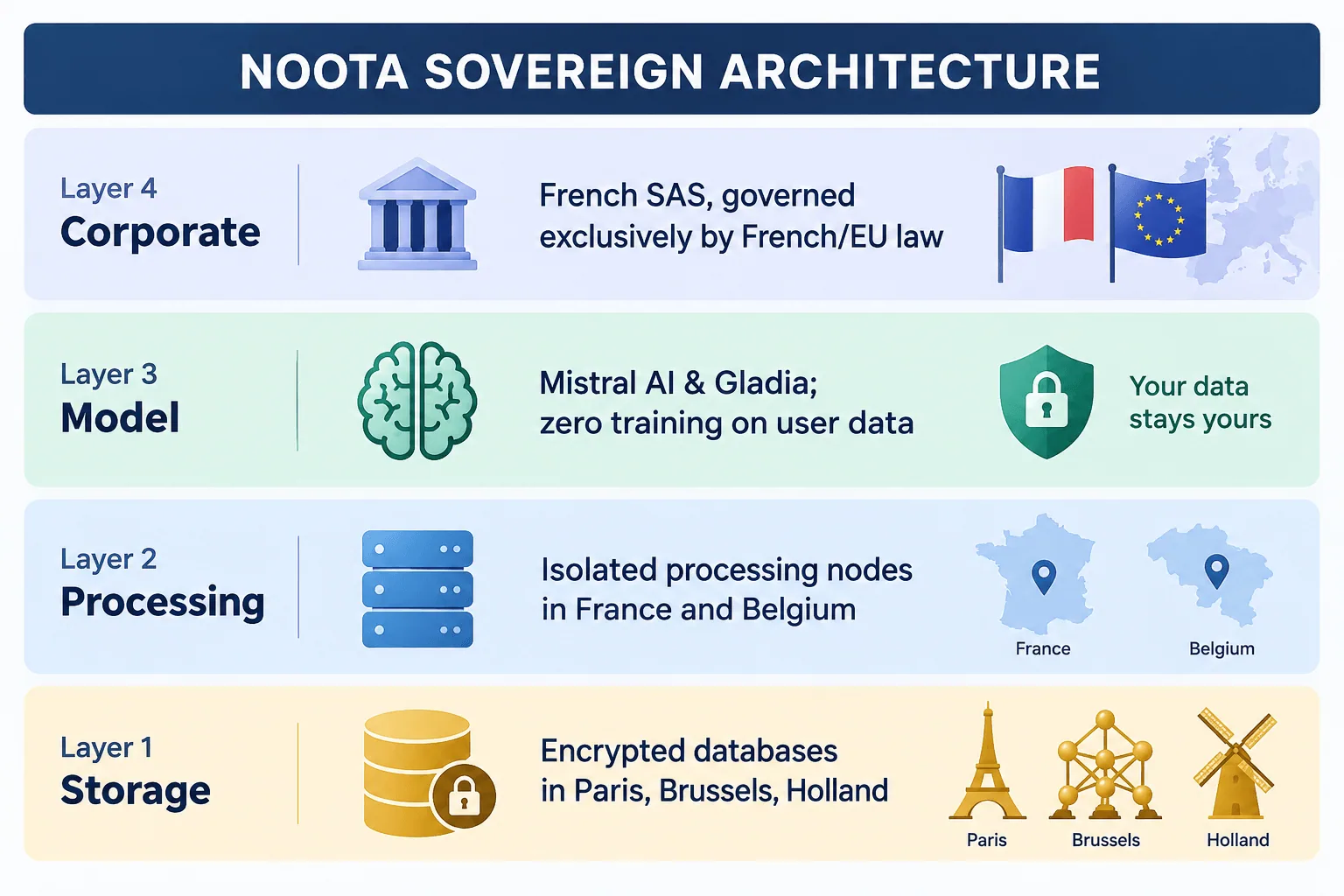
- Strict zero-training policy: Customer conversations, transcripts, and meeting audio are never used to train AI models across any plan, including Free.
- Audited certifications: Officially SOC 2 Type II certified (third-party audit report available at trust.noota.io) alongside ISO 27001 certification.
- European data residency: Standard plans are hosted in the European Union on Google Cloud infrastructure (Belgium and Netherlands).
- Sovereign French hosting: Enterprise plans offer sovereign French infrastructure hosted on Scaleway in Paris, with Bleu infrastructure expected by the end of 2026.
- Enterprise data encryption: AES-256 encryption at rest and TLS in transit.
Read next: GDPR-compliant AI note takers for EU teams and SOC 2 compliant AI note takers
Start free with Noota or book a demo for enterprise rollouts.
Looking for Something Different?
- Tool comparisons: Browse our detailed comparison hub for in-depth evaluations of leading AI note takers.
- Full feature walkthrough: Noota AI note taker
- Integrations directory: 50+ CRM, ATS, and productivity integrations
- Pricing & plans: Compare Free, Pro, Business, and Enterprise
- Enterprise security details: Noota Trust Center
Related: Noota vs Granola · Noota vs Leexi
Frequently asked questions
For basic English transcription with a participant bot, Otter.ai offers 300 minutes per month on its free tier. For unlimited meeting notes with a connected calendar, 50+ languages, and bot-free desktop capture from Pro, Noota's Free plan is the more flexible option.
Only if your clients, prospects, or internal IT policies restrict third-party meeting bots. Tools like Noota Desktop record system audio on macOS and Windows without joining the meeting as a visible participant.
If you prefer a physical recording gadget, Plaud Note records room audio via dual microphones on a magnetic card. If you prefer software with zero extra hardware, Noota Mobile (iOS and Android) and Noota Desktop record room audio directly.
Compliance varies widely. Several US-hosted tools train models on anonymized transcripts or de-identified data. Noota does not use customer conversations to train models, holds official ISO 27001 and SOC 2 Type II certifications, and stores standard plan data in the European Union on Google Cloud (Belgium and Netherlands), with a sovereign French option on Scaleway (Paris, with Bleu expected by the end of 2026).
 Written byAlexandre Duffaut